# DOCAPOSTECHECK

## Aperçu

L'application de workflow **DOCAPOSTECHECK** vous permet de vérifier le statut d'une transaction et de télécharger les fichiers associés.

## Mode de fonctionnement

* Vous pouvez vérifier le statut d'une transaction et télécharger le fichier depuis Docaposte.<br>
* Des logs d'application sont disponibles. Ceux-ci peuvent être spécifiés en définissant la valeur du paramètre `DocaposteCheckLogLevel` dans le fichier `web.config` sur `0` pour désactiver la journalisation, `1` pour les logs d'erreur, `2` pour des logs d'informations ou `3` pour les logs de débogage; la valeur par défaut est `0`.

## Paramètre requis

<table data-header-hidden><thead><tr><th valign="top">Paramètre</th><th valign="top">Type</th><th valign="top">Direction</th><th valign="top">Description</th></tr></thead><tbody><tr><td valign="top"><strong>Paramètre</strong></td><td valign="top"><strong>Type</strong></td><td valign="top"><strong>Direction</strong></td><td valign="top"><strong>Description</strong></td></tr><tr><td valign="top"><code>DOCAPOSTE_TRANSACTION_ID</code></td><td valign="top">TEXT</td><td valign="top">IN</td><td valign="top">Identifiant de la transaction à vérifier</td></tr></tbody></table>

## Paramètres facultatifs

### Configuration Docaposte

<table data-header-hidden><thead><tr><th valign="top">Paramètres</th><th valign="top">Type</th><th valign="top">Direction</th><th valign="top">Description</th></tr></thead><tbody><tr><td valign="top"><strong>Paramètres</strong></td><td valign="top"><strong>Type</strong></td><td valign="top"><strong>Direction</strong></td><td valign="top"><strong>Description</strong></td></tr><tr><td valign="top"><code>DOCAPOSTE_USERNAME</code></td><td valign="top">TEXT</td><td valign="top">IN</td><td valign="top">Nom d'utilisateur Docaposte<br><br>Par défaut, cette valeur provient du paramètre <code>DocaposteUsername</code> dans le fichier <code>web.config</code>.</td></tr><tr><td valign="top"><code>DOCAPOSTE_PASSWORD</code></td><td valign="top">TEXT</td><td valign="top">IN</td><td valign="top">Mot de passe Docaposte<br><br>Par défaut, cette valeur provient du paramètre <code>DocapostePassword</code> dans le fichier <code>web.config</code>.</td></tr><tr><td valign="top"><code>DOCAPOSTE_HOST_SERVER</code></td><td valign="top">TEXT</td><td valign="top">IN</td><td valign="top"><p>Serveur hôte Docaposte</p><p></p><p>Par défaut, cette valeur provient du paramètre <code>DocaposteHostServer</code> dans le fichier <code>web.config</code>.</p></td></tr></tbody></table>

### Général

<table data-header-hidden><thead><tr><th valign="top">Paramètres</th><th valign="top">Type</th><th valign="top">Direction</th><th valign="top">Description</th></tr></thead><tbody><tr><td valign="top"><strong>Paramètres</strong></td><td valign="top"><strong>Type</strong></td><td valign="top"><strong>Direction</strong></td><td valign="top"><strong>Description</strong></td></tr><tr><td valign="top"><code>DOCAPOSTE_DOCUMENT_NAMES</code></td><td valign="top">TEXT</td><td valign="top">IN</td><td valign="top">Nom(s) du ou des document(s) envoyé(s) pour signature(s)</td></tr><tr><td valign="top"><code>DOCAPOSTE_DOCUMENTx</code></td><td valign="top">FILE</td><td valign="top">OUT</td><td valign="top">Document(s) signé(s) où <code>x</code> est le numéro du document</td></tr><tr><td valign="top"><code>DOCAPOSTE_STATUS</code></td><td valign="top">TEXT</td><td valign="top">OUT</td><td valign="top">Statut de la transaction</td></tr></tbody></table>

## Exemple avec DOCAPOSTESEND

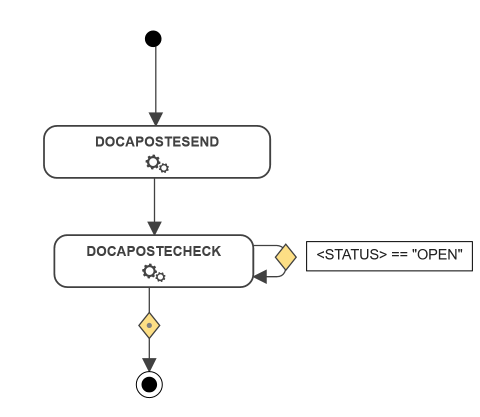
Dans l'exemple suivant, l'action [DOCAPOSTESEND](https://docs.workflowgen.com/admin-fr/applications-de-workflow/docaposte/application-de-workflow-docapostesend) est directement suivie par l'action DOCAPOSTCHECK. Cette action reviendra sur elle-même jusqu'à ce que le statut soit différent de `OPEN`.

Si le statut renvoyé remplit la condition, le document sera téléchargé à partir de Docaposte.

<div align="left"><img src="https://content.gitbook.com/content/IbbNNVUyjtF2kertGbOZ/blobs/FY18117HCJX45D4yyzbz/image.png" alt=""></div>

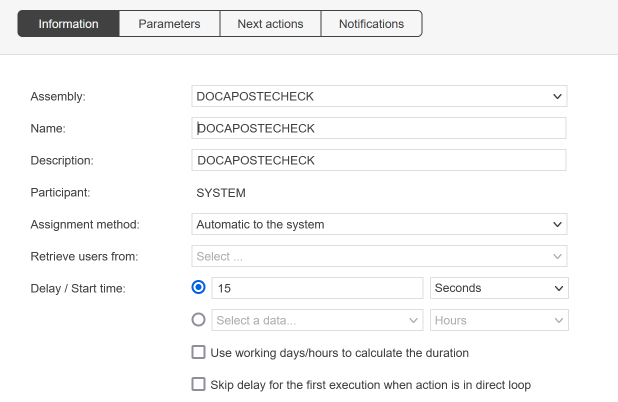
Avec la fonction d'action de boucle système, l'action DOCAPOSTECHECK sera exécutée toutes les `x` secondes jusqu'à ce que la condition OUT soit remplie.

<div align="left"><img src="https://content.gitbook.com/content/IbbNNVUyjtF2kertGbOZ/blobs/pvnsOMeT8s4nwxOvlnn7/image.png" alt=""></div>


---

# Agent Instructions: Querying This Documentation

If you need additional information that is not directly available in this page, you can query the documentation dynamically by asking a question.

Perform an HTTP GET request on the current page URL with the `ask` query parameter:

```
GET https://docs.workflowgen.com/admin-fr/applications-de-workflow/docaposte/application-de-workflow-docapostecheck.md?ask=<question>
```

The question should be specific, self-contained, and written in natural language.
The response will contain a direct answer to the question and relevant excerpts and sources from the documentation.

Use this mechanism when the answer is not explicitly present in the current page, you need clarification or additional context, or you want to retrieve related documentation sections.