# Reports

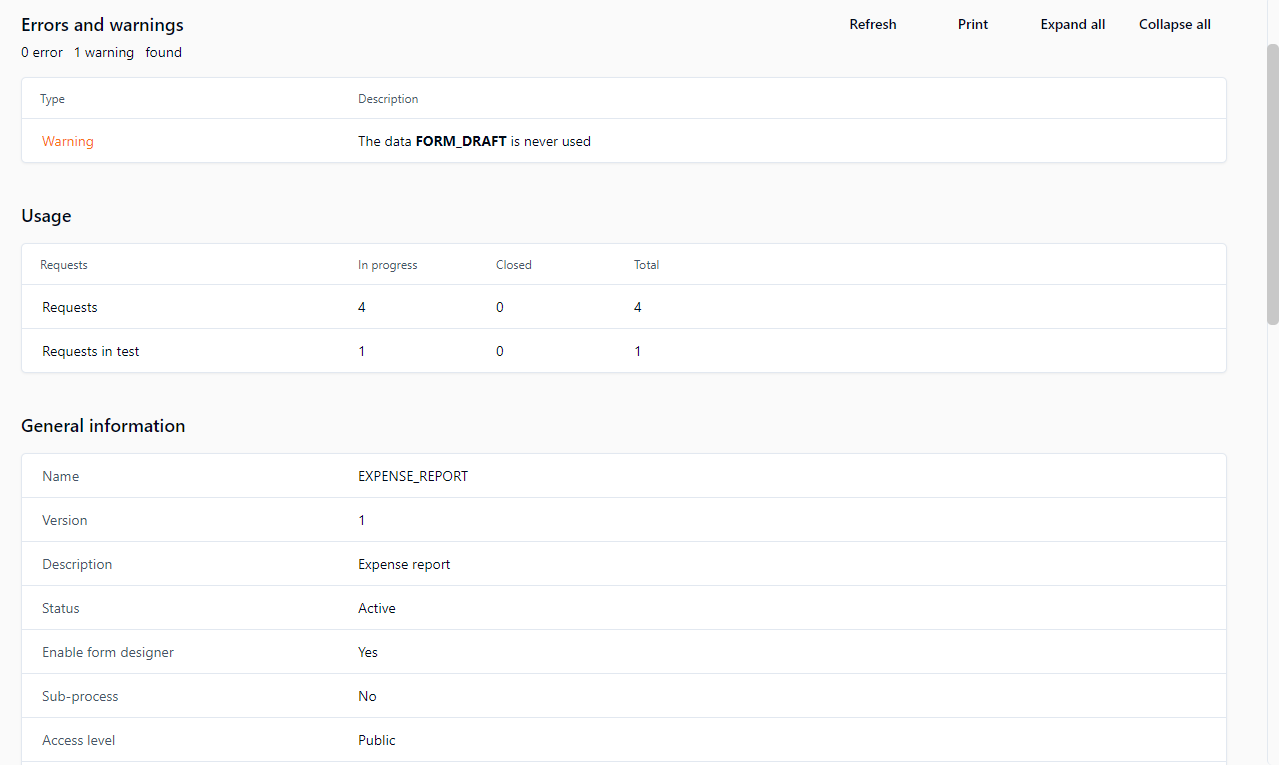
## Process report screen

<figure><img src="/files/Ko7HK0O4U4k2s8hKFIbT" alt=""><figcaption></figcaption></figure>

## Errors and warnings

### Errors (prevent the workflow from running)

#### General validations performed by the report generator

* A process must have at least a beginning and an end.
* A process must have one single participant in the role of requester.
* There can only be one `OTHERWISE` condition in an action's transitions.
* If more than one transition exists between two actions, all of the transitions must be conditions.
* All process data must be used in the action parameters or in the transition conditions.
* Data used in a condition must be associated to an OUT or INOUT direction action parameter if no default value is set.

#### Action validations performed by the report generator

* All actions must have at least one next action or END.
* If an action has a transition to an end of a process, the transition of the next actions must have a condition.
* An action that loops must have a condition.
* For an application or a sub-process, all the required parameters of an action must be defined.
* Actions that include a transition with an `OTHERWISE` condition must have another transition with a condition that is not an `OTHERWISE` condition.
* If the action comes from a synchronization, the **By the action initiator** assignment method is not possible.
* If the action can be launched after an exception transition, the **By the action initiator** assignment method is not possible.
* The **Automatic to the action initiator** assignment method is not allowed if the participant is not a requester and if the participant of the previous action is different.
* The **By the action initiator** assignment method is not allowed if the action is called after an exception.
* Ensure that all required application parameters for an action are defined.
* Ensure that all the required action parameters for a sub-process are defined

### Warnings (don't prevent the workflow from running)

#### Action validations performed by the report generator

* It's recommended to use an exception transition if actions use the following assignment methods and if the username is retrieved from process data:
  * Automatic to the person who handled...
  * Manual by the person who handled...
  * Automatic to the person
* It's recommended to use an exception transition if actions use an automatic application (web proc, web service or asynchronous web proc).
* It's advised to use an exception transition if actions use a sub-process.
* All process data must be used.
* Ensure that default and additional parameters used as OUT types are linked with data.
* Automatic applications must use an exception.

## Usage

<table data-header-hidden><thead><tr><th valign="top">Fields</th><th valign="top">Remarks</th></tr></thead><tbody><tr><td valign="top"><strong>Fields</strong></td><td valign="top"><strong>Remarks</strong></td></tr><tr><td valign="top">Requests</td><td valign="top">Request environment</td></tr><tr><td valign="top">In progress</td><td valign="top">Number of requests in progress</td></tr><tr><td valign="top">Closed</td><td valign="top">Number of requests closed</td></tr><tr><td valign="top">Total</td><td valign="top">Total requests launched</td></tr></tbody></table>

## General information

<table data-header-hidden><thead><tr><th valign="top">Fields</th><th valign="top">Remarks</th></tr></thead><tbody><tr><td valign="top"><strong>Fields</strong></td><td valign="top"><strong>Remarks</strong></td></tr><tr><td valign="top">Name</td><td valign="top">Process name</td></tr><tr><td valign="top">Version</td><td valign="top">Process version</td></tr><tr><td valign="top">Description</td><td valign="top">Process description</td></tr><tr><td valign="top">Status</td><td valign="top">Process status</td></tr><tr><td valign="top">Sub-process</td><td valign="top">Is this a sub-process?</td></tr><tr><td valign="top">Access level</td><td valign="top">Public or private access level</td></tr><tr><td valign="top">Categories</td><td valign="top">List of categories with which the process is associated</td></tr><tr><td valign="top">Lead time</td><td valign="top">Process lead time</td></tr><tr><td valign="top">Use working days/hours in duration calculation</td><td valign="top">Uses only office hours to calculate time schedule</td></tr><tr><td valign="top">Notify the requester when closed</td><td valign="top">Notification is sent to the requester when the request is closed</td></tr><tr><td valign="top">Archive the results of the actions</td><td valign="top">Saves the result of each process action at each step of the process</td></tr></tbody></table>

## Participants

<table data-header-hidden><thead><tr><th valign="top">Fields</th><th valign="top">Remarks</th></tr></thead><tbody><tr><td valign="top"><strong>Fields</strong></td><td valign="top"><strong>Remarks</strong></td></tr><tr><td valign="top">Description</td><td valign="top">Participant description</td></tr><tr><td valign="top">Scope</td><td valign="top">The participant is defined in the global information</td></tr><tr><td valign="top">Role</td><td valign="top">Participant role in the process</td></tr><tr><td valign="top">Participant type</td><td valign="top">Type of association to the directory</td></tr><tr><td valign="top">Users</td><td valign="top">List of users associated with this participant</td></tr><tr><td valign="top">Groups</td><td valign="top">List of groups associated with this participant</td></tr><tr><td valign="top">Directories</td><td valign="top">List of directories associated with this participant</td></tr><tr><td valign="top">Coordinators</td><td valign="top">List of coordinator users for this participant</td></tr><tr><td valign="top">Graphical follow-up</td><td valign="top">Visible in the graphical follow-up</td></tr><tr><td valign="top">Permission for requests</td><td valign="top">Access to all requests</td></tr><tr><td valign="top">Permission for supervisors</td><td valign="top">Special permissions for supervisors</td></tr><tr><td valign="top">Permission for comments</td><td valign="top">None, read, or read/write permissions</td></tr><tr><td valign="top">Query</td><td valign="top">Supervisor limited scope query</td></tr><tr><td valign="top">Used in actions</td><td valign="top">Actions in which this participant is used</td></tr></tbody></table>

## Data

<table data-header-hidden><thead><tr><th valign="top">Fields</th><th valign="top">Remarks</th></tr></thead><tbody><tr><td valign="top"><strong>Fields</strong></td><td valign="top"><strong>Remarks</strong></td></tr><tr><td valign="top">Description</td><td valign="top">Data description</td></tr><tr><td valign="top">Data type</td><td valign="top">Type of data</td></tr><tr><td valign="top">Default value</td><td valign="top">Default value of the data</td></tr><tr><td valign="top">Security</td><td valign="top">List of participants with access to the data</td></tr><tr><td valign="top">Show the data in the follow-up forms</td><td valign="top"><p>The selected data will be visible in the following places:</p><ul><li>Request and action follow-up forms</li><li>Default notification messages (emails)</li><li>Action data popup window</li><li>Search criteria list</li></ul><p>✏️ <strong>Note:</strong> Unchecking this option disables and unchecks the <strong>Search criteria by default</strong>, <strong>Display in columns in the lists</strong>, and <strong>Display in column</strong> options.</p></td></tr><tr><td valign="top">Search criteria by default</td><td valign="top">The selected data will appear in every search screen as selected criteria without search parameters</td></tr><tr><td valign="top">Display in columns in the lists</td><td valign="top">The selected data will appear in a column in all lists of requests and actions (single-process mode)</td></tr><tr><td valign="top">Display in column in homepage</td><td valign="top">The selected data will appear in a column on the home page (single-process mode)</td></tr><tr><td valign="top">Read-only</td><td valign="top">Define data as read-only<br><br>This saves disk space when used on file process data by associating a single copy of the file per process for all closed actions and closed requests.<br><br>✏️ <strong>Note:</strong> An action’s OUT and INOUT parameters using data declared as read-only will not be updated.<br><br>⚠️ <strong>Caution:</strong> In general, do not define EFORM applications'<code>FORM_DATA</code> elements (which contain the data of a form) as read-only.</td></tr><tr><td valign="top">Used in actions</td><td valign="top">List of actions in which the data is used</td></tr><tr><td valign="top">Used in conditions</td><td valign="top">List of process transitions in which the data is used</td></tr></tbody></table>

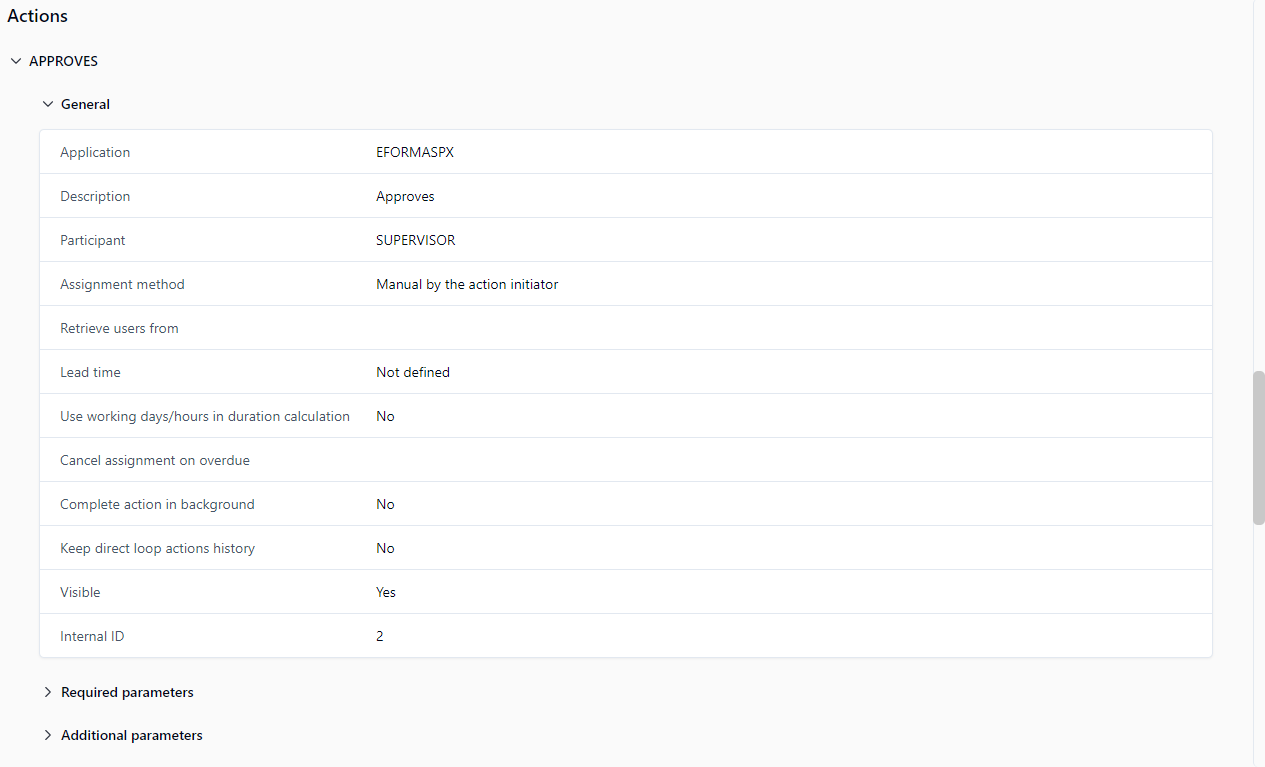
## Actions

<figure><img src="/files/EtNdfMqaR9igqO60HCUR" alt=""><figcaption></figcaption></figure>

Action sections have sub-sections that provide information about the following:

* General
* Required parameters
* Additional parameters
* Previous action
* Next actions
* Notifications
* Additional notifications


---

# Agent Instructions: Querying This Documentation

If you need additional information that is not directly available in this page, you can query the documentation dynamically by asking a question.

Perform an HTTP GET request on the current page URL with the `ask` query parameter:

```
GET https://docs.workflowgen.com/admin/10.0/reports.md?ask=<question>
```

The question should be specific, self-contained, and written in natural language.
The response will contain a direct answer to the question and relevant excerpts and sources from the documentation.

Use this mechanism when the answer is not explicitly present in the current page, you need clarification or additional context, or you want to retrieve related documentation sections.