# Groups

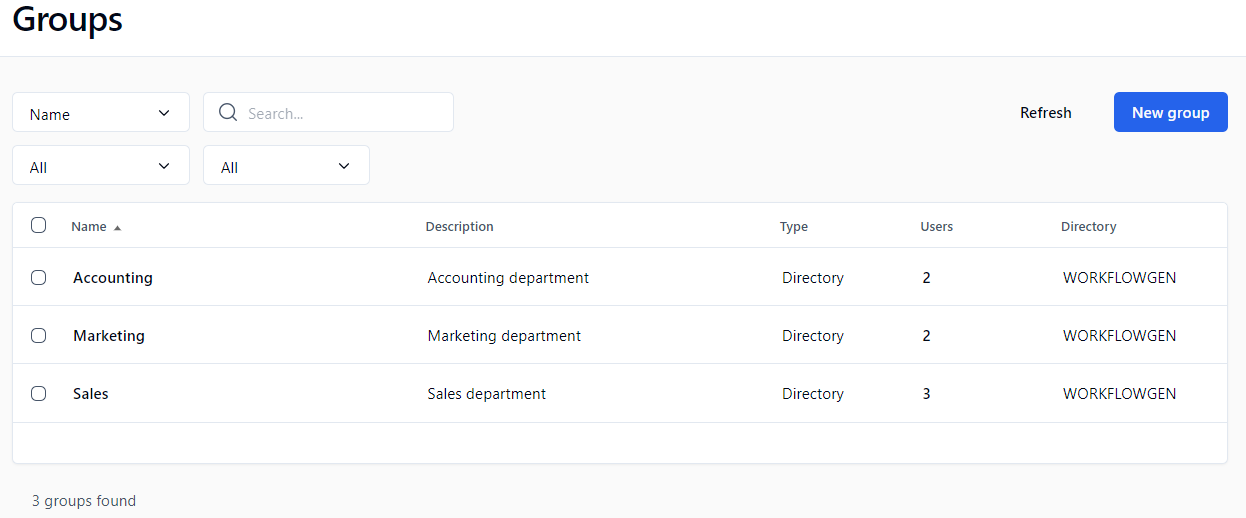
## Groups screen

In the left menu on the Administration Module home page, click ![](/files/Ps3tEtrE2SfGoWvX1hkH) to display the **Groups** screen.

<figure><img src="/files/ZgwDXRghLP22loPqkDGw" alt=""><figcaption></figcaption></figure>

## Menu banner

| **Buttons** | **Remarks**                              |
| ----------- | ---------------------------------------- |
| Refresh     | Refreshes the group list displayed       |
| New group   | Displays a blank form to add a new group |

## Filters

| **External filters**     | **Remarks**                                                                                                                                                                                                                                                                                                                |
| ------------------------ | -------------------------------------------------------------------------------------------------------------------------------------------------------------------------------------------------------------------------------------------------------------------------------------------------------------------------- |
| Filter drop-down list    | Filters by specified criteria (e.g. name, description, email address, etc.); see next table                                                                                                                                                                                                                                |
| Search                   | Searches for groups by name, description, etc.                                                                                                                                                                                                                                                                             |
| Directory drop-down list | Displays the specified group directory                                                                                                                                                                                                                                                                                     |
| Type drop-down list      | <ul><li><strong>All</strong></li><li><strong>Directory</strong>: A group of users from a single directory (created by a synchronization or defined within WorkflowGen)</li><li><strong>Virtual group</strong>: A virtual group of users from a single directory filtered by an SQL-like query (directory filter)</li></ul> |

| **Filter drop-down list \*** | **Remarks**                                |
| ---------------------------- | ------------------------------------------ |
| ADS Path                     | Filters by group's ADS Path                |
| Common name                  | Filters by group's common name             |
| Description                  | Filters by group’s description             |
| Disintguished name           | Filters by group's distinguished name      |
| Email                        | Filters by group's email address           |
| Group code                   | Filters by group's group code              |
| Name                         | Filters by group's name                    |
| Query                        | Filters by group's query                   |
| System identifier            | Filters by group's system identifier (SID) |

\* A filter can be applied to part of a field.

## Groups list

| **Columns**             | **Remarks**                                                                                                                                                                                                                 |
| ----------------------- | --------------------------------------------------------------------------------------------------------------------------------------------------------------------------------------------------------------------------- |
| Multi-select checkboxes | <p>Clicking one or more checkboxes will display buttons to:</p><ul><li>Delete the selected group(s)</li><li>Activate the members of the selected group(s)</li><li>Deactivate the members of the selected group(s)</li></ul> |
| Name                    | Name of the group (click to open the group form in edit mode)                                                                                                                                                               |
| Description             | Description of the group                                                                                                                                                                                                    |
| Users                   | Number of users associated to the group (a link displays the corresponding users)                                                                                                                                           |
| Directory               | Group directory                                                                                                                                                                                                             |

## Group form

Click a group name to open its form, which contains the following sections and fields.

| **Sections / Fields**                                               | **Remarks**                                                                                                                                                              |
| ------------------------------------------------------------------- | ------------------------------------------------------------------------------------------------------------------------------------------------------------------------ |
| **General**                                                         |                                                                                                                                                                          |
| Directory                                                           | Group directory                                                                                                                                                          |
| Name                                                                | Unique identifier for the group in the directory (required field)                                                                                                        |
| Description                                                         | Group description (required field)                                                                                                                                       |
| Synchronized                                                        | If checked, the group is managed by the directory synchronization                                                                                                        |
| **Associations**                                                    |                                                                                                                                                                          |
| Virtual group query                                                 | Statement allowing a group definition based on query parameters (directory filter); see below for [query examples](/admin/10.0/user-management/groups.md#query-examples) |
| <img src="/files/UxMdVr13zNHorugdSU3J" alt="" data-size="original"> | Help on query syntax (field name list)                                                                                                                                   |
| Test                                                                | Query syntax test and query result                                                                                                                                       |
| Users                                                               | Number of users associated to the group (a link displays the corresponding users); see [Associated users](#associated-users) below for more information                  |
| **Properties**                                                      |                                                                                                                                                                          |
| Email                                                               | Group's email address                                                                                                                                                    |
| Group code                                                          | Group's code                                                                                                                                                             |
| LDAP ADsPath                                                        | Group's LDAP ADsPath string                                                                                                                                              |
| Common name                                                         | Group's common name                                                                                                                                                      |
| Distinguished name                                                  | Group's distinguished name                                                                                                                                               |
| System identifier                                                   | Group's SID                                                                                                                                                              |

### Associated users

Users are associated with a group only when the group is saved (at creation or when manually re-saved). If synchronized, the user list is refreshed at the time of the synchronization. If no synchronization has been defined for that directory, users in the virtual groups of that directory will not be updated automatically.

### Query examples

* User of a group: `{ISMEMBER(FINANCE)}`
* Users from a defined city: `CITY = 'LOS ANGELES'`
* Combinations, such as: `Country='USA'` and `{ISMEMBER(FINANCE)}`

## Deleting a group

Deleting a group does not delete the associated users.


---

# Agent Instructions: Querying This Documentation

If you need additional information that is not directly available in this page, you can query the documentation dynamically by asking a question.

Perform an HTTP GET request on the current page URL with the `ask` query parameter:

```
GET https://docs.workflowgen.com/admin/10.0/user-management/groups.md?ask=<question>
```

The question should be specific, self-contained, and written in natural language.
The response will contain a direct answer to the question and relevant excerpts and sources from the documentation.

Use this mechanism when the answer is not explicitly present in the current page, you need clarification or additional context, or you want to retrieve related documentation sections.
