> For the complete documentation index, see [llms.txt](https://docs.workflowgen.com/llms.txt). Markdown versions of documentation pages are available by appending `.md` to page URLs; this page is available as [Markdown](https://docs.workflowgen.com/admin/7.22/process-definition.md).
# Process Definition
## Overview
Processes are organized in folders administered by managers. Only one folder level is possible in WorkflowGen.
A folder is assigned to a global participant. The persons who are part of that participant are known as folder managers or process managers. A manager may be one or more persons. However, the participant type **List of persons with a coordinator** cannot be used for the purpose of assigning folder managers.
Managers have full access to the process definition of their processes, but not to other folders or other administration features.
Users with a WorkflowGen administrator profile have complete access to all folders and their associated processes.
A process can have several versions, but only one can be active at any one time for the purpose of launching new requests. Existing requests launched in prior versions continue to function with the older process definition until the requests are closed but the processes for those prior versions cannot, for the most part, be edited.
A process can be declared as a sub-process and then used in another process action as an independent or embedded sub-process.
A process is made up of the following components:
* Participants (e.g. requester, actor)
* Relevant data (e.g. form, agreement, amount, etc.)
* Actions (e.g. find information, validate, process, wait)
* Transitions (e.g. next actions, conditions)
* Assignment method (e.g. automatic, manual, etc.)
* Notifications (e.g. assignment, closing, etc.)
The definition of a process involves building a number of rules. To simplify implementation, WorkflowGen groups process definition into several sections:
#### Process information
Information related to process creation (status, version, etc.) and general parameters (archiving, notification upon closing, process lead time).
#### Participant
Global participants selected or process-specific participants that will take on the roles of either a requester, an actor, or a process supervisor.
#### Data
Data that are used by the process per request and that are relevant and necessary to carry out the process workflow.
#### Form
WYSIWYG built-in form designer to create the forms used by the workflow.
#### Workflow
Workflow definition that is made up of actions and their associated transitions, conditions, and exceptions.
#### Full screen / Exit full screen
Display or quit the process definition full screen mode.
#### Report
Provides both an overview and details of all parameters used in the process, and also provides a description of any workflow design errors. As well, the report shows summary usage statistics on the process.
#### Test
Allow testing the process if the status is set to **In test**. To be able to select the **Test** link, the process/folder manager must be one of the requesters of the process.
## Process folder
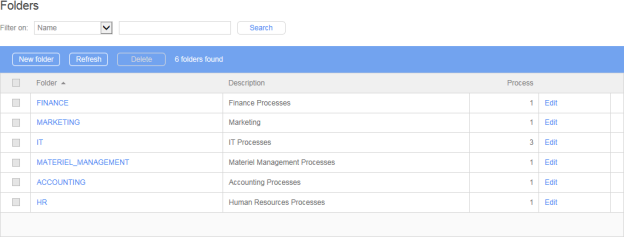
### Process folder list screen
### Menu banner
| Links | Remarks |
| ---------- | ------------------------------------------------ |
| New folder | Displays a blank folder form to add a new folder |
| Refresh | Refreshes the folder list displayed |
### Filters
| Filter on \* | Remarks |
| ------------ | ----------------------------- |
| Name | Filters by folder name |
| Description | Filters by folder description |
\* A filter can be applied to a part of a field.
### Folder list
| Columns | Remarks |
| ----------- | ---------------------------------------------------------------------- |
| Folder | Folder name (a link displays the process list contained in the folder) |
| Description | Folder description |
| Process | Number of processes contained in the folder |
| Edit | Link to edit the folder information |
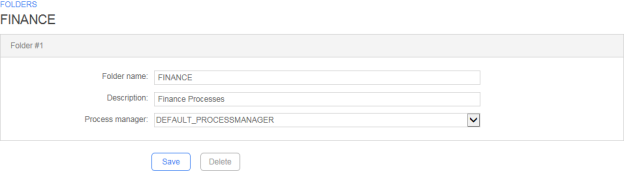
### Folder screen
### Folder form
| Fields | Remarks |
| --------------- | ------------------------------------------------------------------------------------------------------------ |
| Folder name | Unique identifier for the folder; must respect nomenclature and be limited to 30 characters (required field) |
| Description | Folder description limited to 255 characters (required field) |
| Process manager | Name of the global participant managing the folder (required field) |
### Process manager
A process manager must be a **Person** or **List of persons** type global participant.
### Deleting a folder
A folder cannot be deleted if it contains processes.
## Process list
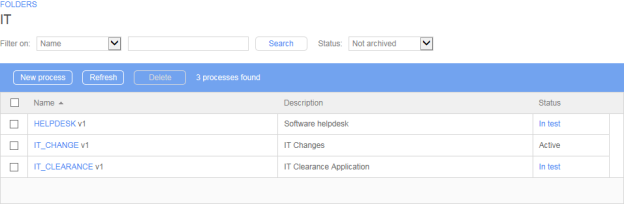
### Process list screen
### Menu banner
| Links | Remarks |
| ------- | ---------------------------------------------------------------- |
| New | Displays a blank process form to where you can add a new process |
| Refresh | Updates the process list |
| Delete | Delete a process |
### Filters
| Filter on \* | Remarks |
| ------------ | ------------------------------ |
| Name | Filters by process name |
| Description | Filters by process description |
\* A filter can be applied to a part of a field.
| External filters | Remarks |
| ---------------- | ------------------------- |
| Status | Filters by process status |
### Process list
| Columns | Remarks |
| ----------- | ------------------------------------------------------------------------ |
| Name | Process name and version (a link displays the process form in edit mode) |
| Description | Process description |
| Status | Process status |
---
# Agent Instructions
This documentation is published with GitBook. GitBook is the documentation platform designed so that both humans and AI agents can read, navigate, and reason over technical content effectively. Learn more at gitbook.com.
## Querying This Documentation
If you need additional information that is not directly available in this page, you can query the documentation by asking a question.
Perform an HTTP GET request on the following URL with the `ask` and `goal` query parameters:
```
GET https://docs.workflowgen.com/admin/7.22/process-definition.md?ask=&goal=
```
`ask` is the immediate question: it should be specific, self-contained, and written in natural language.
`goal` is what the user is ultimately trying to achieve, the reason they need the answer. Sharing it helps GitBook give you a better, more relevant answer. A goal is most helpful when it describes the outcome the user wants rather than restating the question. For example, with `ask=how do I create an API token`, a goal like `automate deployments from our CI pipeline` lets GitBook tailor the answer to that use case.
The response will contain a direct answer to the question and relevant excerpts and sources from the documentation.
Use this mechanism when the answer is not explicitly present in the current page, you need clarification or additional context, or you want to retrieve related documentation sections.