# Participants
## Process participant list screen
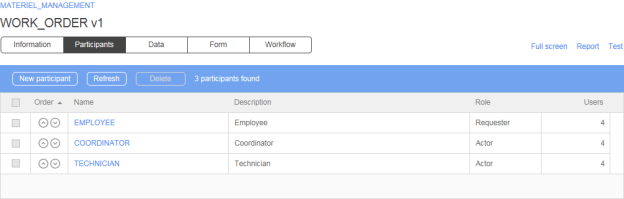
## Participant list
| Columns | Remarks |
| ----------- | -------------------------------------------------------------------------------------------------------------------------------------------------------------------------------------------------------------- |
| Order | Use the arrows to change the display order of the participant |
| Name | Participant name
A link displays the participant form in edit mode. Click New participant to associate a global participant or to create a new process specific participant.
|
| Description | Participant description |
| Role | Role of the participant in the process |
| Users | Number of users associated to the participant |
## Participant form
| Fields | Remarks |
| -------------------------- | -------------------------------------------------------------------------------------------------------------------------------------------------------------------------------------------------------------------------------------------------------------------------------------------------------------------------- |
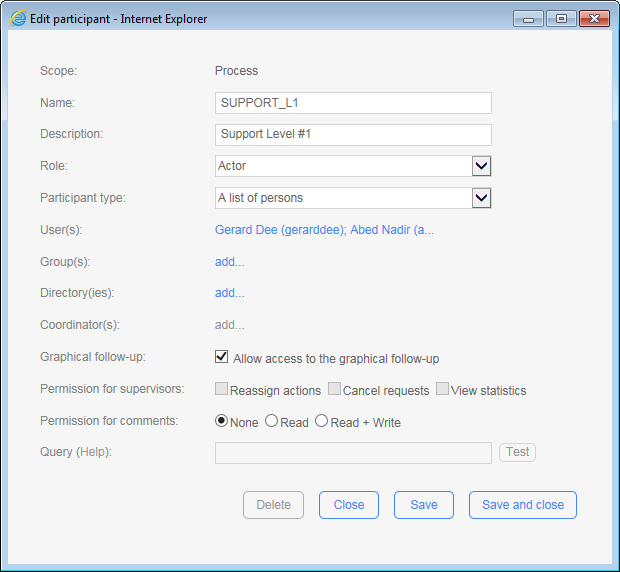
| Scope | Scope information: process or global |
| Name \[1] | Unique identifier for the participant (including global ones); must respect nomenclature and be limited to 30 characters (required field) |
| Description | Participant description limited to 255 characters (required field) |
| Role \[2] | Role of the participant in the process:
- Requester
- Actor
- Process supervisor \[5]
|
| Participant type \[1] | Participant type, define possible associations to the directory (required field):
- Person
- List of persons
- List of persons with coordinator(s)
|
| User(s) | List of users associated with a participant; a link allows associated users to be added or deleted. |
| Group(s) \[3] | List of groups associated with a participant; a link allows associated groups to be added or deleted. |
| Directory(ies) \[3] | List of directories associated with a participant; a link allows associated directories to be added or deleted. |
| Coordinator(s) \[4] | List of coordinators associated with a participant; a link allows associated coordinators to be added or deleted. |
| Graphical follow-up | Allow the associated users of the participant to view the graphical follow-up of the requests and the graphical help of the process from the user module. |
| Permission for Supervisors | - Reassign current actions
- Cancel current requests
- View statistics
|
| Permission for comments | - None: The comments list will be hidden to the participant’s associated users
- Read: The participant’s associated users can only view the comments list
- Read + Write: The participant’s associated users can view and post new comments
|
| Query (Help) | The supervisor limited scope feature allows for dynamic filtering of requests and actions for process supervisor participants only. A test link is available to validate the syntax of the supervisor limited scope query. |
1. In read-only mode if the participant is of the global type.
2. Only one requester is allowed per process.
3. Accessible only to **List of persons** and **List of persons with coordinator** type participants.
4. Accessible only to **List of persons with coordinato**r type participants.
5. Supervisor’s participant does not have to be associated to an action.
## Association with the directory
| Fields | Remarks |
| --------- | -------------------------------------------- |
| Name \* | Filters by person’s name |
| Available | Lists possible associations to the directory |
| Selected | Lists current associations to the directory |
\* Visible only if associated with a user or a coordinator and when the number of users in the base is greater than the limit set by the software administrator.
* A **Person** type participant can only be associated with a single user.
* A **List of persons** type participant is associated to one or several users or groups or directories.
* A **List of persons with coordinator** type participant is associated with one or several coordinators and to one or several users, groups or directories.
## Deleting a participant
A participant cannot be deleted if the participant is being used in a process action.
## Adding a global participant
A global participant can only be associated once to a process.
## Process requester
There can only be one participant in the Requester role in a process.
## Process supervisor
There can be multiple participants with the Supervisor role in a process, each with different security settings and different follow-up access specified via the limited scope query.
## Changing the participant type
The following conditions apply when changing the participant type:
* **Person** to **List of persons** or **List of persons with coordinator(s):** The participant must not be used in a process action.
* **List of persons** to **Person:** A single user must be associated to the participant, and the participant must not be used in a process action.
* **List of persons** to **List of persons with coordinator(s):** Add at least one coordinator.
* **List of persons with coordinator(s)** to **List of persons:** The participant must not be used in a process action where the assignment is made by the coordinator.
## Supervisor limited scope
The supervisor limited scope feature allows dynamic filtering of requests and action follow-up access for process supervisors. When a user is associated with a process supervisor participant with limited scope access enabled, the User Portal homepage follow-up results, portlet RSS feeds, follow-up search results, and statistics reports will be shown only with accessible requests and actions. The supervisor limited scope is defined using criteria conditions in which the syntax is similar to SQL query criteria conditions and allows the usage of a user’s profile and requests data information as filter criteria in the query definition.
### Definitions
A limited scope query can be defined for process participant with the process supervisor role only. You need to add a new process or edit a process supervisor participant and define the query in order to enable the limited scope feature. The query length is limited to a maximum of 255 characters.
If a query is empty, then the process supervisor has follow-up access to all requests and actions of the specific process.
### Query help
To access online supervisor limited scope query definition help, click the **Query (Help)** link.
### Query syntax validation
Click the **Test** link to validate the syntax of a supervisor limited scope query. Saving an invalid syntax query is not allowed.
### Available fields and macros for queries
The fields and macros available for supervisor limited scope queries are listed below. The fields refer to the user’s profile information. You can also use request data as a comparison value in criteria conditions for a query to filter the results.
| Available fields | Definition |
| ---------------- | -------------------- |
| `LASTNAME` | Last name |
| `FIRSTNAME` | First name |
| `USERNAME` | Username |
| `EMAIL` | Email |
| `PHONE` | Telephone |
| `MOBILE` | Mobile |
| `PAGER` | Pager |
| `FAX` | Fax |
| `OFFICE` | Office |
| `DEPARTMENT` | Department |
| `COMPANY` | Company |
| `JOBTITLE` | Job title |
| `PERSONALTITLE` | Title |
| `EMPLOYEENUMBER` | Employee number |
| `EMPLOYEETYPE` | Employee type |
| `POSTALADDRESS` | Postal address |
| `POSTALCODE` | Zip/postal code |
| `CITY` | City |
| `STATE` | State/Area |
| `COUNTRY` | Country |
| `EXTATT_1` | Extended attribute 1 |
| `EXTATT_2` | Extended attribute 2 |
| `EXTATT_3` | Extended attribute 3 |
| `EXTATT_4` | Extended attribute 4 |
| `EXTATT_5` | Extended attribute 5 |
| Available macros | Definition |
| ------------------------------ | ----------------------------------- |
| `{ISMEMBER(groupname)}` \* | Member of the group `groupname` |
| `{ISMANAGER(username)}` \* | Manager of the user `username` |
| `{ISSTAFFMEMBER(username)}` \* | Staff member of the user `username` |
\* Macros only support hard-coded static text as a parameter. Indicating a process data name is not supported. For example:
* **Valid:** `{ISMEMBER(my_group_name)}`
* **Not valid:** `{ISMEMBER(@GROUP_NAME)}`
### Query examples
This example matches requests/actions for users is in the province of Quebec:
```
STATE = 'QC'
```
This example matches requests/actions for users who have an email ending with `advantys.com`:
```
EMAIL LIKE '%ADVANTYS.COM'
```
This example matches users in my group:
```
{ISMEMBER(MYGROUPNAME)}
```
This example matches requests/actions for users whose department is equal to the value of the `DEPT_DATA` request data:
```
DEPARTMENT = @DEPT_DATA
```
#### Comparing a text to a request data
To compare a text to a request data, you must **inverse the comparison order**, with the text first, followed by the operator and the data.
This example matches requests/actions for users whose city is equal to the value of the `MY_CITY` request data and the value of the `MY_COUNTRY` request data is `CANADA`:
```
CITY = @MY_CITY AND 'CANADA' = @MY_COUNTRY
```
### Comparison operators
You can use standard SQL comparison operators such as `=`, `!=`, `<>`, `IS NULL`, `NOT IS NULL`, `LIKE`, `NOT LIKE`, etc.
For better compatibility, it is recommended to use standard operators that are supported on the database hosting WorkflowGen.
#### 📌 **Example**
This example matches requests/actions for users who are not located in Montreal:
```
CITY <> 'MONTREAL'
```
### Logical operators and parentheses
You can use standard SQL logical operators such as `AND` and `OR` to combine multiple criteria conditions to a maximum of 255 characters length in the query. When there are many criteria conditions, it is strongly recommended to use parentheses to logically enclose them.
#### 📌 **Example**
This example matches requests/actions for users who are located in either Toronto or `CITY_DATA` of `CANADA`:
```
COUNTRY = 'CANADA' AND (CITY = 'TORONTO' OR CITY = @CITY_DATA)
```
### Text values
Text values in criteria conditions must be enclosed between single quotes. Double quotes are not supported for enclosure but are valid as a value. Wildcard characters such as `%` (percent sign) and `_` (underscore) can be used with the `LIKE` operator.
#### 📌 **Example**
This example matches requests/actions for users whose last name starts with `AN`:
```
LASTNAME LIKE 'AN%'
```
### Request data
You can use request data in criteria conditions to filter requests dynamically, since the request data value can be different from one request to another. To do this, call these request data in the criteria condition by prefixing them with the `@` character.
#### 📌 **Example**
This example matches requests/actions for users whose company is equal to the value of request data `DATA1`:
```
COMPANY = @DATA1
```
(`DATA1` is an arbitrary convention; any request data name may be used.)
{% hint style="info" %}
Ensure that the requested data name used in the criteria condition has the exact name as the one defined in the WorkflowGen process data list.
{% endhint %}
### Macros
You can also use macros in criteria conditions contained in the query. You just have to add an available macro in the criteria condition.
#### 📌 **Example**
This example matches requests/actions for a user who is member of the `Dev` group, member of the `WORKFLOWGEN` directory and comes from Montreal:
```
CITY = 'MONTREAL' and {ISMEMBER(Dev)}
```
{% hint style="warning" %}
It is very important to respect the syntax in the **Available macros** list.
{% endhint %}
### Performance impacts
In some cases, the WorkflowGen User Portal is reduced in performance or has a slower response time when the limited scope is applied for a process supervisor with filtering queries that use `LIKE` operators and wildcard characters (`%`,`_`) in criteria conditions. The is due to a possible large amount of information that needs to be filtered by the limited scope engine for user accessible requests and actions.
We suggest testing the supervisor-limited scope query in a development environment before releasing for production.