> For the complete documentation index, see [llms.txt](https://docs.workflowgen.com/llms.txt). Markdown versions of documentation pages are available by appending `.md` to page URLs; this page is available as [Markdown](https://docs.workflowgen.com/admin/7.22/reports.md).
# Reports
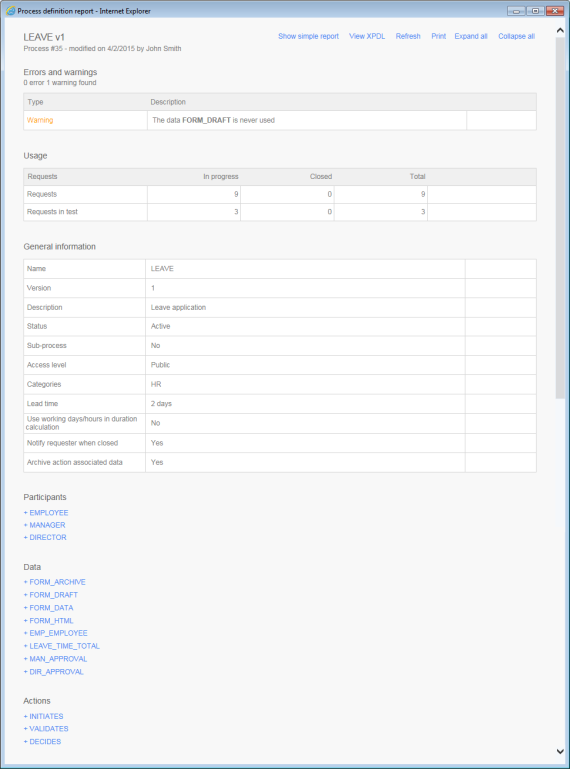
## Process report screen
## Errors and warnings
### Errors (prevent the workflow from running)
General validations performed by the report generator:
* A process must have at least a beginning and an end.
* A process must have one single participant in the role of requester.
* There can only be one `OTHERWISE` condition in the transitions of an action.
* If more than one transition exists between two actions, all of the transitions must be conditions.
* All process data must be used in the action parameters or in the transition conditions.
* Data used in a condition must be associated to an OUT or INOUT direction action parameter if no default value is set.
Action validations performed by the report generator:
* All actions must have at least one next action or END.
* If an action has a transition to an end of a process, the transition of the next actions must have a condition.
* An action that loops must have a condition.
* For an application or a sub-process, all the required parameters of an action must be defined.
* Actions that include a transition with an `OTHERWISE` condition must have another transition with a condition that is not an `OTHERWISE` condition.
* If the action comes from a synchronization, the **By the action initiator** assignment method is not possible.
* If the action can be launched after an exception transition, the **By the action initiator** assignment method is not possible.
* The **Automatic to the action initiator** assignment method is not allowed if the participant is not a requester and if the participant of the previous action is different.
* The **By the action initiator** assignment method is not allowed if the action is called after an exception.
* Ensure that all required application parameters for an action are defined.
* Ensure that all the required action parameters for a sub-process are defined
### Warnings (do not prevent the workflow from running)
Action validations performed by the report generator:
* It is advised to use an exception transition if actions use the following assignment methods and if the username is retrieved from process data:
* Automatic to the person who handled...
* Manual by the person who handled...
* Automatic to the person
* It is advised to use an exception transition if actions use an automatic application (web proc, web service or asynchronous web proc).
* It is advised to use an exception transition if actions use a sub-process.
* All process data must be used.
* Ensure that default and additional parameters used as OUT types are linked with data.
* Automatic applications must use an exception.
## Usage
| Fields | Remarks |
| ----------- | ------------------------------ |
| Requests | Request environment |
| In progress | Number of requests in progress |
| Closed | Number of requests closed |
| Total | Total requests launched |
## General information
| Fields | Remarks |
| ---------------------------------------------- | ------------------------------------------------------------------- |
| Name | Process name |
| Version | Process version |
| Description | Process description |
| Status | Process status |
| Sub-process | Is this a sub-process? |
| Access level | Public or private access level |
| Categories | List of categories with which the process is associated |
| Lead time | Process lead time |
| Use working days/hours in duration calculation | Uses only office hours to calculate time schedule |
| Notify the requester when closed | Notification is sent to the requester when the request is closed |
| Archive the results of the actions | Saves the result of each process action at each step of the process |
## Participants
| Fields | Remarks |
| -------------------------- | ---------------------------------------------------- |
| Description | Participant description |
| Scope | The participant is defined in the global information |
| Role | Participant role in the process |
| Participant type | Type of association to the directory |
| Users | List of users associated with this participant |
| Groups | List of groups associated with this participant |
| Directories | List of directories associated with this participant |
| Coordinators | List of coordinator users for this participant |
| Graphical follow-up | Visible in the graphical follow-up |
| Permission for supervisors | Special permissions for supervisors |
| Permission for comments | None, read, or read/write permissions |
| Query | Supervisor limited scope query |
| Used in actions | Actions in which this participant is used |
## Data
| Fields | Remarks |
| ------------------------------------ | ------------------------------------------------------------------------------------------------------------------------------------------------------------------------------------------------------------------------------------------------------------------------------------------------------------------------------------------------------------------------------------------------------------------------------------------------------------------------------------------- |
| Description | Data description |
| Data type | Type of data |
| Default value | Default value of the data |
| Security | List of participants with access to the data |
| Show the data in the follow-up forms | The selected data will be visible in the following places:
- Request and action follow-up forms
- Default notification messages (emails)
- Action data popup window
- Search criteria list
✏️ Note: Unchecking this option disables and unchecks the Search criteria by default, Display in columns in the lists, and Display in column options.
|
| Search criteria by default | The selected data will appear in every search screen as selected criteria without search parameters |
| Display in columns in the lists | The selected data will appear in a column in all lists of requests and actions (single-process mode) |
| Display in column in homepage | The selected data will appear in a column on the home page (single-process mode) |
| Read-only | Define data as read-only
This saves disk space when used on file process data by associating a single copy of the file per process for all closed actions and closed requests.
✏️ Note: An action’s OUT and INOUT parameters using data declared as read-only will not be updated.
⚠️ Caution: In general, do not define EFORM applications'FORM\_DATA elements (which contain the data of a form) as read-only.
|
| Used in actions | List of actions in which the data is used |
| Used in conditions | List of process transitions in which the data is used |
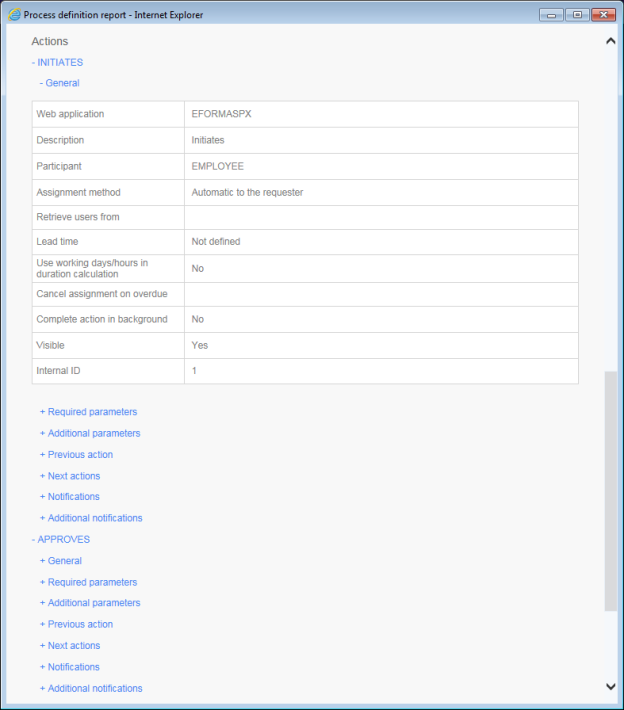
## Actions