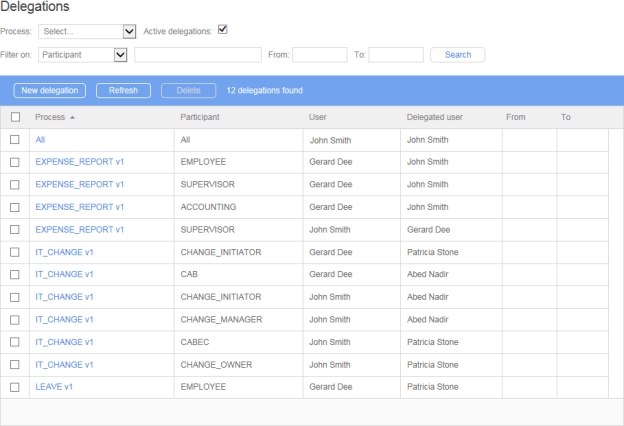
When adding a new delegation, you can decide whether or not to send a notification email to the delegated user via the displayed message box.
A delegation is unique based on the process, the participant, the delegator, the delegatee, the begin date, and the end date. This means that you cannot define multiple time periods for a given delegation.
Deleting a delegation does not delete the associated user.
Delegations are process version-specific:
New versions of a process copy all existing delegations where possible, based on matching participant names.
Since delegations can only be created for active processes, delegations are only carried forward when a versioned process is activated.
A delegatee can only see the delegator’s actions and requests from the version at which they were delegated the role, and going forward if copied by creating a new version and not changed subsequently.
Delegation end date (included); if not defined, the delegation is unlimited.
If prior version actions and requests also need to be delegated, an administrator must use the administrator delegation screen to add the prior versions' delegations.
Links
Remarks
New delegation
Displays a blank delegation form to add a new delegation
Refresh
Refreshes the delegations list
External filters
Remarks
Process
Displays the delegations of the selected process (only active or archived processes are listed)
Filter on
Remarks
Participant
Filter by participant
User
Filter by user (delegator)
Delegated user
Filter by delegated user
Column
Remarks
Process
Process name
Participant
Participant name
User
User name (delegator)
Delegated user
Delegated user name
From ...
Delegation start date (included); if not defined, the delegation is unlimited.
To ...