> For the complete documentation index, see [llms.txt](https://docs.workflowgen.com/llms.txt). Markdown versions of documentation pages are available by appending `.md` to page URLs; this page is available as [Markdown](https://docs.workflowgen.com/admin/9.2/user-management/delegations.md).
# Delegations
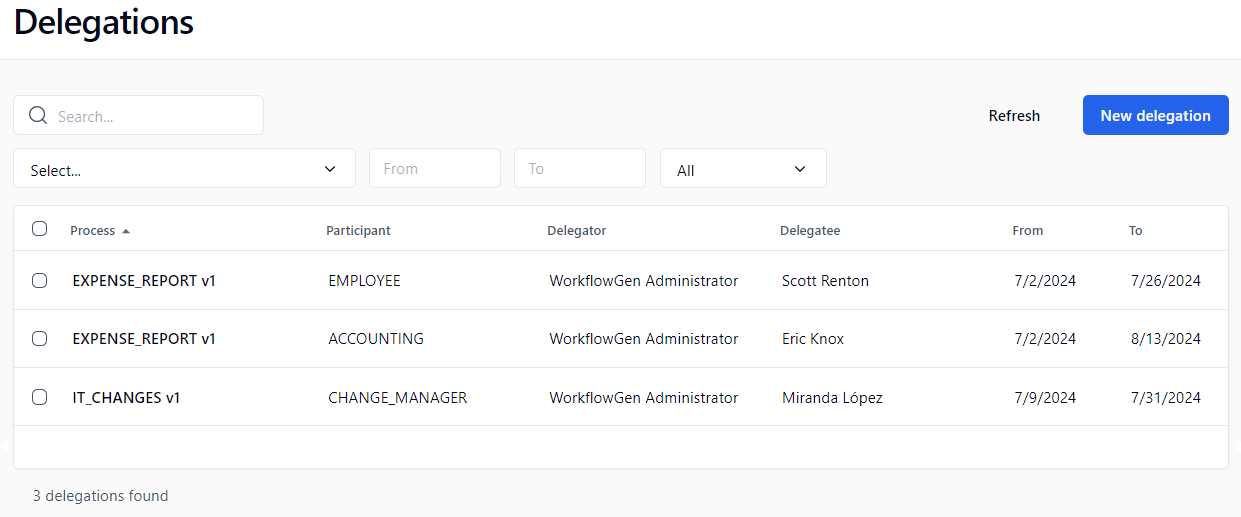
## Delegations screen
In the left menu on the Administration Module home page, click  to display the **Delegations** screen.
## Menu banner
| **Buttons** | **Remarks** |
| -------------- | --------------------------------------------- |
| Refresh | Refreshes the delegations list |
| New delegation | Displays a blank form to add a new delegation |
## Filters
| **External filters** | **Remarks** |
| ---------------------- | ----------------------------------------------------------------------------------------------- |
| Process drop-down list | Displays the delegations of the selected process (only active or archived processes are listed) |
| **Filter on** | **Remarks** |
| ------------- | -------------------------------- |
| Participant | Filter by participant |
| Delegator | Filter by user who delegated |
| Delegatee | Filter by user to whom delegated |
## Delegation list
| **Column** | **Remarks** |
| ----------- | ------------------------------------------------------------------ |
| Process | Process name |
| Participant | Participant name |
| Delegator | User who delegated |
| Delegatee | User to whom delegated |
| From | Delegation start date; if not defined, the delegation is unlimited |
| To | Delegation end date; if not defined, the delegation is unlimited |
## Adding a delegation
When adding a new delegation, you can decide whether or not to send a notification email to the delegatee via the displayed message box.
A delegation is unique based on the process, the participant, the delegator, the delegatee, the begin date, and the end date. This means that you cannot define multiple time periods for a given delegation.
{% hint style="info" %}
As of WorkflowGen 8.0.3:
* You can define cross-delegations on overlapping periods between the same users on the same participant.
* You can define multi-level delegations, so if user A has delegated actions to user B, user B can then delegate these actions to user C.
{% endhint %}
## Deleting a delegation
Deleting a delegation does not delete the associated user.
## Process versioning
Delegations are process version-specific:
* New versions of a process copy all existing delegations where possible, based on matching participant names.
* Since delegations can only be created for active processes, delegations are only carried forward when a versioned process is activated.
* A delegatee can only see the delegator’s actions and requests from the version at which they were delegated the role, and going forward if copied by creating a new version and not changed subsequently.
* When a user changes a delegation in the current version, it does not affect prior delegations performed for previous versions.
* If prior version actions and requests also need to be delegated, an Administrator must use their delegation screen to add the prior versions' delegations.
---
# Agent Instructions
This documentation is published with GitBook. GitBook is the documentation platform designed so that both humans and AI agents can read, navigate, and reason over technical content effectively. Learn more at gitbook.com.
## Querying This Documentation
If you need additional information that is not directly available in this page, you can query the documentation dynamically by asking a question.
Perform an HTTP GET request on the current page URL with the `ask` query parameter, and the optional `goal` query parameter:
```
GET https://docs.workflowgen.com/admin/9.2/user-management/delegations.md?ask=&goal=
```
`ask` is the immediate question: it should be specific, self-contained, and written in natural language.
`goal` is optional and describes the broader end goal you are ultimately trying to accomplish on behalf of the user. GitBook uses it to tailor the answer towards what is most useful for that goal.
The response will contain a direct answer to the question and relevant excerpts and sources from the documentation.
Use this mechanism when the answer is not explicitly present in the current page, you need clarification or additional context, or you want to retrieve related documentation sections.