# DOCUSIGNCHECK

## Overview

The **DOCUSIGNCHECK** workflow application lets you check the status of an envelope and download its associated file, which is a concatenation of attached files.

## How it works

* You can check the status of an envelope and download the file from DocuSign according to your status criteria.<br>
* Application logs are available. These can be specified by setting the value of the `DocuSignCheckLogLevel` parameter in the `web.config` file to `0` to deactivate logs, `1` for error logs, `2` for information logs, or `3` for debug logs; the default value is `0`.

## Required parameter

<table data-header-hidden><thead><tr><th valign="top">Parameter</th><th valign="top">Type</th><th valign="top">Direction</th><th valign="top">Description</th></tr></thead><tbody><tr><td valign="top"><strong>Parameter</strong></td><td valign="top"><strong>Type</strong></td><td valign="top"><strong>Direction</strong></td><td valign="top"><strong>Description</strong></td></tr><tr><td valign="top"><code>DOCUSIGN_ENVELOPE_ID</code></td><td valign="top">TEXT</td><td valign="top">IN</td><td valign="top">DocuSign envelope ID to check</td></tr></tbody></table>

## Optional parameters

### DocuSign configuration

There are two ways to configure DocuSign account information: you can define the configuration in the `web.config` file or in the Configuration Panel, or you can manage the configuration on each DOCUSIGNCHECK action.

{% hint style="info" %}
These parameters must be associated to a DocuSign account.
{% endhint %}

{% hint style="warning" %}
It's necessary to have authorized your DocuSign application for use. To do this, go to the following address: `<SERVER>/oauth/auth?response_type=code&scope=signature%20impersonation&client_id=<CLIENT_ID>&redirect_uri=<REDIRECT_URI>`

* `<SERVER>`: `https://account.docusign.com` (production) or`https://account-d.docusign.com` (demo)
* `<CLIENT_ID>`: Corresponds to your DocuSign application's `Integration Key` value
* `<REDIRECT_URI>`: Redirect address (e.g.  `https://docusign.com`)
  {% endhint %}

<table data-header-hidden><thead><tr><th valign="top">Parameters</th><th valign="top">Type</th><th valign="top">Direction</th><th valign="top">Description</th></tr></thead><tbody><tr><td valign="top"><strong>Parameters</strong></td><td valign="top"><strong>Type</strong></td><td valign="top"><strong>Direction</strong></td><td valign="top"><strong>Description</strong></td></tr><tr><td valign="top"><code>DOCUSIGN_CLIENT_ID</code></td><td valign="top">TEXT</td><td valign="top">IN</td><td valign="top"><p>DocuSign client ID<br><br>Corresponds to your DocuSign application's <code>Integration Key</code> value</p><p></p><p>By default, this value comes from the <code>DocuSignClientId</code> parameter in the <code>web.config</code>.</p></td></tr><tr><td valign="top"><code>DOCUSIGN_USER_GUID</code></td><td valign="top">TEXT</td><td valign="top">IN</td><td valign="top"><p>DocuSign user GUID<br><br>Corresponds to the value of <code>User ID</code> in the DocuSign configuration panel</p><p></p><p>By default, this value comes from the <code>DocuSignUserGuid</code> parameter in the <code>web.config</code>.</p></td></tr><tr><td valign="top"><code>DOCUSIGN_AUTH_SERVER</code></td><td valign="top">TEXT</td><td valign="top">IN</td><td valign="top"><p>DocuSign Auth server</p><p></p><p>DocuSign values:</p><ul><li><code>account.docusign.com</code> (production)</li><li><code>account-d.docusign.com</code> (demo)</li></ul><p>By default, this value comes from the <code>DocuSignAuthServer</code> parameter in the <code>web.config</code>.</p></td></tr><tr><td valign="top"><code>DOCUSIGN_RSA_KEY</code></td><td valign="top">TEXT</td><td valign="top">IN</td><td valign="top">DocuSign RSA key<br><br>By default, this value come from the <code>/Files/DocuSign/rsaKey.pem</code> file.</td></tr><tr><td valign="top"><code>DOCUSIGN_HOST_SERVER</code></td><td valign="top">TEXT</td><td valign="top">IN</td><td valign="top"><p>DocuSign host server</p><p></p><p>DocuSign values:</p><ul><li><code>https://docusign.net</code> (production)</li><li><code>https://demo.docusign.net</code> (demo)</li></ul><p>By default, this value comes from the <code>DocuSignHostServer</code> parameter in the <code>web.config</code>.</p></td></tr></tbody></table>

### General

<table data-header-hidden><thead><tr><th valign="top">Parameters</th><th valign="top">Type</th><th valign="top">Direction</th><th valign="top">Description</th></tr></thead><tbody><tr><td valign="top"><strong>Parameters</strong></td><td valign="top"><strong>Type</strong></td><td valign="top"><strong>Direction</strong></td><td valign="top"><strong>Description</strong></td></tr><tr><td valign="top"><code>VALID_STATUS_LIST</code></td><td valign="top">TEXT</td><td valign="top">IN</td><td valign="top">Valid status to download the document<br><strong>Default:</strong> <code>signed,completed,voided,declined</code></td></tr><tr><td valign="top"><code>DOCUSIGN_DOCUMENT</code></td><td valign="top">FILE</td><td valign="top">OUT</td><td valign="top">DocuSign document</td></tr><tr><td valign="top"><code>DOCUSIGN_STATUS</code></td><td valign="top">TEXT</td><td valign="top">OUT</td><td valign="top">Envelope status</td></tr></tbody></table>

## Example with DOCUSIGNSEND

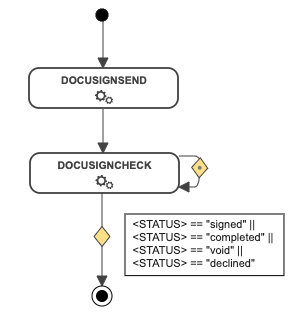
In the following example, the [DOCUSIGNSEND](https://docs.workflowgen.com/admin/9.2/workflow-applications/docusign/docusignsend-workflow-application) action is directly followed by the DOCUSIGNCHECK action. This action will loop back on itself until the status changes to `signed`, `completed`, `voided`, or `declined`.

If the status returned meets the condition, the document will be downloaded from DocuSign.

<div align="left"><img src="https://content.gitbook.com/content/5hqlx79C7yAtTmCBPpSq/blobs/TrUdQ5VYyWuxz9UGqzGq/docusigncheck_workflow.png" alt=""></div>

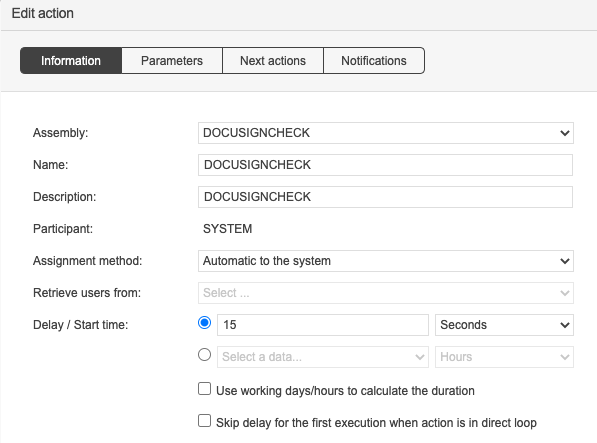
With the system loop action feature, the DOCUSIGNCHECK action will be executed every `x` seconds until the OUT condition is met.

<div align="left"><img src="https://content.gitbook.com/content/5hqlx79C7yAtTmCBPpSq/blobs/Pig6hhejUbExUxG5XuGZ/image.png" alt="Configuration of a DOCUSIGNCHECK action"></div>