# YOUSIGNCHECK

## Overview

The **YOUSIGNCHECK** workflow application lets you verify the status of an agreement and download its associated file, which is a concatenation of attached files.

## How it works

* You can verify the status of an agreement and download the file from Yousign based on your status criteria.<br>
* Application logs are available. These can be specified by setting the value of the `YousignCheckLogLevel` parameter in the `web.config` file to `0` to deactivate logs, `1` for error logs, `2` for information logs, or `3` for debug logs; the default value is `0`.

## Configuring the Yousign API

For instructions on how to configure the the Yousign API, see the [Configuring the Yousign API](https://docs.workflowgen.com/admin/9.2/workflow-applications/yousignsend#configuring-the-yousign-api) section in the [YOUSIGNSEND Workflow Application](https://docs.workflowgen.com/admin/9.2/workflow-applications/yousign/yousignsend) chapter.

## Required parameter

<table data-header-hidden><thead><tr><th valign="top">Parameter</th><th valign="top">Type</th><th valign="top">Direction</th><th valign="top">Description</th></tr></thead><tbody><tr><td valign="top"><strong>Parameter</strong></td><td valign="top"><strong>Type</strong></td><td valign="top"><strong>Direction</strong></td><td valign="top"><strong>Description</strong></td></tr><tr><td valign="top"><code>YOUSIGN_SIGNATURE_ID</code></td><td valign="top">TEXT</td><td valign="top">IN</td><td valign="top">ID of the Yousign signature to verify</td></tr></tbody></table>

## Optional parameters

### Yousign configuration

<table data-header-hidden><thead><tr><th valign="top">Parameters</th><th valign="top">Type</th><th valign="top">Direction</th><th valign="top">Description</th></tr></thead><tbody><tr><td valign="top"><strong>Parameters</strong></td><td valign="top"><strong>Type</strong></td><td valign="top"><strong>Direction</strong></td><td valign="top"><strong>Description</strong></td></tr><tr><td valign="top"><code>YOUSIGN_API_KEY</code></td><td valign="top">TEXT</td><td valign="top">IN</td><td valign="top">Yousign API key<br><br>By default, this value comes from the <code>YousignApiKey</code> parameter in the <code>web.config</code> file.</td></tr><tr><td valign="top"><code>YOUSIGN_HOST_SERVER</code></td><td valign="top">TEXT</td><td valign="top">IN</td><td valign="top"><p>Yousign host server (e.g.:  <code>https://api.yousign.app/v3</code>)<br></p><p>By default, this value comes from the <code>YousignHostServer</code> parameter in the <code>web.config</code> file.</p></td></tr></tbody></table>

### General

<table data-header-hidden><thead><tr><th valign="top">Parameter</th><th valign="top">Type</th><th valign="top">Direction</th><th valign="top">Description</th></tr></thead><tbody><tr><td valign="top"><strong>Parameter</strong></td><td valign="top"><strong>Type</strong></td><td valign="top"><strong>Direction</strong></td><td valign="top"><strong>Description</strong></td></tr><tr><td valign="top"><code>VALID_STATUS_LIST</code></td><td valign="top">TEXT</td><td valign="top">IN</td><td valign="top"><p>Valid status to download the document<br></p><p><strong>Possible values:</strong></p><ul><li><code>draft</code></li><li><code>ongoing</code></li><li><code>done</code></li><li><code>deleted</code></li><li><code>expired</code></li><li><code>canceled</code></li><li><code>approval</code></li><li><code>rejected</code></li><li><code>declined</code></li></ul><p><strong>Default:</strong> <code>done,canceled,expired,deleted,rejected</code></p></td></tr><tr><td valign="top"><code>YOUSIGN_DOCUMENT</code></td><td valign="top">FILE</td><td valign="top">OUT</td><td valign="top">Yousign document</td></tr><tr><td valign="top"><code>YOUSIGN_STATUS</code></td><td valign="top">TEXT</td><td valign="top">OUT</td><td valign="top">Agreement status</td></tr></tbody></table>

## Example with YOUSIGNSEND

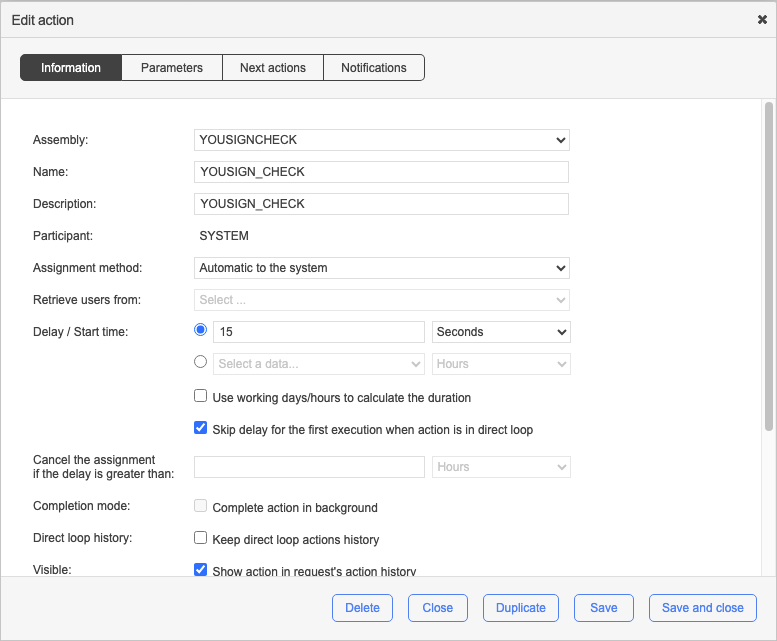
In the following example, the YOUSIGNSEND action is directly followed by the YOUSIGNCHECK action. This action will loop back onto itself until the status changes to `done`, `canceled`, `expired`, `deleted`, or `rejected`.

If the status returned meets the condition, the document will be downloaded from Yousign.

<div align="left"><figure><img src="https://content.gitbook.com/content/5hqlx79C7yAtTmCBPpSq/blobs/3wCQFbgNRshB0gMsy8Xy/image.png" alt=""><figcaption></figcaption></figure></div>

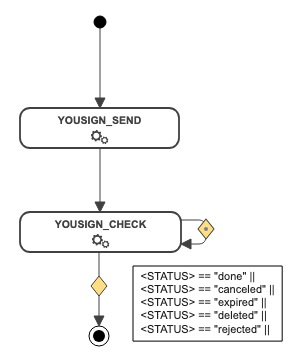
With the system loop action function, the YOUSIGNCHECK action will be executed every `x` seconds until the OUT condition is met.

<div align="left"><figure><img src="https://content.gitbook.com/content/5hqlx79C7yAtTmCBPpSq/blobs/oTnCr5QEHwXWMHfYxVK4/image.png" alt=""><figcaption><p>Configuring a YOUSIGNCHECK action</p></figcaption></figure></div>