# Participants

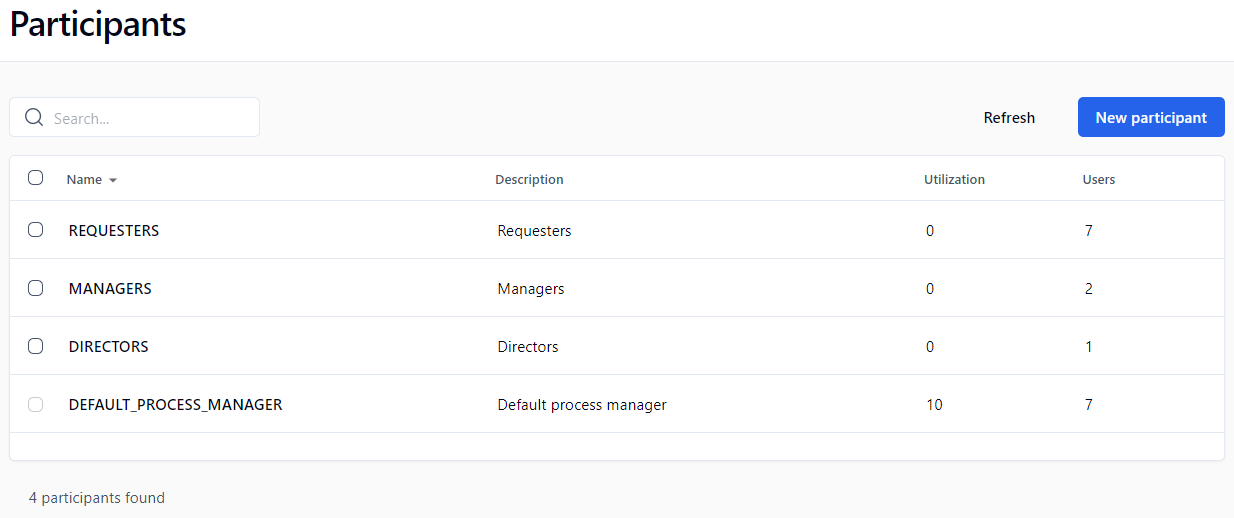
## Participants screen

In the left menu on the Administration Module home page, click ![](https://content.gitbook.com/content/KjZcMxkzmJaMCI7tSLjB/blobs/1Nhd9qG7L2Aqf3c9i4TT/left_menu_participants_small.png) to display the **Participants** screen.

<figure><img src="https://content.gitbook.com/content/KjZcMxkzmJaMCI7tSLjB/blobs/rBfEln1C4XokT1uZ7kc0/participants.png" alt=""><figcaption></figcaption></figure>

## Menu banner

<table data-header-hidden><thead><tr><th valign="top">Buttons</th><th valign="top">Remarks</th></tr></thead><tbody><tr><td valign="top"><strong>Buttons</strong></td><td valign="top"><strong>Remarks</strong></td></tr><tr><td valign="top">Refresh</td><td valign="top">Refreshes the participant list displayed</td></tr><tr><td valign="top">New participant</td><td valign="top">Opens a blank <strong>Add a participant</strong> form</td></tr></tbody></table>

## Filters

<table data-header-hidden><thead><tr><th valign="top">Filter on *</th><th valign="top">Remarks</th></tr></thead><tbody><tr><td valign="top"><strong>Filter on *</strong></td><td valign="top"><strong>Remarks</strong></td></tr><tr><td valign="top">Name</td><td valign="top">Filters by participant name</td></tr><tr><td valign="top">Description</td><td valign="top">Filters by participant description</td></tr></tbody></table>

\* A filter can be applied to a part of a field.

## Participants list

<table data-header-hidden><thead><tr><th valign="top">Columns</th><th valign="top">Remarks</th></tr></thead><tbody><tr><td valign="top"><strong>Columns</strong></td><td valign="top"><strong>Remarks</strong></td></tr><tr><td valign="top">Name</td><td valign="top">Participant’s name (click to display the participant form in edit mode)</td></tr><tr><td valign="top">Description</td><td valign="top">Participant description</td></tr><tr><td valign="top">Utilization</td><td valign="top">Number of processes the participant belongs to, added to the number of files of which the participant is a manager</td></tr><tr><td valign="top">Users</td><td valign="top">Number of potential users of the participant</td></tr></tbody></table>

## Participant form

<table data-header-hidden><thead><tr><th valign="top">Fields</th><th valign="top">Remarks</th></tr></thead><tbody><tr><td valign="top"><strong>Fields</strong></td><td valign="top"><strong>Remarks</strong></td></tr><tr><td valign="top">Name</td><td valign="top">Unique identifier for the participant; must respect nomenclature and be limited to 30 characters (required field)</td></tr><tr><td valign="top">Description</td><td valign="top">Participant description limited to 255 characters (required field)</td></tr><tr><td valign="top">Participant type</td><td valign="top">Type of participant defining possible associations to the directory (required field): <strong>Person</strong>, <strong>List of persons</strong>, or <strong>List of persons with coordinator(s)</strong>  (a link allows associated users to be added or deleted)</td></tr><tr><td valign="top">Users</td><td valign="top">List of users associated to a participant (a link allows associated users to be added or deleted)</td></tr><tr><td valign="top">Groups <sup>1</sup></td><td valign="top">List of groups associated to a participant (a link allows associated groups to be added or deleted)</td></tr><tr><td valign="top">Directories <sup>1</sup></td><td valign="top">List of directories associated to a participant (a link allows associated directories to be added or deleted)</td></tr><tr><td valign="top">Coordinators <sup>2</sup></td><td valign="top">List of coordinators associated to a participant (a link allows associated coordinators to be added or deleted)</td></tr></tbody></table>

1. Accessible only to **List of persons** and Li**st of persons with coordinator** type participants.
2. Accessible only to **List of persons with coordinator** type participants.

## Directory associations

<table data-header-hidden><thead><tr><th valign="top">Fields</th><th valign="top">Remarks</th></tr></thead><tbody><tr><td valign="top"><strong>Fields</strong></td><td valign="top"><strong>Remarks</strong></td></tr><tr><td valign="top">Name *</td><td valign="top">Filters by person’s name</td></tr><tr><td valign="top">Available</td><td valign="top">List of possible associations to the directory</td></tr><tr><td valign="top">Selected</td><td valign="top">List of existing associations to the directory</td></tr></tbody></table>

\* Visible only if associated with a user or a coordinator and if the number of users in the database is higher than the limit set by the software administrator.

* A **Person** type participant is associated with a single user.
* A **List of persons** type participant is associated to one or more users and/or groups and/or directories.
* A **List of persons with coordinator** type participant is associated with one or more coordinators, and to one or more users and/or groups and/or directories.

When adding users, groups, and directories to a participant, note that the list is cumulative in that adding 3 users, 2 groups, and 4 directories will result in a list of users that contain the sum of those users, groups, and directories.

A group or directory does not need to be specific to add users that belong to those groups or directories; adding those groups or directories will result in adding all the users that are part of those groups and directories to the participant list.

## Changing the participant type

The following conditions apply when changing the participant type:

* **Person** to **List of persons** or **List of persons with coordinator(s):** The participant must not be used in a process action.
* **List of persons** to **Person:** A single user must be associated to the participant, and the participant must not be used in a process action.
* **List of persons** to **List of persons with coordinator(s):** Add at least one coordinator.
* **List of persons with coordinator(s)** to **List of persons:** The participant must not be used in a process action where the assignment is made by the coordinator.

## Deleting a participant

A participant cannot be deleted if the person (or persons) is part of a process or is a process/folder manager.