# DOCUSIGNCHECK

## Overview

The **DOCUSIGNCHECK** workflow application lets you check the status of an envelope and download its associated file, which is a concatenation of attached files.

## How it works

* You can check the status of an envelope and download the file from DocuSign according to your status criteria.<br>
* Application logs are available. These can be specified by setting the value of the `DocuSignCheckLogLevel` parameter in the `web.config` file to `0` to deactivate logs, `1` for error logs, `2` for information logs, or `3` for debug logs; the default value is `0`.

## Required parameter

<table data-header-hidden><thead><tr><th valign="top">Parameter</th><th valign="top">Type</th><th valign="top">Direction</th><th valign="top">Description</th></tr></thead><tbody><tr><td valign="top"><strong>Parameter</strong></td><td valign="top"><strong>Type</strong></td><td valign="top"><strong>Direction</strong></td><td valign="top"><strong>Description</strong></td></tr><tr><td valign="top"><code>DOCUSIGN_ENVELOPE_ID</code></td><td valign="top">TEXT</td><td valign="top">IN</td><td valign="top">DocuSign envelope ID to check</td></tr></tbody></table>

## Optional parameters

### DocuSign configuration

There are two ways to configure DocuSign account information: you can define the configuration in the `web.config` file or in the Configuration Panel, or you can manage the configuration on each DOCUSIGNCHECK action.

{% hint style="info" %}
These parameters must be associated to a DocuSign account.
{% endhint %}

{% hint style="warning" %}
It's necessary to have authorized your DocuSign application for use. To do this, go to the following address: `<SERVER>/oauth/auth?response_type=code&scope=signature%20impersonation&client_id=<CLIENT_ID>&redirect_uri=<REDIRECT_URI>`

* `<SERVER>`: `https://account.docusign.com` (production) or`https://account-d.docusign.com` (demo)
* `<CLIENT_ID>`: Corresponds to your DocuSign application's `Integration Key` value
* `<REDIRECT_URI>`: Redirect address (e.g.  `https://docusign.com`)
  {% endhint %}

<table data-header-hidden><thead><tr><th valign="top">Parameters</th><th valign="top">Type</th><th valign="top">Direction</th><th valign="top">Description</th></tr></thead><tbody><tr><td valign="top"><strong>Parameters</strong></td><td valign="top"><strong>Type</strong></td><td valign="top"><strong>Direction</strong></td><td valign="top"><strong>Description</strong></td></tr><tr><td valign="top"><code>DOCUSIGN_CLIENT_ID</code></td><td valign="top">TEXT</td><td valign="top">IN</td><td valign="top"><p>DocuSign client ID<br><br>Corresponds to your DocuSign application's <code>Integration Key</code> value</p><p></p><p>By default, this value comes from the <code>DocuSignClientId</code> parameter in the <code>web.config</code>.</p></td></tr><tr><td valign="top"><code>DOCUSIGN_USER_GUID</code></td><td valign="top">TEXT</td><td valign="top">IN</td><td valign="top"><p>DocuSign user GUID<br><br>Corresponds to the value of <code>User ID</code> in the DocuSign configuration panel</p><p></p><p>By default, this value comes from the <code>DocuSignUserGuid</code> parameter in the <code>web.config</code>.</p></td></tr><tr><td valign="top"><code>DOCUSIGN_AUTH_SERVER</code></td><td valign="top">TEXT</td><td valign="top">IN</td><td valign="top"><p>DocuSign Auth server</p><p></p><p>DocuSign values:</p><ul><li><code>account.docusign.com</code> (production)</li><li><code>account-d.docusign.com</code> (demo)</li></ul><p>By default, this value comes from the <code>DocuSignAuthServer</code> parameter in the <code>web.config</code>.</p></td></tr><tr><td valign="top"><code>DOCUSIGN_RSA_KEY</code></td><td valign="top">TEXT</td><td valign="top">IN</td><td valign="top">DocuSign RSA key<br><br>By default, this value come from the <code>/Files/DocuSign/rsaKey.pem</code> file.</td></tr><tr><td valign="top"><code>DOCUSIGN_HOST_SERVER</code></td><td valign="top">TEXT</td><td valign="top">IN</td><td valign="top"><p>DocuSign host server</p><p></p><p>DocuSign values:</p><ul><li><code>https://docusign.net</code> (production)</li><li><code>https://demo.docusign.net</code> (demo)</li></ul><p>By default, this value comes from the <code>DocuSignHostServer</code> parameter in the <code>web.config</code>.</p></td></tr></tbody></table>

### General

<table data-header-hidden><thead><tr><th valign="top">Parameters</th><th valign="top">Type</th><th valign="top">Direction</th><th valign="top">Description</th></tr></thead><tbody><tr><td valign="top"><strong>Parameters</strong></td><td valign="top"><strong>Type</strong></td><td valign="top"><strong>Direction</strong></td><td valign="top"><strong>Description</strong></td></tr><tr><td valign="top"><code>VALID_STATUS_LIST</code></td><td valign="top">TEXT</td><td valign="top">IN</td><td valign="top">Valid status to download the document<br><strong>Default:</strong> <code>signed,completed,voided,declined</code></td></tr><tr><td valign="top"><code>DOCUSIGN_DOCUMENT</code></td><td valign="top">FILE</td><td valign="top">OUT</td><td valign="top">DocuSign document</td></tr><tr><td valign="top"><code>DOCUSIGN_STATUS</code></td><td valign="top">TEXT</td><td valign="top">OUT</td><td valign="top">Envelope status</td></tr></tbody></table>

## Example with DOCUSIGNSEND

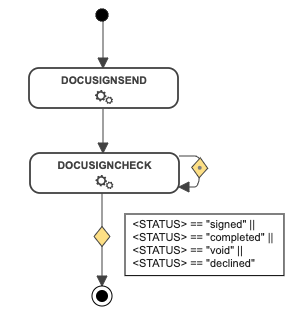
In the following example, the [DOCUSIGNSEND](https://docs.workflowgen.com/admin/workflow-applications/docusign/docusignsend-workflow-application) action is directly followed by the DOCUSIGNCHECK action. This action will loop back on itself until the status changes to `signed`, `completed`, `voided`, or `declined`.

If the status returned meets the condition, the document will be downloaded from DocuSign.

<div align="left"><img src="https://content.gitbook.com/content/KjZcMxkzmJaMCI7tSLjB/blobs/vqh7UHqYbVPOu4YvydWe/docusigncheck_workflow.png" alt=""></div>

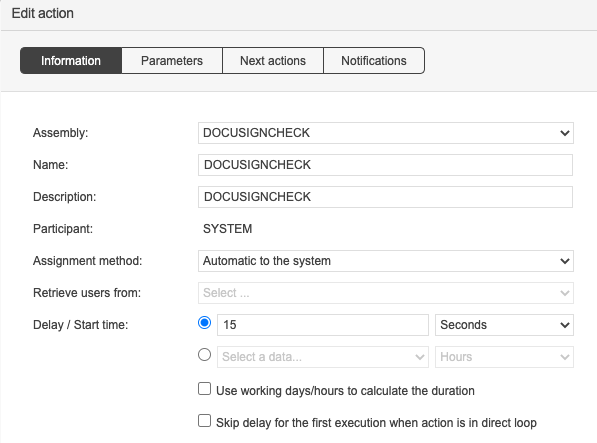
With the system loop action feature, the DOCUSIGNCHECK action will be executed every `x` seconds until the OUT condition is met.

<div align="left"><img src="https://content.gitbook.com/content/KjZcMxkzmJaMCI7tSLjB/blobs/3YJ2wQJluoBl7auz6UQd/image.png" alt="Configuration of a DOCUSIGNCHECK action"></div>


---

# Agent Instructions: Querying This Documentation

If you need additional information that is not directly available in this page, you can query the documentation dynamically by asking a question.

Perform an HTTP GET request on the current page URL with the `ask` query parameter:

```
GET https://docs.workflowgen.com/admin/workflow-applications/docusign/docusigncheck-workflow-application.md?ask=<question>
```

The question should be specific, self-contained, and written in natural language.
The response will contain a direct answer to the question and relevant excerpts and sources from the documentation.

Use this mechanism when the answer is not explicitly present in the current page, you need clarification or additional context, or you want to retrieve related documentation sections.