
Loading...
Loading...
Loading...
Loading...
Loading...
Loading...
Loading...
Loading...
Loading...
Loading...
Loading...
Loading...
Loading...
Loading...
Loading...
Loading...
This guide provides instructions on:
GraphQL APIHow to use the WorkflowGen GraphQL API
Web Services APIHow to use the WorkflowGen web services API
Incoming WebhooksOutgoing WebhooksHow to create incoming and outgoing webhooks
Workflow ApplicationsHow to build applications for WorkflowGen using .NET Framework
RemoteLaunch Development in .NET FrameworkHow to use WorkflowGen.My to develop a RemoteLaunch SDK application to launch a process from outside the WorkflowGen environment
Access TokenHow to use an OAuth 2.0 access token for server-side .NET development
AuthenticationHow to create custom authentication modules
User ManagementUser management and directory synchronization
User Portal CustomizationHow to customize the WorkflowGen User Portal
Integration Using WorkflowGen URLsHow to create integrations using WorkflowGen URLs to perform certain process functions
How to set up and customize notifications
The appendix contains a table that lists time zone names and IDs
Outgoing webhooks are a simple way to send HTTP POST requests to external applications. They are like notifications, but the recipient is an external application URL instead of an email address, and the message is a JSON payload instead of a text or HTML body.
To create outgoing webhooks, use the RESTAPICLIENT or SENDHTTPPOST workflow application, which you can use as a system action in your workflows.
It's recommended to use RESTAPICLIENT instead of SENDHTTPPOST, since RESTAPICLIENT provides more extensive features.
The RESTAPICLIENT workflow application is the preferred solution for advanced REST integration, since SENDHTTPPOST provides only a subset of RESTAPICLIENT features intended for simple use cases.
RESTAPICLIENT allows you to call REST API endpoints to exchange information with other applications through HTTP requests, and can be used to build integrations with extendable applications (such as Azure services and Slack).
It also allows you to call a REST API endpoint using application/json or application/x-www-form-urlencoded payloads. RESTAPICLIENT will then receive and process the response from the external API by mapping the response content with defined OUT parameters.
For information on RESTAPICLIENT, see the section in the .
The SENDHTTPPOST workflow application (available as of version 6.6.0) allows WorkflowGen to send HTTP POST requests to external applications using JSON or URLENCODED payloads. The SENDHTTPPOST application will then receive and process the response from the external API.
For more information on how the application works, see in the .
For samples of APIs that use SENDHTTPPOST, see the repository on GitHub.
The value of the nodeProcessCountPerApplication setting is set to 0 by default for the best performance in Node.js applications. This creates one node process based on the number of virtual processors that are configured. You can change this value at any time to a custom number of node processes; for example, nodeProcessCountPerApplication=2 will create two node processes independently of the number of virtual processors.
For more information, see the Microsoft article.
The WorkflowGen app banner can be customized via the Administration Module, in the Banner section on the Portal tab in the Configuration panel.
You can create custom menus for the User Portal by creating and modifying the portal.xml XML file in the CustomMenu folder located in the \wwwroot\wfgen\App_Data\customMenus folder.
These custom menus will then be available as extra menu options on the User Portal home page.
The User Portal stylesheet can be customized to match your organization's colors and styles. The CSS files are located in the \wfgen\App_Themes\Default\portal\css folder.
This parameter allows you to enter the same names and data types, which can then be used in a multi-process view.
For example, if you have process data such as CUSTOMER (TEXT) that are used in most of your processes, you can define these data as User Portal common process data by entering them in the Common process data name list field.
Clients that are already using Shibboleth Service Provider 3 to manage resource access (such as services or applications) can quickly integrate with WorkflowGen by offering users Single Sign-On (SSO) authentication for a secure and seamless user experience.
For this, Shibboleth SP3 provides a native module for IIS 7 and later that passes user information to WorkflowGen via the REMOTE_USER environment variable.
The WorkflowGen website and web apps should have only the Anonymous Authentication method enabled under the IIS Manager Authentication feature page.
For installation and configuration details, see the documentation.
The majority of WorkflowGen clients use Windows Integrated Authentication in IIS, although several other modes are supported. By using Integrated Authentication, users are seamlessly authenticated to WorkflowGen by using the Windows local session (network password) of the user.
WorkflowGen also supports .NET web form-based authentication and custom HTTP module authentication for single sign-in (SSO) integration.
If your organization has implemented the Shibboleth ecosystem, you can integrate WorkflowGen with the Shibboleth SP3 SSO module.
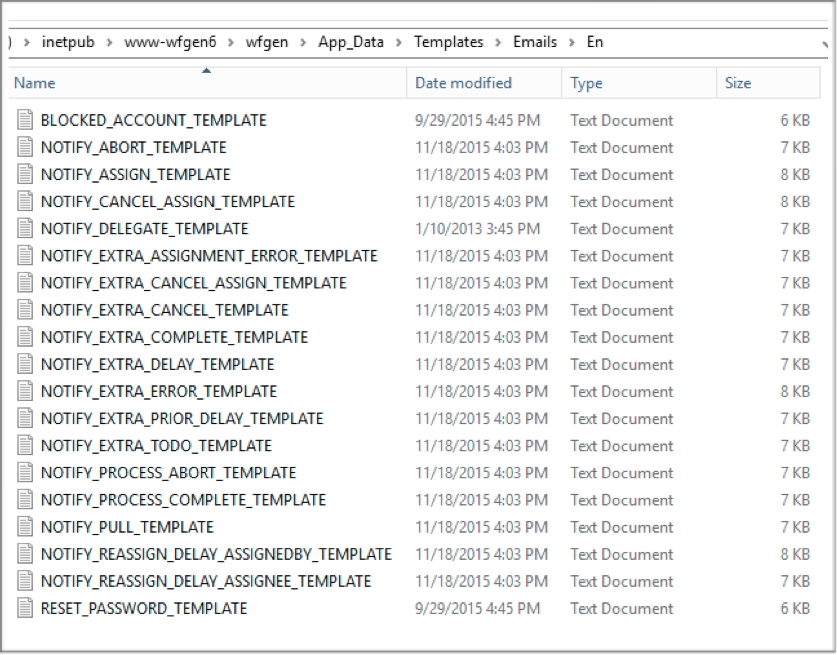
Notification templates are text files with HTML content and WorkflowGen macros. The default notification templates are located in the \wfgen\App_Data\Templates\Emails folder.
The stylesheet must be embedded in the template. You can attach a file to the notification via the <WF_PROCESS_INST_RELDATA_FILE.YOURPROCESSDATANAME> macro.
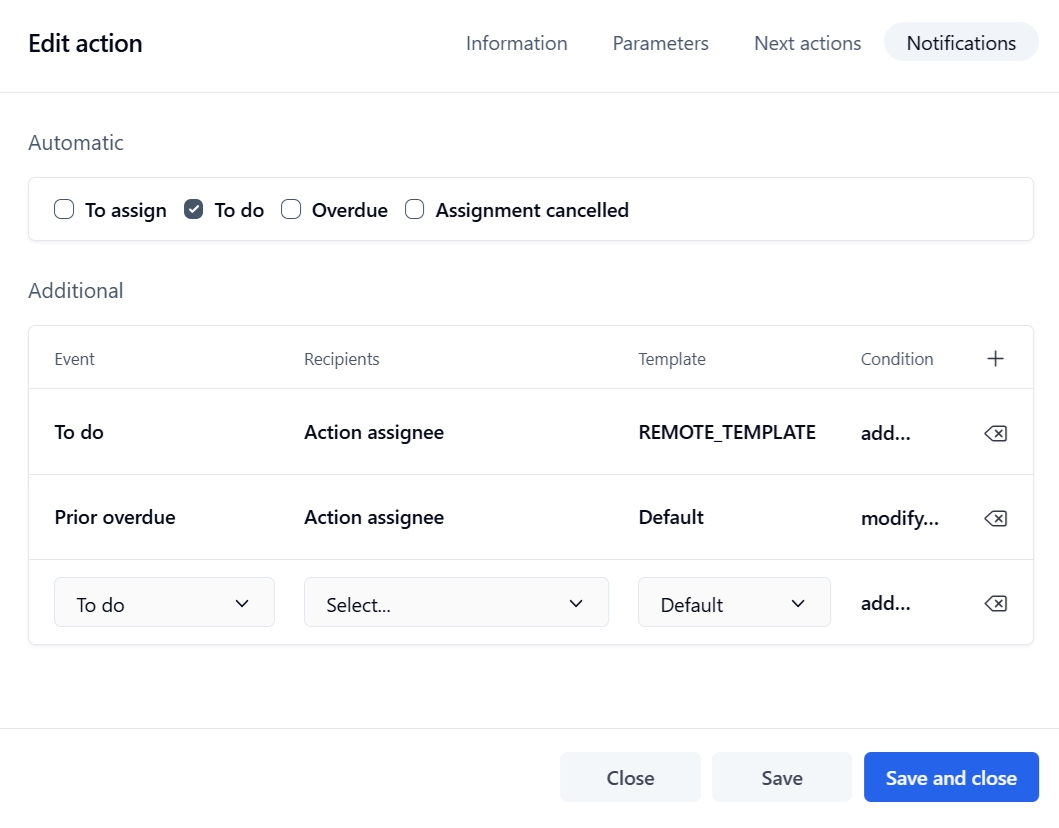
You can also use a custom notification template in a process data and use this process data in an additional notification of a workflow action.
For more information, see the section in the .
We recommend using the local IIS SMTP server. There are several advantages to using an SMTP relay at the IIS WorkflowGen server:
Better performance, since messages are sent directly to the relay.
Local SMTP acts as a buffer to avoid loss of emails if the main SMTP server is not available.
Connection problems are reduced because the relay manages communication problems.
The relay traces email deliveries in its own log files.
WorkflowGen supports pickup directories for best performance and availability. This means that the notifications are created in a pickup directory managed by the SMTP server. IIS SMTP server and Exchange support pickup directory management.
For more information, see in the .
WorkflowGen supports multiple connectors to Active Directory and other LDAP user directories. If these connectors are not used or are not well populated, it may be necessary to consider using the WorkflowGen Text connector, which allows the import of user data from various sources of information such as HR systems.
Richer directory information gives WorkflowGen more ability to integrate organizational data seamlessly into processes:
Automatically fill in some form fields by using macros (e.g. Current User.Department)
Automatic to the manager assignment method
Reuse groups in process participants
to retrieve users
See the section in the for information on how to configure directory synchronization.
You can also find FAQs on user provisioning and directory synchronization in the section on the .
The relay allows you to limit access to WorkflowGen.
The relay supports SMTP authentication and encryption (TLS encryption) to connect to your Exchange SMTP (or other mail server).
When using an OpenID Connect (OIDC) authentication method with WorkflowGen, an OAuth 2.0 access token is available for server-side .NET development. This token enables you to make requests to the GraphQL API as well as to your own APIs, depending on your provider's configuration.
For instructions on how to configure an OIDC provider with WorkflowGen, see the WorkflowGen for Azure guide for Microsoft Entra ID (formerly Azure Active Directory) or the WorkflowGen Technical Guide for Active Directory Federation Services (AD FS), Auth0, and Okta.
You can get the current user's access token from the new this.CurrentUserAccessToken() public instance method of the WorkflowPage class (available since WorkflowGen.My version 4.6.0) in order to make calls from the code-behind to WorkflowGen's GraphQL API or to your own APIs. To do this, follow the example code below:
There are settings that need to be added to the WebForms web.config file in order for this example to work. You must add the reference to the System.Net.Http namespace and deactivate unobtrusive validation mode. Here's a minimal web.config content that you can use:
...
<body>
<table class="Header" cellpadding="0" cellspacing="0">
<tr>
<td class="Title"><WF_PROCESS_INST_NAME></td>
</tr>
</table>
<table class="Content">
<tr>
<td class="FieldLabel">Subject:</td>
<td class="FieldValue">A new action that you can handle has been created.</td>
</tr>
<tr>
<td class="FieldLabel">Action:</td>
<td class="FieldValue"><WF_ACTIVITY_INST_NAME></td>
</tr>
<tr>
<td class="FieldLabel">Description:</td>
<td class="FieldValue"><WF_ACTIVITY_INST_DESC></td>
</tr>
<tr>
<td class="FieldLabel">Link:</td>
<td class="FieldValue">
<a class="Link" href="<WF_LINK_ACTIVITY_INST_FORM>">View action</a>
</td>
</tr>
</table>
<table class="DataList" cellpadding="0" cellspacing="0">
<tr>
<td class="Header" colspan="2">Associated data:</td>
</tr>
<WF_PROCESS_INST_RELDATA>
<tr class="ListRow" onmouseover="this.className='ListRowHighLight'" onmouseout="this.className='ListRow'">
<td class="FieldLabel"><WF_KEY></td>
<td class="FieldValue"> <WF_VALUE></td>
</tr>
</WF_PROCESS_INST_RELDATA>
</table>
<WF_PROCESS_INST_RELDATA_FILE.FORM_ARCHIVE>
</body>
...protected void Page_Load(object sender, EventArgs e)
{
base.Page_Load(sender, e);
var accessToken = this.CurrentUserAccessToken();
var query = @"
query {
viewer {
firstName
lastName
userName
}
}
";
using (var client = new System.Net.Http.HttpClient
{
BaseAddress = new System.Uri("http://localhost/wfgen/graphql")
})
{
client.DefaultRequestHeaders.Accept.Clear();
client.DefaultRequestHeaders.Accept.Add(
new System.Net.Http.Headers.MediaTypeWithQualityHeaderValue("application/json")
);
client.DefaultRequestHeaders.Authorization =
new System.Net.Http.Headers.AuthenticationHeaderValue("Bearer", accessToken);
var jsonQuery = Newtonsoft.Json.JsonConvert.SerializeObject(new
{
query = query,
operationName = "",
variables = new {}
});
var response = client.PostAsync(string.Empty, new System.Net.Http.StringContent(jsonQuery, System.Text.Encoding.UTF8, "application/json")).Result;
response.EnsureSuccessStatusCode();
// Display the result in a web form field for debug purposes
REQUEST_DESCRIPTION.Text = response.Content.ReadAsStringAsync().Result;
}
}<?xml version="1.0" encoding="UTF-8"?>
<configuration>
<appSettings>
<add key="ValidationSettings:UnobtrusiveValidationMode" value="None" />
</appSettings>
<system.web>
<compilation debug="false" targetFramework="4.6.1">
<assemblies>
<add assembly="System.Net.Http, Version=4.0.0.0, Culture=neutral, PublicKeyToken=B03F5F7F11D50A3A" />
</assemblies>
</compilation>
<httpRuntime targetFramework="4.6.1" />
</system.web>
</configuration>


The RemoteLaunch SDK is used to launch a WorkflowGen process from the outside of the WorkflowGen environment. This section will explain how to develop a RemoteLaunch SDK application using WorkflowGen.My v3.3. You'll need to create a new website for each RemoteLaunch SDK application you need.
This integration is not supported when using OpenID Connect authentication methods (Microsoft Entra ID, AD FS, Auth0, Okta). Alternative solutions would be to use a GraphQL API request with a server-side script or to use webhooks.
See the following documentation for instructions on how to configure each method for server-side scripts:
Visual Studio Standard or Professional 2013 or later
We strongly suggest that you put all of your RemoteLaunch SDKs in the \wfgen\wfapps\sdk\MyRemoteLaunch folder.
The RemoteLaunch site directory must be declared as an IIS application in order to be recognized as a .NET website application. Follow these instructions to declare your website directory as an IIS application:
Open Internet Information Services (IIS) Manager.
Navigate to your web form location, which should be placed under the Default Web Site node, under \wfgen\wfapps\sdk\MyRemoteLaunch.
Right-click on MyRemoteLaunch and choose Convert to Application.
Open Visual Studio.
Choose File > New Web Site.
Select ASP.NET Empty Web Site.
Select File system from the Location
By default, you'll have no web.config file in your web project if you're using C# as your development language in the Visual Studio IDE. In order to be able to see complete error messages when you want to debug, you need to have a web.config file.
In order to be able to see complete error messages, change the following properties in the web.config file:
Make sure this line is set to "true":
Make sure this is not commented and that the mode="Off":
In order to demonstrate how to implement a RemoteLaunch application, we'll make a simple RemoteLaunch example that sends a context containing two parameters to a WorkflowGen process: AMOUNT and NAME. This process will be launched with these two parameters.
You must add a reference to WorkflowGen.My.dll in your web project, then add a using statement for the WorkflowGen.My.Data namespace of the WorkflowGen.My assembly.
Page_Load eventWe'll use the Page_Load event to immediately start the remote process. Here's the basic code structure we are going to use for the RemoteLaunch SDK application:
web.config to store your configurationsIt's recommended to use the web.config file to store all the configurations, instead of hard coding them directly in your website's code-behind. The advantage to this is that if you modify the name of the process to launch, or the username of the launching user, or any other configurations, you won't have to change your code-behind files, only your web.config file, without recompiling the web application. Here are the web.config values that we'll use:
The following code declares all the variables we need for the RemoteLaunch, then gets the web.config values to populate some of these variables:
We now need to build a new context to send to WorkflowGen in order to start the new process that needs two parameters: AMOUNT and NAME, which are numeric and text parameters, respectively. Here's the necessary code to create a new context:
After having created the context, we need to make a web request to WorkflowGen to start the remote process, and we also need to post the context to the new process instance. Here's the necessary code:
After starting the process, you might receive errors from WorkflowGen if something's not working as expected. Here's the necessary code to display the WorkflowGen error so that you can debug your RemoteLaunch application:
Select the application pool used by your site and another specific application pool.
Click OK.
Click Browse and choose the location of your ASP.NET website.
Click OK.
<compilation debug="true" /><customErrors mode="Off" defaultRedirect="GenericErrorPage.htm">
<error statusCode="403" redirect="NoAccess.htm" />
<error statusCode="404" redirect="FileNotFound.htm" />
</customErrors>using WorkflowGen.My.Data;protected void Page_Load(object sender, EventArgs e)
{
// Call the main function
RemoteProcessLaunch();
}
/// <summary>
/// RemoteProcessLaunch
/// </summary>
private void RemoteProcessLaunch()
{
...
}<appSettings>
<add key="WorkflowGenLaunchUrl" value="https://localhost/wfgen/requests/new?remote=true"/>
<add key="WorkflowGenUsername" value="wfgen_admin"/>
<add key="WorkflowgenUserPassword" value="Advantys123"/>
<add key="WorkflowGenUserDomain" value=""/>
<add key="ProcessName" value="SDK_CS_REMOTE_LAUNCH"/>
<add key="Language" value="en-US"/>
<add key="RequesterUsername" value="wfgen_admin"/>
<add key="Test" value="Y"/>
</appSettings>// Variables Declaration
System.Net.HttpWebRequest httpWebReq = null; // Http web request object
System.Net.HttpWebResponse httpWebResp = null; // Http web response object
System.Net.NetworkCredential myCred = null; // To hold credential information
System.Net.CredentialCache myCache = null; // credential cache
System.Text.ASCIIEncoding encoding = null; // for encoding
System.IO.Stream myStream = null; // To get request data
System.IO.StreamReader myReader = null; // To read response stream
string respCode; // string used to get response status code
string workflowContextXml; // string to get the xml context data
string appUrl = string.Empty; // string used to Approval URL
string postData = null; // string used to put the data for request
string response = null; // string used to display response
byte[] buffer; // byte used to get the encoded data
// Get values into Configuration constants
// Get the Launch URL
workflowGenLaunchUrl = ConfigurationManager.AppSettings["WorkflowGenLaunchUrl"].ToString();
// Get the WorkflowGen user username
workflowGenUsername = ConfigurationManager.AppSettings["WorkflowGenUsername"].ToString();
// Get the WorkflowGen user password
workflowgenUserPassword = ConfigurationManager.AppSettings["WorkflowgenUserPassword"].ToString();
// Get the WorkflowGen user domain
workflowGenUserDomain = ConfigurationManager.AppSettings["WorkflowGenUserDomain"].ToString();
// Get the process name
processName = ConfigurationManager.AppSettings["ProcessName"].ToString();
// Get the culture information
language = ConfigurationManager.AppSettings["Language"].ToString();
// Get the requester name, default is wfgen_admin
requesterUsername = ConfigurationManager.AppSettings["RequesterUsername"].ToString();
// Get the launch test mode status
test = Convert.ToChar(ConfigurationManager.AppSettings["Test"].ToString());// Create a new WorkflowGen object for context parameters
WorkflowGen.My.Data.ContextParameters myWorkflowContextParameters = new
WorkflowGen.My.Data.ContextParameters();
// Create a new AMOUNT context parameter object
WorkflowGen.My.Data.ContextParameter contextParamAmount = new
WorkflowGen.My.Data.ContextParameter();
// Set the parameter name
contextParamAmount.Name = "AMOUNT";
// Set the direction for the parameter
contextParamAmount.Direction = WorkflowGen.My.Data.ContextParameter.Directions.In;
// Set parameter type as double
contextParamAmount.Type = typeof(double);
// Set parameter value
contextParamAmount.Value = Convert.ToDouble(10000);
// Adding the parameter to the context parameters
myWorkflowContextParameters.Add(contextParamAmount);
// Updating the context parameters
myWorkflowContextParameters.Update();
WorkflowGen.My.Data.ContextParameter contextParamName = new
WorkflowGen.My.Data.ContextParameter();
// Set the parameter name
contextParamName.Name = "NAME";
// Set the direction for the parameter
contextParamName.Direction = WorkflowGen.My.Data.ContextParameter.Directions.In;
// Set parameter type as string
contextParamName.Type = typeof(string);
// Set parameter value
contextParamName.Value = "SDK SAMPLE TEXT";
// Adding the parameter to the context parameters
myWorkflowContextParameters.Add(contextParamName);
// Updating the context parameters
myWorkflowContextParameters.Update();
// Get the xml context data into variable
workflowContextXml = myWorkflowContextParameters.GetXml();// Call WorkflowGen to instantiate the process
// Prepare the URL
appUrl = workflowGenLaunchUrl + "&l=" + language + "&process=" + processName + "&requester_username=" + requesterUsername + "&test=" + test;
// Submit the parameters
myCred = new System.Net.NetworkCredential(workflowGenUsername,workflowgenUserPassword, workflowGenUserDomain);
myCache = new System.Net.CredentialCache();
myCache.Add(new Uri(workflowGenLaunchUrl), "Basic", myCred);
// Prepare a request
httpWebReq = (System.Net.HttpWebRequest)System.Net.WebRequest.Create(appUrl);
httpWebReq.Method = "POST";
// Set authentication information
httpWebReq.Credentials = myCache;
// Set CONTEXT content
postData = "CONTEXT=" + HttpUtility.UrlEncode(workflowContextXml.ToString());
encoding = new System.Text.ASCIIEncoding();
buffer = encoding.GetBytes(postData);
// Set the content type of the data being posted.
httpWebReq.ContentType = "application/x-www-form-urlencoded";
// Set the content length of the string being posted.
httpWebReq.ContentLength = postData.Length;
// Send the CONTEXT
myStream = httpWebReq.GetRequestStream();
myStream.Write(buffer, 0, buffer.Length);
// Close the Stream object.
myStream.Close();// Try block to handle exception
try
{
// Check the WorkflowGen response status
httpWebResp = (System.Net.HttpWebResponse)httpWebReq.GetResponse();
}
// Catch the exception
catch (WebException e)
{
// Display the error message
Response.Write(e.ToString());
return;
}
respCode = "OK"; // response code variable
// Check the response status code is OK
if (respCode != httpWebResp.StatusCode.ToString())
{
// Display the Error details
Response.Write("Error:" + httpWebResp.StatusCode);
}
else
{
// Gets the stream associated with the response
httpWebResp = (System.Net.HttpWebResponse)httpWebReq.GetResponse();
myReader = new System.IO.StreamReader(httpWebResp.GetResponseStream());
response = myReader.ReadToEnd();
httpWebResp.Close();
// Display response message
Response.Write(response);
}The following application types are covered in this section:
Web procedures
Asynchronous web procedures
The following application types are not covered in this section:
Incoming webhooks
Non-interactive clients
SOAP web services
WCF services
When an action using a workflow application is launched, WorkflowGen sends the parameters in a JSON or XML file (depending on the context format previously chosen during the creation of the application) to the application using the HTTP protocol. The application uses the JSON or XML file to get the parameters and executes its operations.
Once the application is done, a JSON or XML file with the OUT parameters is sent back to WorkflowGen. JSON is supported by Webproc and Webproc Async applications. For web services, the SOAP protocol is used to communicate with the application. Web services that don’t use the SOAP protocol to communicate with WorkflowGen application will be referred as Webproc applications.
The WorkflowGen.My assembly requires .NET Framework 4.
In order to implement a custom workflow application using the .NET Framework, you must have the latest version of WorkflowGen.My 4.x referenced in your project. To directly reference an assembly in your web project, do the following:
Create a \bin directory under your project root folder (e.g. \wfgen\wfapps\sdk\MyProject\bin).
Copy the WorkflowGen.My.dll file to this folder.
Right-click on your project name and choose Add reference...
You can also put this assembly in your GAC (Global Assembly Cache) in order to have only one centralized reference, instead of referring to a copy of the assembly in each project. To install the assembly in your GAC, do the following:
Copy WorkflowGen.My.dll to DRIVE:\Windows\system32.
Open a command prompt and browse to DRIVE:\Program Files (x86)\Microsoft Visual Studio 14.0\SDK\v3.5\Bin.
Enter the command gacutil /i c:\windows\system32\WorkflowGen.My.dll, then press ENTER
If you want to use an assembly from the GAC, you should drop your assemblies into a local folder, and then add a reference to the assembly from this folder. You may want to set the Copy Local property to False for that assembly if you don't want the assembly to be copied locally to your project folders. At runtime, the application will automatically use the assembly from the GAC.
WorkflowGen.My.dll 3.4.0 and later require in the same BIN or GAC.
app.config or web.config)The WorkflowGen.My assembly does not require any particular configuration settings.
There are some considerations when deploying a custom assembly SDK workflow application in WorkflowGen, namely the assembly location, the reference to WorkflowGen.My, and references to other software libraries.
There are two ways of deploying an assembly file in WorkflowGen.
The assembly file must be copied to the three bin folders containing the WorkflowGen executable files: \wfgen\bin, \wfgen\ws\bin, and DRIVE:\Program Files\Advantys\WorkflowGen\Services\bin.
Method 2: Reference by assembly’s path (full physical path with file name)
The assembly file can be copied to a custom folder such as DRIVE:\MyWorkflowApps\Assembly.dll, and then use that specific path in the workflow application’s definition.
If your custom assembly has dependencies, they must be located in the same folder as the assembly.
WorkflowGen.My v3.1.0 and earlier
WorkflowGen.My versions 3.1.0 and earlier are strong-named, which means your assembly must be built with and use the same version as your target WorkflowGen. This requires recompiling your assembly whenever you upgrade WorkflowGen to a newer version.
You can use one of the following workarounds to overcome this requirement:
Install the required WorkflowGen.My version in the system's global assembly cache (GAC). For instructions on how to do this, see the Microsoft article. OR
Add a delegate to handle the assembly resolve event in order to load the current WorkflowGen.My version. For instructions on how to do this, see the article on the WorkflowGen Forum & Knowledge Base. OR
Add a web configuration setting to redirect the required version to the current version of WorkflowGen.My. For more information, see the Microsoft article.
As of version 3.2.0, WorkflowGen.My is no longer strong-named in order to allow non-specific version dependency when referenced by your assembly. You can simply deploy your assembly file using one of the two methods in the section above in WorkflowGen 6.2.0 and later.
If your assembly uses third-party libraries, then these must also be deployed into the three WorkflowGen executable \bin folders. Alternatively, they can be installed into the system’s global assembly cache (GAC) if they are strong-named assemblies.
WorkflowContext is a JSON or XML data structure used to exchange parameters with WorkflowGen. The context format is used by both web procedures and asynchronous web procedures.
For an example of an XML ADO.NET DataSet context, see in the section.
As of WorkflowGen 7.0.0, the application can build ContextParameters instances from JSON strings. The JSON should respect the following structures:
In order to manipulate a WorkflowGen context, it is necessary to load it into a ContextParametersobject instance. Usually, you will receive the context in a string variable. The following sample code loads the context from a workflowGenContext string:
You can access any data parameter in the WorkflowGen context by using the contextHandler (ContextParameters instance) that you created in the previous section. When you access a single parameter, you store it in a ContextParameter object to manipulate it. The following example accesses a DATE_EXAMPLE parameter in the previously loaded context:
ContextParameter valueTo access the value of the context parameter, use the Value property of the ContextParameter instance that you retrieved in the previous section:
The dateValue variable now contains the DATE_EXAMPLE parameter value.
ContextParameters collectionSuppose that you would like to iterate over all the IN parameters of the ContextParameters instance. You could do this by using a filter and then using the collection enumerator. Don't forget to remove the filter afterward, or else you won't be able to access the other parameters.
After you have stored your data parameter in a ContextParameter, you can modify its value:
In order to add a parameter to the context, you need to build a new ContextParameter instance, define its name and direction, and then add it to the ContextParameters instance you already have:
File parameters need to be put into a ContextFileReference instance. The following is an example that extracts a file parameter value into a ContextFileReference, then modifies the file parameter so that it points to another sample file.
As of WorkflowGen 7.1.0, JSON context file parameters use the file URI scheme in the fileValue URL field (see for more information).
The most widely-used type of WorkflowGen integration is the web procedure. Web procedures are used to receive a WorkflowGen context as a parameter, manipulate it, and then return the modified context to WorkflowGen.
Visual Studio Standard or Professional 2013 or later is suggested for development.
We strongly suggest that you put all of your web services in the \wfgen\wfapps\WebServices\MyWebProc folder.
If you modify your WorkflowGen process and you need to modify the associated MyWebProc because of those changes, you should duplicate MyWebProc beforehand and create another IIS application, otherwise the two versions of the process will use the same modified MyWebProc.
The web service directory must be declared as an application in IIS in order to be recognized as a .NET web service application. To declare your web service directory as an IIS application, do the following:
Open Internet Information Services (IIS) Manager.
Navigate to your web form location, which should be under the Default Web Site node, under \wfgen\wfapps\webservices\MyWebProc.
Right-click on MyWebProc and choose Convert to Application.
You can create a web procedure using an ASP.NET web service, but this Visual Studio template is only available for .NET versions 2.0 to 3.5.
Open Visual Studio.
Select File > New Web Site.
Choose ASP.NET Web Service (available for .NET Framework versions 2.0 to 3.5).
Choose File system from the Location drop-down list.
In order to be able to see complete error messages, change the following properties in the web.config file:
Make sure this line is set to true:
Make sure this is not commented and that the mode="Off":
In order to use a web service with WorkflowGen, the GET and POST protocols must be enabled in the web service's web.config file. The following are the necessary nodes to insert in the system.web node of your web.config file:
web.config fileYou will need to revert to the behavior of having only .aspx pages trigger request validation by adding the following code to your web.config file:
In order to demonstrate how to implement a web procedure that processes a context from WorkflowGen, we'll build a simple web service that receives and returns TEXT, NUMERIC, FILE, and DATETIME parameters using the JSON and XML ADO.NET DataSet context formats and their respective content types.
You must add a reference to WorkflowGen.My.dll in your web project, and then add a using statement (for the WorkflowGen.My.Data namespace of the WorkflowGen.My assembly. For example:
If you want to receive a JSON formatted context, you should add the following signature, located in the App_Code\Service.cs file, to your web procedure's Service class (note that ScriptService signatures aren't required for other context formats). Your service class should look like this:
Only the methods that have the WebMethod attribute can be remotely executed. The default web method signature created with your web service should look like this:
Here, we'll modify the web method signature. If JSON is the chosen context format with application/json content type, or if the context format is XML ADO.NET DataSet with application/xml content type, the web method will not receive any parameter. Otherwise, if you exchange a JSON or ADO.NET DataSet context using the application/x-www-form-urlencoded content type, your method must receive a string parameter called WFGEN_CONTEXT.
application/json) and XML ADO.NET DataSet (application/xml) context formatsapplication/x-www-form-urlencoded content typeThe next step is to retrieve the WorkflowGen context. In the case of JSON or XML ADO.NET DataSet contexts (when using application/json or application/xml, respectively), the context is retrieved from the HttpContext request as shown in the following example:
Otherwise, if the web method has received the WFGEN_CONTEXT in parameters (this is the case for JSON and XML ADO.NET DataSet contexts when using the application/x-www-form-urlencoded content type), it is available to be used within the method.
Now, we're ready to create a ContextParameters instance that will be used to manipulate the WorkflowGen context:
We'll now retrieve the NUMERIC_IN value into our numericIn double variable, and at the same time, we'll verify that the value is not null (if it is, we'll send an exception):
We'll now modify some parameters by giving them new values:
Now that we've processed the context, we need to send the context back to WorkflowGen. Below is the necessary code, depending on the context format you chose when creating or editing your WorkflowGen application.
application/json content typeapplication/x-www-form-urlencoded content typeapplication/xml content typeapplication/x-www-form-urlencoded content typeAsynchronous web procedures allow a WorkflowGen system action to be run asynchronously, meaning that the action is initiated at some point in time during the workflow and can be completed at a later instance by an external application.
This type of asynchronous processing can be used in cases where a system action (such a web service) can time out or cause the UI to hang when processing a large volume of information.
This section will explain how to develop an asynchronous web procedure application using WorkflowGen.My v4.0. The example will consist of two different parts: an ASP.NET XML web service that receives and processes the context, and cURL examples of HTTP POST requests (you can choose the appropriate technology to post these) needed to complete the action.
To create the ASP.NET XML web service, follow the steps in the previous section, :
Create the web procedure.
Create the application in IIS
Create a web procedure workflow application using an ASP.NET XML web service.
Configure the IIS rendering framework version in the web.config file.
In order to demonstrate how to implement an asynchronous web procedure application, we have developed an ASP.NET XML web service that receives a context in JSON or XML ADO.NET DataSet formats, processes the context and updates it.
You must add a reference to WorkflowGen.My.dll in your web project, then add a using statement for the WorkflowGen.My.Data namespace of the WorkflowGen.My assembly:
Only methods that have the WebMethod attribute can be remotely executed. If the chosen context format is JSON with the application/json content type, or if the context format is XML ADO.NET DataSet with application/xml content type, the web method will not receive any parameters. Otherwise, if you exchange a JSON or ADO.NET DataSet using the application/x-www-form-urlencoded content type, your method must receive a string parameter called WFGEN_CONTEXT.
application/json) and XML ADO.NET DataSet (application/xml) context formatsapplication/x-www-form-urlencoded content typeBe aware that WorkflowGen will send the context to your external application formatted based on your chosen context format and context type when creating or editing your application in WorkflowGen application form.
For example, if you choose JSON context with the application/json content type, your incoming payload will have the following structure:
For an example of an XML ADO.NET DataSet context, see in the section.
The next thing to do is receive the WorkflowGen context. In the case of the JSON or XML ADO.NET DataSet contexts, when using application/json and application/xml respectively, the context is retrieved from the HttpContext request:
Otherwise, if the web method has received the WFGEN_CONTEXT in parameters (this is the case with the JSON and XML ADO.NET DataSet contexts when using the application/x-www-form-urlencoded content type), it is available to be used within the method.
Now, we're ready to create a ContextParameters instance that will be used to manipulate the WorkflowGen context.
We'll now receive the NUMERIC_IN value into our numericIn double variable, and at the same time, we'll verify that the value is not null; if it is, we'll send an exception:
Now, we'll modify some parameters by giving them new values:
Since the asynchronous web procedure will complete the action afterwards, the context and the replyToUrl values should be stored. In this example, we'll use files for this purpose:
After the ASP.NET XML web service used to launch the asynchronous web procedure has saved the context, we need to complete the action by sending it back to WorkflowGen. The following cURL examples provide all of the information required to post the context back to WorkflowGen using the information previously saved in the text files. There are many technologies and applications available to do this; for example, you can develop a .NET console application, or post your request using the Postman application. Be aware that the special character must be correctly escaped depending on your application of technology requirements.
application/json content typeapplication/x-www-form-urlencoded content typeapplication/x-www-form-urlencodedcontent typeapplication/xml; charset=UTF=8 content typeThe advantage of the custom HTTP module solution is that it secures all WorkflowGen HTTP requests, including web services. It also provides more customization possibilities than the form authentication-based solution.
This section focuses on the custom HTTP module authentication solution.
(GMT+01:00) Brussels, Copenhagen, Madrid, Paris
3
(GMT+01:00) Amsterdam, Berlin, Bern, Rome, Stockholm, Vienna
4
(GMT+02:00) Bucharest
5
(GMT+01:00) Belgrade, Bratislava, Budapest, Ljubljana, Prague
6
(GMT+02:00) Athens, Istanbul, Minsk
7
(GMT-03:00) Brasilia
8
(GMT-04:00) Atlantic Time (Canada)
9
(GMT-05:00) Eastern Time (US and Canada)
10
(GMT-06:00) Central Time (US and Canada)
11
(GMT-07:00) Mountain Time (US and Canada)
12
(GMT-08:00) Pacific Time (US and Canada)
13
(GMT-09:00) Alaska
14
(GMT-10:00) Hawaii
15
(GMT-11:00) Midway Island, Samoa
16
(GMT+12:00) Auckland, Wellington
17
(GMT+10:00) Brisbane
18
(GMT+09:30) Adelaide
19
(GMT+09:00) Osaka, Sapporo, Tokyo
20
(GMT+08:00) Kuala Lumpur, Singapore
21
(GMT+07:00) Bangkok, Hanoi, Jakarta
22
(GMT+05:30) Chennai, Kolkata, Mumbai, New Delhi
23
(GMT+04:00) Abu Dhabi, Muscat
24
(GMT+03:30) Tehran
25
(GMT+03:00) Baghdad
26
(GMT+02:00) Jerusalem
27
(GMT-03:30) Newfoundland
28
(GMT-01:00) Azores
29
(GMT-02:00) Mid-Atlantic
30
(GMT) Casablanca, Monrovia
31
(GMT-03:00) Buenos Aires, Georgetown
32
(GMT-04:00) Caracas, La Paz
33
(GMT-05:00) Indiana (East)
34
(GMT-05:00) Bogota, Lima, Quito, Rio Branco
35
(GMT-06:00) Saskatchewan
36
(GMT-06:00) Guadalajara, Mexico City, Monterrey
37
(GMT-07:00) Arizona
38
(GMT-12:00) International Date Line West
39
(GMT+12:00) Fiji Is., Kamchatka, Marshall Is.
40
(GMT+11:00) Magadan, Solomon Is., New Caledonia
41
(GMT+10:00) Hobart
42
(GMT+10:00) Guam, Port Moresby
43
(GMT+09:30) Darwin
44
(GMT+08:00) Beijing, Chongqing, Hong Kong, Urumqi
45
(GMT+06:00) Almaty, Novosibirsk
46
(GMT+05:00) Islamabad, Karachi, Tashkent
47
(GMT+04:30) Kabul
48
(GMT+02:00) Cairo
49
(GMT+02:00) Harare, Pretoria
50
(GMT+03:00) Moscow, St. Petersburg, Volgograd
51
(GMT-01:00) Cape Verde Is.
52
(GMT+04:00) Yerevan
53
(GMT-06:00) Central America
54
(GMT+03:00) Nairobi
55
(GMT+01:00) Sarajevo, Skopje, Warsaw, Zagreb
56
(GMT+05:00) Ekaterinburg
57
(GMT+02:00) Helsinki, Kyiv, Riga, Sofia, Tallinn, Vilnius
58
(GMT-03:00) Greenland
59
(GMT+06:30) Rangoon
60
(GMT+05:45) Kathmandu
61
(GMT+08:00) Irkutsk, Ulaan Bataar
62
(GMT+07:00) Krasnoyarsk
63
(GMT-04:00) Santiago
64
(GMT+06:00) Sri Jayawardenepura
65
(GMT+13:00) Nuku'alofa
66
(GMT+10:00) Vladivostok
67
(GMT+01:00) West Central Africa
68
(GMT+09:00) Yakutsk
69
(GMT+06:00) Astana, Dhaka
70
(GMT+09:00) Seoul
71
(GMT+08:00) Perth
72
(GMT+03:00) Kuwait, Riyadh
73
(GMT+08:00) Taipei
74
(GMT+10:00) Canberra, Melbourne, Sydney
75
(GMT-07:00) Chihuahua, La Paz, Mazatlan
76
(GMT+03:00) Tbilisi
77
(GMT+04:00) Baku
78
(GMT-08:00) Tijuana, Baja, California
79
(GMT+02:00) Amman
80
(GMT+02:00) Beirut
81
(GMT-03:00) Montevideo
82
(GMT+02:00) Windhoek
83
(GMT-04:00) Manaus
ID
Name
1
(GMT) Greenwich Mean Time: Dublin, Edinburgh, Lisbon, London
2
Click Browse.
Navigate to the \bin directory you created and choose the WorkflowGen.My.dll file, then click OK. WorkflowGen.My is now referenced in your project.
Click OK.
Click Browse and choose the location of your ASP.NET website.
Click OK.
Specify your class signature steps.
{
"parameters": [
{
"name": "DATE_IN",
"dataType": "DATETIME",
"direction": "IN",
"dateTimeValue": "2017-02-23T20:46:00Z"
},
{
"name": "FILE_IN",
"dataType": "FILE",
"direction": "IN",
"fileValue": {
"name": "Test File.txt",
"contentType": "text/plain",
"size": 616,
"url": "file:///C:/inetpub/wwwroot/wfgen/App_Data/Files/DataSet/runtime/2017/02/27/49726-1.txt"
"updatedAt": "2017-02-21T15:06:38Z"
}
},
{
"name": "NUMERIC_IN",
"dataType": "NUMERIC",
"direction": "IN",
"numericValue": 100.0
},
{
"name": "TEXT_IN",
"dataType": "TEXT",
"direction": "IN",
"textValue": "Lorem ipsum dolor sit amet ~!@#$%^;*()_+-=[]{}\\\\|:\\\"';?/,:;.,`&<>"
}
]
}{
"replyToUrl": "http://localhost/wfgen/show.aspx?QUERY=APPLICATION_COMPLETE&ID_PROCESS_INST=2304&ID_ACTIVITY_INST=1&ENCTYPE=application%2fjson&ID_APP_TYPE=WEBPROCASYNC",
"parameters": [
{
"name": "DATE_IN",
"dataType": "DATETIME",
"direction": "IN",
"dateTimeValue": "2017-02-21T15:07:00Z"
},
{
"name": "FILE_IN",
"dataType": "FILE",
"direction": "IN",
"fileValue": {
"name": "TestFile.txt",
"contentType": "text/plain",
"size": 616,
"url": "file:///C:/inetpub/wwwroot/wfgen/App_Data/Files/DataSet/runtime/2017/02/27/49749-1.txt"
"updatedAt": "2017-02-21T15:06:38Z"
}
},
{
"name": "NUMERIC_IN",
"dataType": "NUMERIC",
"direction": "IN",
"numericValue": 100.0
},
{
"name": "TEXT_IN",
"dataType": "TEXT",
"direction": "IN",
"textValue": "Lorem ipsum dolor sit amet ~!@#$%^&;*()_+-=[]{}\\|:\"';?/,<:>.,`"
}
]
}ContextParameters contextHandler = new ContextParameters(workflowGenContext);ContextParameter dateParameter = contextHandler["DATE_EXAMPLE"];ContextParameter dateParameter = contextHandler["DATE_PARAMETER"];
DateTime dateValue = (DateTime)dateParameter.Value;contextHandler.ApplyFilter(ContextParameter.Directions.In, ContextParameters.ComparisonOperators.Equals);
foreach (ContextParameter inParameter in contextHandler)
{
// Do something here with each "inParameter" variable
}
contextHandler.RemoveFilter();ContextParameter dateParameter = contextHandler["DATE_PARAMETER"];
dateParameter.Value = System.DateTime.Now;
contextHandler.Update("DATE_PARAMETER");ContextParameter newOutParameter = new ContextParameter(typeof(DateTime), DateTime.Now);
newOutParameter.Name = "SAMPLE_OUT_PARAM";
newOutParameter.Direction = ContextParameter.Directions.Out;
contextHandler.Add(newOutParameter);
contextHandler.Update();ContextParameters cps = new ContextParameters(context);
ContextFileReference cfr = new ContextFileReference();
FileInfo fi = new FileInfo(@"c:\TestFile.txt");
cfr.Name = fi.Name;
cfr.Description = fi.Name;
cfr.Path = fi.FullName;
cfr.OriginalPath = fi.FullName;
cfr.ContentType = "text/plain";
cfr.DateLastModified = fi.LastWriteTimeUtc;
cfr.Size = fi.Length;
cps["FILE_OUT"].Value = cfr;
cps.Update();<compilation debug="true" /><customErrors mode="Off" defaultRedirect="GenericErrorPage.htm">
<error statusCode="403" redirect="NoAccess.htm" />
<error statusCode="404" redirect="FileNotFound.htm" />
</customErrors><webServices>
<protocols>
<add name="HttpGet"/>
<add name="HttpPost"/>
</protocols>
</webServices><httpRuntime requestValidationMode="2.0" />using WorkflowGen.My.Data;[WebService(Namespace = "http://tempuri.org/")]
[System.Web.Script.Services.ScriptService]
public class Service : System.Web.Services.WebService[WebMethod]
public string HelloWorld()[WebMethod]
public void WebProcAppJsonXml()[WebMethod]
public string WebProcAppJsonXml(string WFGEN_CONTEXT)// Reading context from request
string WFGEN_CONTEXT;
HttpContext.Current.Request.InputStream.Position = 0;
using (var reader = new StreamReader(HttpContext.Current.Request.InputStream, System.Text.UTF8Encoding.UTF8))
{
WFGEN_CONTEXT = reader.ReadToEnd();
}ContextParameters myWorkflowContextParameters = new ContextParameters(WFGEN_CONTEXT);double numericIn = 0;
if (myWorkflowContextParameters["NUMERIC_IN"].Value != DBNull.Value)
{
// Get the value of 'NUMERIC_IN' into the numericIn variable
numericIn = (double)myWorkflowContextParameters["NUMERIC_IN"].Value;
}
else
{
// If NUMERIC_IN is null generate an error
throw new SoapException("Web procedure error: 'NUMERIC_IN' parameter must not be null", SoapException.ServerFaultCode);
}myWorkflowContextParameters["DATE_OUT"].Value = DateTime.UtcNow;
myWorkflowContextParameters["NUMERIC_OUT"].Value = 1234567.89;
myWorkflowContextParameters["TEXT_OUT"].Value = "Lorem ipsum dolor sit amet ~!@#$%^&;*()_+-=[]{}\\|:\"';?/,<:>.,`";
ContextFileReference cfr = new ContextFileReference();
FileInfo fi = new FileInfo(@"c:\temp\TestFile.txt");
cfr.Name = fi.Name;
cfr.Description = fi.Name;
cfr.Path = fi.FullName;
cfr.OriginalPath = fi.FullName;
cfr.ContentType = "text/plain";
cfr.DateLastModified = fi.LastWriteTimeUtc;
cfr.Size = fi.Length;
myWorkflowContextParameters["param_file_out"].Value = cfr;
myWorkflowContextParameters.Update();// Sending context response
HttpContext.Current.Response.Clear();
HttpContext.Current.Response.ContentType = HttpContext.Current.Request.ContentType;
HttpContext.Current.Response.AddHeader("content-length", myWorkflowContextParameters.GetJson().Length.ToString());
HttpContext.Current.Response.Flush();
HttpContext.Current.Response.Write(myWorkflowContextParameters.GetJson());// Returning the context
return myWorkflowContextParameters.GetJson();// Sending context response
HttpContext.Current.Response.Clear();
HttpContext.Current.Response.ContentType = HttpContext.Current.Request.ContentType;
HttpContext.Current.Response.AddHeader("content-length", myWorkflowContextParameters.GetXml().Length.ToString());
HttpContext.Current.Response.Flush();
HttpContext.Current.Response.Write(myWorkflowContextParameters.GetXml());// Returning the context
return myWorkflowContextParameters.GetXml();using WorkflowGen.My.Data;[WebMethod]
public void WebProcAppJsonXmlAsync()[WebMethod]
public string WebProcAppJsonXmlAsync(string WFGEN_CONTEXT){
"replyToUrl": "http://localhost/wfgen/show.aspx?QUERY=APPLICATION_COMPLETE&ID_PROCESS_INST=2304&ID_ACTIVITY_INST=1&ENCTYPE=application%2fjson&ID_APP_TYPE=WEBPROCASYNC",
"parameters": [
{
"name": "DATE_IN",
"dataType": "DATETIME",
"direction": "IN",
"dateTimeValue": "2017-02-21T15:07:00Z"
},
{
"name": "FILE_IN",
"dataType": "FILE",
"direction": "IN",
"fileValue": {
"name": "TestFile.txt",
"contentType": "text/plain",
"size": 616,
"url": "file:///C:/inetpub/wwwroot/wfgen/App_Data/Files/DataSet/runtime/2017/02/27/49749-1.txt"
}
},
{
"name": "NUMERIC_IN",
"dataType": "NUMERIC",
"direction": "IN",
"numericValue": 100.0
},
{
"name": "TEXT_IN",
"dataType": "TEXT",
"direction": "IN",
"textValue": "Lorem ipsum dolor sit amet ~!@#$%^&;*()_+-=[]{}\\|:\"';?/,<:>.,`"
}
]
}// Reading context from request
string WFGEN_CONTEXT;
HttpContext.Current.Request.InputStream.Position = 0;
using (var reader = new StreamReader(HttpContext.Current.Request.InputStream, System.Text.UTF8Encoding.UTF8))
{
WFGEN_CONTEXT = reader.ReadToEnd();
}ContextParameters myWorkflowContextParameters = new ContextParameters(WFGEN_CONTEXT);double numericIn = 0;
if (myWorkflowContextParameters["NUMERIC_IN"].Value != DBNull.Value)
{
// Get the value of 'NUMERIC_IN' into the numericIn variable
numericIn = (double)myWorkflowContextParameters["NUMERIC_IN"].Value;
}
else
{
// If NUMERIC_IN is null generate an error
throw new SoapException("Web procedure error: 'NUMERIC_IN' parameter must not be null", SoapException.ServerFaultCode);
}myWorkflowContextParameters["DATE_OUT"].Value = DateTime.UtcNow;
myWorkflowContextParameters["NUMERIC_OUT"].Value = 1234567.89;
myWorkflowContextParameters["TEXT_OUT"].Value = "Lorem ipsum dolor sit amet ~!@#$%^&;*()_+-=[]{}\\|:\"';?/,<:>.,`";
ContextFileReference cfr = new ContextFileReference();
FileInfo fi = new FileInfo(@"c:\temp\TestFile.txt");
cfr.Name = fi.Name;
cfr.Description = fi.Name;
cfr.Path = fi.FullName;
cfr.OriginalPath = fi.FullName;
cfr.ContentType = "text/plain";
cfr.DateLastModified = fi.LastWriteTimeUtc;
cfr.Size = fi.Length;
myWorkflowContextParameters["FILE_OUT"].Value = cfr;
myWorkflowContextParameters.Update();// Save the WFGEN_REPLY_TO and context in a file for later processing and reply to WorkflowGen
System.IO.File.WriteAllText(@"c:\WorkflowGen_ReplyToUrl.txt", HttpContext.Current.Request["WFGEN_REPLY_TO"]);System.IO.File.WriteAllText(@"c:\Json_Context.json", myWorkflowContextParameters.GetJson());System.IO.File.WriteAllText(@"c:\Xml_Context.xml", myWorkflowContextParameters.GetXml());curl -X POST
-H 'Authorization: Basic [your basic authentication credentials]'
-H 'Content-Type: application/json
-d '{
"replyToUrl": "http://localhost/wfgen/show.aspx?QUERY=APPLICATION_COMPLETE&ID_PROCESS_INST=2482&ID_ACTIVITY_INST=1&ENCTYPE=application%2fjson&ID_APP_TYPE=WEBPROCASYNC",
"parameters": [
{
"name": "DATE_OUT",
"dataType": "DATETIME",
"direction": "OUT",
"dateTimeValue": "2017-03-03T15:54:50Z"
},
{
"name": "FILE_OUT",
"dataType": "FILE",
"direction": "OUT",
"fileValue": {
"name": "Test File.txt",
"contentType": "text/plain",
"size": 616,
"url": "file:///c:/TestFile.txt",
"updatedAt": "2017-02-21T15:06:38Z"
}
},
{
"name": "NUMERIC_OUT",
"dataType": "NUMERIC",
"direction": "OUT",
"numericValue": 1234567.89
},
{
"name": "TEXT_OUT",
"dataType": "TEXT",
"direction": "OUT",
"textValue": "This is my text out Lorem ipsum dolor sit amet"
}
]
}' "http://localhost/wfgen/show.aspx?QUERY=APPLICATION_COMPLETE&ID_PROCESS_INST=2482&ID_ACTIVITY_INST=1&ENCTYPE=application%2fjson&ID_APP_TYPE=WEBPROCASYNC"curl -X POST
-H 'Authorization: Basic [your basic authentication credentials]'
-H 'Content-Type: application/x-www-form-urlencoded'
-d 'WFGEN_RESULT={
"replyToUrl": "http://localhost/wfgen/show.aspx?QUERY=APPLICATION_COMPLETE&ID_PROCESS_INST=2481&ID_ACTIVITY_INST=1&ENCTYPE=application%2fx-www-form-urlencoded&ID_APP_TYPE=WEBPROCASYNC",
"parameters": [
{
"name": "DATE_OUT",
"dataType": "DATETIME",
"direction": "OUT",
"dateTimeValue": "2017-03-03T15:54:50Z"
},
{
"name": "FILE_OUT",
"dataType": "FILE",
"direction": "OUT",
"fileValue": {
"name": "Test File.txt",
"contentType": "text/plain",
"size": 616,
"url": "file:///c:/TestFile.txt",
"updatedAt": "2017-02-21T15:06:38Z"
}
},
{
"name": "NUMERIC_OUT",
"dataType": "NUMERIC",
"direction": "OUT",
"numericValue": 1234567.89
},
{
"name": "TEXT_OUT",
"dataType": "TEXT",
"direction": "OUT",
"textValue": "This is my text out Lorem ipsum dolor sit amet"
}
]
}' "http://localhost/wfgen/show.aspx?QUERY=APPLICATION_COMPLETE&ID_PROCESS_INST=2481&ID_ACTIVITY_INST=1&ENCTYPE=application%2fx-www-form-urlencoded&ID_APP_TYPE=WEBPROCASYNC"curl -X POST
-H 'Authorization: Basic [your Basic authentication credentials]'
-H 'Content-Type: application/x-www-form-urlencoded'
-d 'WFGEN_RESULT=
<NewDataSet>
<parameter>
<name>DATE_OUT</name>
<dataType>DATETIME</dataType>
<direction>OUT</direction>
<dateTimeValue>2017-02-27T15:39:02.0846762Z</dateTimeValue>
</parameter>
<parameter>
<name>FILE_OUT</name>
<dataType>FILE</dataType>
<direction>OUT</direction>
<fileName>Test File.txt</fileName>
<fileSize>616</fileSize>
<fileContentType>text/plain</fileContentType>
<fileDescription>Test File.txt</fileDescription>
<fileOriginalPath>c:\Test File.txt</fileOriginalPath>
<fileDateLastModified>2017-01-12T14:28:32.8829125-05:00</fileDateLastModified>
<filePath>c:\TestFile.txt</filePath>
</parameter>
<parameter>
<name>NUMERIC_OUT</name>
<dataType>NUMERIC</dataType>
<direction>OUT</direction>
<numericValue>1234567.89</numericValue>
</parameter>
<parameter>
<name>TEXT_OUT</name>
<dataType>TEXT</dataType>
<direction>OUT</direction>
<textValue>Lorem ipsum dolor sit amet </textValue>
</parameter>
<session>
<processInstanceId>2483</processInstanceId>
<activityInstanceId>1</activityInstanceId>
</session>
</NewDataSet>' "http://localhost/wfgen/show.aspx?QUERY=APPLICATION_COMPLETE&ID_PROCESS_INST=2483&ID_ACTIVITY_INST=1&ENCTYPE=application%2fx-www-form-urlencoded&ID_APP_TYPE=WEBPROCASYNC"curl -X POST
-H 'Authorization: Basic [your Basic authentication credentials]'
-H 'Content-Type: application/xml; charset=UTF-8'
-d '
<NewDataSet>
<parameter>
<name>DATE_OUT</name>
<dataType>DATETIME</dataType>
<direction>OUT</direction>
<dateTimeValue>2017-02-27T15:39:02.0846762Z</dateTimeValue>
</parameter>
<parameter>
<name>FILE_OUT</name>
<dataType>FILE</dataType>
<direction>OUT</direction>
<fileName>TestFile.txt</fileName>
<fileSize>616</fileSize>
<fileContentType>text/plain</fileContentType>
<fileDescription>TestFile.txt</fileDescription>
<fileOriginalPath>c:\TestFile.txt</fileOriginalPath>
<fileDateLastModified>2017-01-12T14:28:32.8829125-05:00</fileDateLastModified>
<filePath>c:\TestFile.txt</filePath>
</parameter>
<parameter>
<name>NUMERIC_OUT</name>
<dataType>NUMERIC</dataType>
<direction>OUT</direction>
<numericValue>1234567.89</numericValue>
</parameter>
<parameter>
<name>TEXT_OUT</name>
<dataType>TEXT</dataType>
<direction>OUT</direction>
<textValue>Lorem ipsum dolor sit amet </textValue>
</parameter>
<session>
<processInstanceId>2485</processInstanceId>
<activityInstanceId>1</activityInstanceId>
</session>
</NewDataSet>' "http://localhost/wfgen/show.aspx?QUERY=APPLICATION_COMPLETE&ID_PROCESS_INST=2485&ID_ACTIVITY_INST=1&ENCTYPE=application%2fxml%3b+charset%3dUTF-8&ID_APP_TYPE=WEBPROCASYNC"login.aspx page (e.g. to simulate an authentication service provider that validates user credentials against an identity provider) and WorkflowGen in another IIS website where the custom HTTP module is installed and configured.Download the CustomAuthModuleSSO 2.0 sample package, unzip the package, then copy the \VS Project\bin\Release\CustomAuthModuleSSO.dll file into the following folders:
\wfgen\bin
\wfgen\wfapps\webforms\bin
All of your custom web forms' \bin folders
In IIS, change the Authentication configuration. Enable Anonymous Authentication on all of the following IIS applications under the WorkflowGen website:
\wfgen
\wfgen\wfapps\webforms
Edit your \wfgen\web.config file and add the following configuration:
✏️ Note: Change the {remoteauthserver:port} value of the RemoteAuthenticationServiceProviderLoginUrl key to your existing remote authentication server name and port number.
If you want to customize the behavior of CustomAuthModuleSSO, open the \VS Project\CustomAuthModuleSSO.sln solution in Visual Studio, then edit the CustomAuthModuleSSO.cs file. When ready, rebuild the solution and redeploy the \VS Project\bin\Release\CustomAuthModuleSSO.dll file as in step 1.
Copy the \Remote auth service provider\login.aspx sample file from the package to your remote authentication server IIS website's root folder. If there's no existing website, then create a new IIS website on your web server and copy the file to the root folder. Normally, the remote authentication server IIS website is a separate website from the WorkflowGen IIS website.
✏️ Note: Don't forget to update the {remoteauthserver:port} value for the RemoteAuthenticationServiceProviderLoginUrl key in the \wfgen\web.config file if the remote authentication server name and port are different or have changed. See step 3 of the previous section.
Edit login.aspx and change the {workflowgenserver:port} to your WorkflowGen server name and port number.
In IIS, change the Authentication configuration. Enable Anonymous Authentication on the remote authentication server IIS website.
Open the http://{remoteauthserver:port}/login.aspx URL in a browser and make sure it's accessible and working properly.
When a user connects to WorkflowGen (http://{workflowgenserver:port}/wfgen), CustomAuthModuleSSO checks if a token is available (in the Cookies, QueryString, Form, or Server variables collections) in order to retrieve the current login user. If no token is found, then it will redirect the user to your remote authentication server login.aspx page with a return URL.
Your remote authentication server will show a login page for the user to input their username and password for submission.
When the user submits the form, the login page validates the user credentials against the authentication service provider (code to implement in login.aspx). If the credentials are valid, then the page generates a token and sets it as a parameter in the WorkflowGen return URL. For the simplicity of this sample, the token only contains the username that is encoded in base64.
When WorkflowGen receives the new HTTP request from your remote authentication server, CustomAuthModuleSSO will retrieve the token from the QueryString. It decodes the token to retrieve the username and creates a GenericPrincipal object used to set the current user session, then it saves the token as a cookie for future HTTP requests. WorkflowGen will now use the user principal (GenericPrincipal object) of the HTTP request context to verify and load the WorkflowGen user's profile.
If the user is invalid (e.g. no matching username is found in the database), WorkflowGen will reject the user and display a Security error: You are not authorized to view this page error message.
For sign out, the user can use one of the following URLs. WorkflowGen will clear the token cookie, which will force the user to log in if they want to access WorkflowGen again.
This sample is an HTTP module that uses the HTTP_AUTHORIZATION server variable for authentication. You must insert your own method to authenticate users.
For more information, see Custom HTTP Basic authentication in the WorkflowGen Technical Guide.
http://{remoteauthserver:port}/login.aspx?return_url=http%3A%2F%2F%7Bworkflowgenserver%3Aport%7D%2Fwfgen//*********************************************************************
// Sample code for an HTTP Authentication module
//*********************************************************************
using System;
using System.Web;
using System.Security.Principal;
using System.Text;
using System.Configuration;
namespace WorkflowGen.Samples
{
/// <summary>
/// Summary description for CustomAuthModule
/// </summary>
// ReSharper disable once UnusedMember.Global
public class CustomAuthModule : IHttpModule
{
private static readonly string RemoteAuthenticationServiceProviderLoginUrl =
ConfigurationManager.AppSettings["RemoteAuthenticationServiceProviderLoginUrl"];
private const string TokenName = "token";
private const bool OnAuthenticationErrorRedirect = true;
/// <summary>
/// Release any resources
/// </summary>
public void Dispose()
{
}
/// <summary>
/// Initialization of module
/// </summary>
public void Init(HttpApplication application)
{
application.AuthenticateRequest += Application_AuthenticateRequest;
}
/// <summary>
/// Delegate for authenticating a request
/// </summary>
/// <param name="sender"></param>
/// <param name="e"></param>
private void Application_AuthenticateRequest(object sender, EventArgs e)
{
var application = sender as HttpApplication;
Authenticate(application);
}
/// <summary>
/// Authenticate a user
/// </summary>
/// <param name="application"></param>
private void Authenticate(HttpApplication application)
{
var request = application.Context.Request;
var response = application.Context.Response;
var server = application.Context.Server;
// if sign out request from the remote authentication service provider
if (request.RawUrl.EndsWith("/logout") || request["logout"] != null &&
(request["logout"].ToLower() == "true" || request["logout"].ToLower() == "y"))
{
// Clear the token cookie when user logout
var tokenCookie = new HttpCookie(TokenName) {Expires = DateTime.UtcNow.AddDays(-1d)};
application.Response.Cookies.Add(tokenCookie);
response.Redirect(RemoteAuthenticationServiceProviderLoginUrl);
}
string token = null;
// Retrieve the authentication token from a QueryString parameter
if (request[TokenName] != null)
{
token = request[TokenName];
}
string returnUrl = server.UrlEncode(request.Url.Query == string.Empty
? request.Url.AbsoluteUri
: request.Url.AbsoluteUri.Replace(request.Url.Query, string.Empty));
// If the token is empty
if (string.IsNullOrEmpty(token))
{
// Redirect to back to the Remote Authentication Service Provider login page
response.Redirect(RemoteAuthenticationServiceProviderLoginUrl + "?return_url=" + returnUrl);
return;
}
string username = null;
try
{
username = Base64Decode(token);
}
catch (Exception e)
{
if (OnAuthenticationErrorRedirect)
{
// Redirect to back to the Remote Authentication Service Provider login page
response.Redirect(RemoteAuthenticationServiceProviderLoginUrl + "?return_url=" + returnUrl);
return;
}
else
{
throw new Exception($"Unable to decode the token: {e.Message}");
}
}
try
{
// Create and set this user for the session
application.Context.User =
new GenericPrincipal(new GenericIdentity(username, "Basic"), new[] {"user"});
// Store the token in cookie for the current user session if not exists
if (request.Cookies[TokenName] == null)
{
var tokenCookie = new HttpCookie(TokenName, Base64Encode(username))
{
Expires = DateTime.UtcNow.AddMinutes(20)
};
application.Response.Cookies.Add(tokenCookie);
}
}
catch (Exception e)
{
if (OnAuthenticationErrorRedirect)
{
// Redirect to back to the Remote Authentication Service Provider login page
response.Redirect(RemoteAuthenticationServiceProviderLoginUrl + "?return_url=" + returnUrl);
}
else
{
throw new Exception($"WorkflowGen authentication error: {e.Message}");
}
}
}
private static string Base64Encode(string message)
{
return Convert.ToBase64String(Encoding.UTF8.GetBytes(message));
}
private static string Base64Decode(string message)
{
return Encoding.UTF8.GetString(Convert.FromBase64String(message));
}
}
}<%@ Import Namespace="System.Web.Security" %>
<html>
<head>
<title>Remote Authentication Service Provider</title>
<script runat="server" language="C#">
void btnSubmit_Click(Object Source, EventArgs e)
{
// Perform custom username and password validation here.
// ...
// If all OK then redirect back to WorkflowGen with the token in QueryString of the URL.
// For simplicity, the token contains the username encoded in base64.
Response.Redirect((!string.IsNullOrEmpty(Request["return_url"]) ? Request["return_url"] : "http://{workflowgenserver:port}/wfgen") +
"?token=" + HttpContext.Current.Server.UrlEncode(Base64Encode(txtUsername.Text)));
}
string Base64Encode(string message)
{
return Convert.ToBase64String(Encoding.UTF8.GetBytes(message));
}
</script>
</head>
<body
class="AuthenticationPage"
onload="document.getElementById('txtUsername').focus();"
>
<div class="Div">
<form method="Post" runat="server">
<fieldset class="FieldSet">
<legend class="Legend">Remote Authentication Service Provider</legend>
<table class="Table" cellpadding="0" cellspacing="0">
<tr class="Row">
<td class="CellCaption">
<span class="Username">Username:</span>
</td>
<td class="CellValue">
<asp:TextBox
CssClass="InputUsername"
ID="txtUsername"
runat="server"
/>
</td>
</tr>
<tr class="Row">
<td class="CellCaption">
<span class="Password">Password:</span>
</td>
<td class="CellValue">
<asp:TextBox
CssClass="InputUsername"
ID="txtPassword"
runat="server"
/>
</td>
</tr>
</table>
<table class="Footer" cellpadding="0" cellspacing="0">
<tr class="Row">
<td class="Cell">
<asp:Button
CssClass="Button"
ID="btnSubmit"
Text="Submit"
OnClick="btnSubmit_Click"
runat="server"
/>
</td>
</tr>
</table>
</fieldset>
</form>
</div>
</body>
</html>//*************************************************************************
// Copyright © 2025
//
// Purpose: Generic sample code for an HTTP module using HTTP_AUTHORIZATION
//
//*************************************************************************
using System;
using System.Web;
using System.Security.Principal;
using System.Text;
using System.Diagnostics;
namespace MyCompany.Hosting.Samples
{
/// <summary>
/// Summary description for CustomAuthModule
/// </summary>
public class CustomAuthModule : IHttpModule
{
/// <summary>
/// Constructor
/// </summary>
public CustomAuthModule()
{
}
/// <summary>
/// Release any resources
/// </summary>
public void Dispose()
{
}
/// <summary>
/// Initialization of module
/// </summary>
/// <param name="context"></param>
public void Init(HttpApplication application)
{
application.AuthenticateRequest += new EventHandler(application_AuthenticateRequest);
}
/// <summary>
/// Delegate for authenticating a request
/// </summary>
/// <param name="sender"></param>
/// <param name="e"></param>
void application_AuthenticateRequest(object sender, EventArgs e)
{
HttpApplication application = sender as HttpApplication;
Debug.Assert(application != null);
// Has the client sent Authorization information
if (application.Context.Request.ServerVariables["HTTP_AUTHORIZATION"] == null)
{
// Redirects client to send HTTP Basic credentials
application.Response.StatusCode = 401;
application.Response.AddHeader("WWW-Authenticate", "Basic");
application.Response.End();
}
else
{
// Retrieve authentication string
string authString = application.Request.ServerVariables["HTTP_AUTHORIZATION"];
// If the authentication method is basic
if (authString.StartsWith("basic", StringComparison.InvariantCultureIgnoreCase))
{
string[] credentials;
bool isValidUser = false;
// Decode credentials
credentials = Base64Decode(authString.Substring(6)).Split(':');
// Credentials should have two cells
// credentials[0] is the username
// credentials[1] is the password
Debug.Assert(credentials.Length == 2);
// ****************************
// Perform your check here
// ****************************
// isValidUser = YourAuthenticationMethod(credentials[0], credentials[1]);
if (isValidUser)
{
// Create a user
GenericPrincipal user =
new GenericPrincipal(
new GenericIdentity(credentials[0], authString),
new string[] { "role_name" });
// Set this user for the session
application.Context.User = user;
}
}
}
}
private static string Base64Decode(string message)
{
return Encoding.UTF8.GetString(Convert.FromBase64String(message));
}
}
}All of your custom web form folders
✏️ Note: All of your web service apps (subfolders in the \wfgen\wfapps\webservices folder) should be using Basic authentication, since this sample redirects to the remote authentication server's login.aspx page, which is not supported in the web service scenario.
<configuration>
<appSettings>
<add key="RemoteAuthenticationServiceProviderLoginUrl" value="http://{remoteauthserver:port}/login.aspx" />
</appSettings>
<system.webServer>
<modules>
<add name="ApplicationSecurityAuthenticationModule" type="WorkflowGen.Samples.CustomAuthModule" />
</modules>
</system.webServer>
</configuration>http://{workflowgenserver:port}/wfgen?token=dXNlcm5hbWU%3Dhttp://{workflowgenserver:port}/wfgen/logout
http://{workflowgenserver:port}/wfgen?logout=true
http://{workflowgenserver:port}/wfgen?logout=yCompleting workflow actions
Managing users, groups, participants, and delegations
Importing and exporting process definitions
For more flexibility, all of the API web methods can be called by using POST, GET, or SOAP.
The authentication method is HTTP basic (over HTTPS) or can be customized according to your requirements (SSO, token, etc.) by using your own custom .NET HTTP authentication module.
Impersonation and delegation mode is also supported on selected web methods (e.g. completing an action on behalf of a WorkflowGen user).
The API web methods are located in http://localhost/wfgen/ws/processesruntime.asmx. See the WorkflowGen Web Services API Reference Guide for more information.
The WorkflowGen web services API uses the WorkflowContext data structure in some important web methods such as:
CompleteActivityInstance
GetActivityInstanceContext
StartProcess
WorkflowContext is an XML data structure used to exchange parameters with WorkflowGen. The XML data structure is based on ADO.NET DataSet object (serialized in XML). As such, the structure is similar to database tables and records.
The <NewDataSet> node is a Dataset object that contains a set of parameters (parameter nodes) and one session information (session node).
The <Parameter> node contains information about the parameter to exchange with WorkflowGen web method:
Node
Description
<name>
Name of the parameter defined in the workflow action
<dataType>
Possible values:
TEXT
NUMERIC
DATETIME
<direction>
Possible values:
IN
OUT
INOUT
<textValue>
Text value of the parameter
<numericValue>
Numeric value of the parameter
To simplify WorkflowContext creation and modification, you can use WorkflowGen.My and its WorkflowGen.My.Data.ContextParameters class:
For more detailed examples, see WorkflowContext creation with WorkflowGen.My.
Before invoking a WorkflowGen API using .NET code, first verify that you have access to the APIs by doing the following:
Open a new web browser.
Connect to your web service with your WorkflowGen URL: http://yourserver:port/wfgen/ws/ProcessesRuntime.asmx.
Authenticate with your WorkflowGen account.
The above URL will provide you with a list of available web service APIs.
Use the sample code below to invoke a web service API from within your code. This example demonstrates how to call the CompleteActivityInstance API, which is used to complete an open action.
Prior to implementing the code below, do the following:
Open your existing web project (or create a new web project) for which you would like to implement the API web service call.
Add a web reference to your website by performing the following steps:
In Visual Studio, choose Website > Add Web Reference...
Enter the web service URL (http://yourserver:port/wfgen/ws/ProcessesRuntime.asmx) and click Add Reference. You'll likely be prompted by the server to authenticate your request. Enter the appropriate username, password, and domain (if necessary). Once submitted, you should see the same screen as when you verified your access to the APIs, with a list of available APIs.
You'll be prompted to give the web reference a name. The sample below uses the web reference name WFG_APIs.
Click Add reference. You should now see the reference within your Solution Explorer.
Add the following code, or incorporate the code into your existing code as required:
StartProcess lets you launch a new request with context parameters from an external application via the web service API using SOAP. This web method lets you launch a new process from another application using HTTP parameters.
public int StartProcess(string processName, bool test, string context): Returns the created request ID if successful
Parameter
Type
Description
processName
String
Name of the process to launch
test
Bool
Launch process in test mode?
Y: Launch a test version
N: Launch the active version
context
String
XML structured INOUT parameters to send to the process start (see the section above for more information)
Parameter
Type
Description
ImpersonateUsername
String
Username of impersonating user
ProcessId
Int
Process ID (to be used independently without the processName and test parameters)
ProcessVersion
Int
Process version (to be used processName only)
For an example of usage, download SDK_CS_RemoteLaunchSOAP_v6_1.zip, unzip it, and follow the instructions in the included setup.txt file.
The StartProcess web method supports impersonation, so an authorized user can launch a process on behalf of another user with this web method call. This impersonation feature is restricted to allowed users (defined in the ProcessesRuntimeWebServiceAllowedUsers entry in the \wfgen\ws\web.config file). This feature is useful when an external application doesn't have the user's credentials and wants to instantiate a process on their behalf. For more information, see the Impersonate username section below and the Web Services API: StartProcess: Launch a process on behalf of another user topic on the WorkflowGen Forum & Knowledge Base.
If you receive the message SoapException "Security: You are not authorized to use this web service", it's because some WorkflowGen web service methods require an additional configuration setting to be called by a user. In the \wfgen\ws\web.config file, you can edit the following key to authorize WorkflowGen administrators to use the secured web methods:
The value contains a comma separated list of usernames. The username must be prefixed by the domain name according to your authentication method.
The following web service API methods are secured by this setting:
RaiseCancelExceptionOnActivityInstance
RaiseCancelExceptionOnActivityInstanceByName
RaiseExceptionOnActivityInstance
RaiseExceptionOnActivityInstanceByName
UpdateProcessInstanceData
StartProcess, with the ImpersonateUsername SOAP or GET/POST parameter
By default, the GetProcessInstanceList and GetActivityInstanceList web methods retrieve all the process data associated to the requests/actions. If you don't need process data values, you only need to add a SOAP header or query string parameter:
ShowData=False
If you only need a subset of the associated process data, you can specify the list of process data to be retrieved with the DataList SOAP header or query string parameter:
DataList=AMOUNT,APPROVAL,COMPANY
This will significantly improve performance.
Get associated data of a request and download the associated attachments.
If you are a process supervisor, manager, or administrator, you can use the web API to get the data of a specific request and download the associated attachments using the URLs below, with the request number as the value of ProcessInstanceId (these examples use request 17).
Inside the retrieved XML output (RSS, XML, or ATOM, depending on the template you're using; see \wfgen\ws\App_Data for the templates), you'll see a specific URL for each data file, which you can download using an HTTP GET/POST or an AJAX call from your web form.
The UpdateProcessInstanceData web method allows you to update the associated data of a request in progress from an external application. It is restricted to allowed users as defined in the ProcessesRuntimeWebServiceAllowedUsers entry in the \wfgen\ws\web.config file.
Only requests in progress can be updated. If a process data to update is locked by another user (such as when a user is filling in a web form that will update one of the process data), the web method triggers a SOAP exception.
The web method parameters (SOAP or GET/POST) are:
processInstanceId
📌 Example: 12345
activityInstanceId
📌 Example: 2
workflowContext
📌 Example:
Here, MYTEXTDATA and MYNUMDATA are the process data names to update.
By updating process data associated to requests in progress, you might impact the ongoing workflow with side effects such as loops or stuck requests, so you should be careful when updating process data used in conditions.
If you need more security and traceability, we recommend using workflow actions to update process data (for more information, see Workflow Design: Update a process data from an external application on the WorkflowGen Forum & Knowledge Base).
All user context-based API web methods support impersonation, so an authorized user can call a web method on behalf of another user.
The impersonation feature is restricted to allowed users as defined in the ProcessesRuntimeWebServiceAllowedUsers entry in the \wfgen\ws\web.config file.
There are two ways to set the ImpersonateUsername value:
As a querystring parameter; in this example, a list of todo actions for jsmith:
As a SOAP header parameter; in this example, to complete an action on behalf of jsmith:
http://myserver/wfgen/ws/ProcessesRuntime.asmx/GetActivityInstanceList?query=todo&impersonateusername=jsmith// Settings and parameters
CompleteActivityInstanceHeader myCompleteActivityInstanceHeader = new CompleteActivityInstanceHeader();
myCompleteActivityInstanceHeader.ImpersonateUsername="jsmith";
// Set NetworkCredentials with the credentials of the current connected user
RuntimeService myRuntimeService = new RuntimeService();
myRuntimeService.CompleteActivityInstanceHeaderValue = myCompleteActivityInstanceHeader;
myRuntimeService.Credentials = CredentialCache.DefaultCredentials;
// Call the Web Service API method
myRuntimeService.CompleteActivityInstance(1,2,wfgContext);<NewDataSet>
<parameter>
<name>COMPANY</name>
<dataType>TEXT</dataType>
<direction>OUT</direction>
<textValue>My company</textValue>
</parameter>
<parameter>
<name>AMOUNT</name>
<dataType>NUMERIC</dataType>
<direction>OUT</direction>
<numericValue>1000</numericValue>
</parameter>
<parameter>
<name>APPROVAL_DATE</name>
<dataType>DATETIME</dataType>
<direction>OUT</direction>
<dateTimeValue>2017-02-17T02:07:43Z</dateTimeValue>
</parameter>
<parameter>
<name>ATTACHMENT</name>
<dataType>FILE</dataType>
<direction>OUT</direction>
<fileName>report.xls</fileName>
<fileDescription>My report</fileDescription>
<fileSize>202345</fileSize>
<fileContentType>application/vnd.ms-excel</fileContentType>
<fileDateLastModified>2017-02-17T02:07:43Z</fileDateLastModified>
<fileOriginalPath>C:\myfolder\report.xls</fileOriginalPath>
<filePath>C:\myfolder\report.xls</filePath>
</parameter>
</NewDataSet>WorkflowGen.My.Data.ContextParameters myWorkflowContextParameters = new WorkflowGen.My.Data.ContextParameters();
WorkflowGen.My.Data.ContextParameter contextParamApproval = new WorkflowGen.My.Data.ContextParameter();
contextParamApproval.Name = "DECISION";
contextParamApproval.Direction = WorkflowGen.My.Data.ContextParameter.Directions.Out;
contextParamApproval.Type = typeof(string);
contextParamApproval.Value = "YES";
myWorkflowContextParameters.Add(contextParamApproval);
myWorkflowContextParameters.Update();
string workflowContext = myWorkflowContextParameters.GetXml();using System;
using System.Data;
using System.Configuration;
using System.Web;
using System.Web.Security;
using System.Web.UI;
using System.Web.UI.WebControls;
using System.Web.UI.WebControls.WebParts;
using System.Web.UI.HtmlControls;
using WorkflowGen.My.Web.UI.WebForms;
using WorkflowGen.My.Data;
using System.Net;
public partial class _Default : WorkflowPage
{
private WFG_APIs.RuntimeService wsAPI;
protected void Page_Load(object sender, EventArgs e)
{
}
protected void Button1_Click(object sender, EventArgs e)
{
string workflowContextXml; // string to get the xml context data
// Create a new WorkflowGen object for context parameters
WorkflowGen.My.Data.ContextParameters myWorkflowContextParameters = new WorkflowGen.My.Data.ContextParameters();
// Get the xml context data into variable
workflowContextXml = myWorkflowContextParameters.GetXml();
// ID of the request to cancel
string RequestID = "1374"
//ID of the activity to cancel (Current Action ID)
string ActivityID = "4"
wsAPI = new WFG_APIs.RuntimeService();
wsAPI.Credentials = new NetworkCredential("USERNAME", "PASSWORD","");
try
{
wsAPI.CompleteActivityInstance(Convert.ToInt16(RequestID), Convert.ToInt16(ActivityID), workflowContextXml.ToString());
Response.Write("OK – Action Completed");
}
catch (Exception exN)
{
Response.Write("Error = " + exN.Message.ToString() + exN.StackTrace.ToString());
}
}
}string workflowContextXml; // string to get the xml context data
// Create a new WorkflowGen object for context parameters
WorkflowGen.My.Data.ContextParameters myWorkflowContextParameters = new WorkflowGen.My.Data.ContextParameters();
// Get the xml context data into variable
workflowContextXml = myWorkflowContextParameters.GetXml();
// ID of the request
int RequestID = 1374
// ID of the activity to complete
int ActivityID = 4
wsAPI = new WFG_APIs.RuntimeService();
wsAPI.Credentials = new NetworkCredential("USERNAME", "PASSWORD","");
try
{
wsAPI.CompleteActivityInstance(RequestID, ActivityID, workflowContextXml.ToString());
Response.Write("OK – Action Completed");
}
catch (Exception exN)
{
Response.Write("Error = " + exN.Message.ToString() + exN.StackTrace.ToString());
}<add key="ProcessesRuntimeWebServiceAllowedUsers" value="wfgen_admin,MYDOMAIN\myusername" />http://localhost/wfgen/ws/ProcessesRuntime.asmx/GetActivityInstanceList?query=closed&datalist=REQUEST_SUBJECT,FORM_ARCHIVEhttp://mywebserver/wfgen/ws/processesruntime.asmx/GetProcessInstanceList?query=supervisedinprogress&ProcessInstanceId=17&Template=ProcessesRuntime.ProcessInstanceListRss.txthttp://mywebserver/wfgen/ws/processesruntime.asmx/GetProcessInstanceList?query=supervisedclosed&ProcessInstanceId=17&Template=ProcessesRuntime.ProcessInstanceListRss.txt<wfg:processInstanceRelData>
<FORM_HTML description="Form" dataType="FILE" fileName="3429158-1.html" fileContentType="text/html" fileSize="9236″>http://mywebserver/wfgen/show.aspx?QUERY=DATASET_FILE_DOWNLOAD&ID_PROCESS=206&ID_RELDATA=2812&ID_DATASET=3429162&NUM_VALUE=1&NO_CHARSET=Y&NO_REDIRECTION=Y</FORM_HTML>
<FORM_DATA description="Form data" dataType="FILE" fileName="dataOUT.xml" fileContentType="application/xml" fileSize="3646″>http://mywebserver/wfgen/show.aspx?QUERY=DATASET_FILE_DOWNLOAD&ID_PROCESS=206&ID_RELDATA=2813&ID_DATASET=3429163&NUM_VALUE=1&NO_CHARSET=Y&NO_REDIRECTION=Y</FORM_DATA>
<FORM_ARCHIVE description="Form archive" dataType="FILE" fileName="form_archive.htm" fileContentType="application/octet-stream" fileSize="17805″>http://mywebserver/wfgen/show.aspx?QUERY=DATASET_FILE_DOWNLOAD&ID_PROCESS=206&ID_RELDATA=2814&ID_DATASET=3429164&NUM_VALUE=1&NO_CHARSET=Y&NO_REDIRECTION=Y</FORM_ARCHIVE>
<FORM_DRAFT description="Form draft" dataType="TEXT" fileName="" fileContentType="" fileSize="">N</FORM_DRAFT>
</wfg:processInstanceRelData>FILE
<dateTimeValue>
Datetime value of the parameter in the format xsd:dateTime and stored in GMT (see the Time Zone IDs & GMT Values Mapping appendix)
<fileName>
File name
<fileDescription>
File description
<fileSize>
File size in bytes
<fileDateLastModified>
Date of last modification to the file in the format xsd:dateTime
<fileContentType>
File MIME type
<fileOriginalPath>
Original file path (for information only)
<filePath>
File path that WorkflowGen uses to retrieve the file
MYTEXTDATAHello
MYNUMDATA1000Integrations with external systems using WorkflowGen are possible through the use of WorkflowGen applications, RSS feeds, and the WorkflowGen Web Service API. As well, integrations with WorkflowGen can be performed through the use of URLs to perform the following types of functions:
Launching requests and actions from any external site, with or without WorkflowGen frames and menus.
Launching an action in a non-WorkflowGen window and redirecting to another (non-WorkflowGen) website.
Viewing a follow-up form disconnected from the WorkflowGen User Portal.
Viewing a graphical follow-up disconnected from the WorkflowGen User Portal.
Use cases could include permitting the seamless integration of WorkflowGen into an external portal, such as Microsoft SharePoint, SAP Portal, DotNetNuke, or other web-based portals. Filling out and submitting web forms as well as following up activities could then be performed without the use of the default WorkflowGen web portal if desired.
To enforce the appropriate security in WorkflowGen, these URL launches require users to authenticate themselves, and therefore work best with Integrated Authentication.
This starts a new request and launches the first action.
Participant security is enforced.
The parameters the URL uses are as follows:
WorkflowGen menus and banners are visible.
To launch a process directly from a link or URL, use one of the examples below based on your version of WorkflowGen:
Versions 9.2 and later:
Versions 9.1 and earlier (deprecated):
WorkflowGen menus and banners are hidden.
A Back button (or a link in versions 9.1 and earlier) is displayed in the top left corner.
Redirection will be performed upon form submit.
To launch a process directly from a link or URL and redirect back to a website other than WorkflowGen, use one of the examples below based on your version of WorkflowGen:
Versions 9.2 and later:
Versions 9.1 and earlier (deprecated):
The parameters the URL uses are as follows:
To launch a process directly from a link or URL without the WorkflowGen portal, use one of the examples below based on your version of WorkflowGen:
Versions 9.2 and later:
Versions 9.1 and earlier (deprecated):
This launches any workflow action that has been created. It can be the first, second, or later action of a workflow.
Participant security is enforced.
The parameters the URL uses are as follows:
WorkflowGen menus and banners are hidden.
To launch an action (second) directly from a link or URL, use one of the examples below based on your version of WorkflowGen:
Versions 9.2 and later:
Versions 9.1 and earlier (deprecated):
WorkflowGen menus and banners are visible.
To launch an action (second) directly from a link or URL with visible menus, use one of the examples below based on your version of WorkflowGen:
Versions 9.2 and later:
Versions 9.1 and earlier (deprecated):
This displays the request follow-up form.
Participant security is enforced.
The parameters the URL uses are as follows:
WorkflowGen menus and banners are hidden.
To display a request follow-up form directly from a link or URL, use one of the examples below based on your version of WorkflowGen:
Versions 9.2 and later:
Versions 9.1 and earlier (deprecated):
WorkflowGen menus and banners are visible.
To display a request follow-up form directly from a link or URL with visible menus, use one of the examples below based on your version of WorkflowGen:
Versions 9.2 and later:
Versions 9.1 and earlier (deprecated):
This displays the graphical follow-up form disconnected from the WorkflowGen User Portal.
Participant security is enforced.
WorkflowGen menus and banner are hidden.
Drill-down to activities is disabled.
The parameters the URL uses are as follows:
To display the disconnected graphical follow-up form, use one of the examples below based on your version of WorkflowGen:
Version 9.2 and later:
Versions 9.1 and earlier (deprecated):
The following examples show how to download file data from specific requests or actions using WorkflowGen URLs.
Versions 9.2 and later:
Versions 9.1 and earlier (deprecated):
Versions 9.2 and later:
Versions 9.1 and earlier (deprecated):
Versions 9.2 and later:
Versions 9.1 and earlier (deprecated):
By using an iFrame you can embed the WorkflowGen User Portal inside another website. In this case, you have to define the URL of the "host" application in the Configuration Panel.
Name of the frame or iFrame to show the redirect page result as defined in the backurl_submit parameter after the webform action is submitted
By default, it uses the parentframe. For example, to show the page in the current frame, you would specify this like so: backtarget_submit=this
✏️ Note: To be used with and requires backurl_submit only.
backurl_cancel
The URL that the user will be returned to when selecting the Back button (or a link in v9.1 and below) generated on the top left of the form page, e.g. https://www.workflowgen.com
✏️ Note: As of version 7.15.5, this parameter ONLY supports absolute URLs (starting with http:// or https://), relative URLs (starting with /), or URLs defined in the PortalRedirectAllowedHttpUrls configuration parameter (e.g. value='blank.htm, myPage.htm')
backtarget_cancel
Name of the frame or iFrame to show the redirect page result as defined in the backurl_cancel parameter after the webform action is cancelled
By default, it uses the parentframe. For example, to show the page in the current frame, you would specify this like so: backtarget_cancel=this
✏️ Note: To be used with and requires backurl_cancel only.
QUERY
(Deprecated) The task WorkflowGen will attempt to run, e.g. START
P
(Deprecated) The process name or ID that WorkflowGen will attempt to run, e.g. CLUB_CS_LEAVE (name); 7 (ID)
FORM_BGCOLOR
(Deprecated) The background color to use when displaying the forms border, e.g. white
Name of the frame or iFrame to show the redirect page result as defined in the backurl_submit parameter after the webform action is submitted
By default, it uses the parentframe. For example, to show the page in the current frame, you would specify this like so: backtarget_submit=this
✏️ Note: To be used with and requires backurl_submit only.
QUERY
(Deprecated) The task WorkflowGen will attempt to run, e.g. PROCESS_START
ID_PROCESS
(Deprecated) The process ID that WorkflowGen will attempt to run, e.g. 7
✏️ Note: If process is also set (process name), it will take precedence over ID_PROCESS (process ID).
To be used with QUERY=CONTEXT to control the portal mode when starting an action. In this case, specify APPLICATION_START
NO_REDIR
(deprecated)
Ensure no redirection after form submit, e.g. Y
ID_PROCESS_INST
(deprecated)
The request ID that WorkflowGen will attempt to run, e.g. 192
ID_ACTIVITY_INST
(deprecated)
The action ID that WorkflowGen will attempt to run, e.g. 2
The specified action was not found of its status does not allow the system to instantiate it.
This process cannot be launched by an external application
The process was not declared as a public sub-process.
Security: You are not authorized to launch this request
The specified requester is not associated to the requester participant of the process.
CONTEXT Invalid XML
The XML content is not a valid XML string.
CONTEXT Invalid recordset
The XML content does not represent a valid ADODB recordset object.
Parameter
Description
yoursite
The site where WorkflowGen is installed
process
The process name that WorkflowGen will attempt to run, e.g. CLUB_CS_LEAVE (name)
process_id
The process ID that WorkflowGen will attempt to run, e.g. 7 (ID)
test
Set to Y to launch the process in Test mode or to N to launch the process in Active mode
✏️ Note: This parameter is only compatible with process.
backurl_submit
The URL that the user will be returned to when submitting the completed form, e.g. https://www.advantys.com
✏️ Note: As of version 7.15.5, this parameter ONLY supports absolute URLs (starting with http:// or https://), relative URLs (starting with /), or URLs defined in the PortalRedirectAllowedHttpUrls configuration parameter (e.g. value='blank.htm, myPage.htm')
Parameter
Description
yoursite
The site where WorkflowGen is installed
process
The process name that WorkflowGen will attempt to run, e.g. CLUB_CS_LEAVE (name)
process_id
The process ID that WorkflowGen will attempt to run, e.g. 7 (ID)
test
Set to Y to launch the process in Test mode or to N to launch the process in Active mode
✏️ Note: This parameter is only compatible with process.
backurl_submit
The URL that the user will be returned to when submitting the completed form, e.g. https://www.advantys.com
✏️ Note: As of version 7.15.5, this parameter ONLY supports absolute URLs (starting with http:// or https://), relative URLs (starting with /), or URLs defined in the PortalRedirectAllowedHttpUrls configuration parameter (e.g. value='blank.htm, myPage.htm')
Parameter
Description
yoursite
The site where WorkflowGen is installed
backurl_submit
The URL that the user will be returned to when submitting the completed form, e.g. https://www.advantys.com
✏️ Notes:
If no backurl_submit is defined, WorkflowGen will use the selected redirection behavior from the Configuration Panel (e.g. return to home page, show follow-up form, etc.).
As of version 7.15.5, this parameter ONLY supports absolute URLs (starting with http:// or https://), relative URLs (starting with /), or URLs defined in the PortalRedirectAllowedHttpUrls configuration parameter (e.g. value='blank.htm, myPage.htm')
backtarget_submit
Name of the frame or iFrame to show the redirect page result as defined in the backurl_submit parameter after the webform action is submitted
By default, it uses the parent frame. For example, to show the page in the current frame, you would specify this like so: backtarget_submit=this
✏️ Note: To be used with and requires backurl_submit only.
nav
Set to false to hide the WorkflowGen menus and banners
QUERY
(Deprecated) The task WorkflowGen will attempt to run, e.g. APPLICATION_START or CONTEXT
Use APPLICATION_START when hiding the WorkflowGen menus and banners
Use CONTEXT with REQUEST_QUERY=APPLICATION_START when displaying the WorkflowGen menus and banners
Parameter
Description
yoursite
The site where WorkflowGen is installed.
superuser
The security mode for accessing the follow-up form.
Set to Y to show the request follow-up form in manager/supervisor mode.
nav
Set to false to hide the WorkflowGen menus and banners
QUERY
(deprecated)
The task WorkflowGen will attempt to run, e.g. PROCESS_INSTANCE_FORM
ID_PROCESS_INST
(deprecated)
The request ID that WorkflowGen will attempt to show, e.g. 192
Parameter
Description
yoursite
The site where WorkflowGen is installed
QUERY
(Deprecated) The task WorkflowGen will attempt to run, e.g. WFCANVAS_PROCESS_INSTANCE
ID_PROCESS_INST
(Deprecated) The request ID that WorkflowGen will attempt to show, e.g. 192
Error
Description
Invalid request: Process NAME or ID is required
The name or the identifier of the process (process_id or process parameter) was not found.
DbConnect
The database is not available.
GetUserInfos
Unable to retrieve the information about the user specified by the REQUESTER_USERNAME parameter.
Invalid user: User not found
The username passed through the REQUESTER_USERNAME parameter does not correspond to a WorkflowGen user.
Incorrect request: The request cannot be found
The specified process was not found or its status does not allow the system to instantiate it.
backtarget_submit
backtarget_submit
REQUEST_QUERY
(deprecated)
Incorrect request: The action cannot be found
https://yoursite/wfgen/requests/new?process=CLUB_CS_LEAVE
https://yoursite/wfgen/requests/new?process_id=7https://yoursite/wfgen/show.aspx?QUERY=START&P=CLUB_CS_LEAVE
https://yoursite/wfgen/show.aspx?QUERY=START&P=7https://yoursite/wfgen/requests/new?process=CLUB_CS_LEAVE&backurl_submit=https://www.advantys.com&backurl_cancel=https://www.workflowgen.comhttps://yoursite/wfgen/show.aspx?QUERY=START&P=CLUB_CS_LEAVE&BACKURL_SUBMIT=https://www.advantys.com&BACKURL_CANCEL=https://www.workflowgen.comhttps://yoursite/wfgen/requests/new?process=CLUB_CS_LEAVE&backurl_submit=https://www.advantys.com
https://yoursite/wfgen/requests/new?process_id=7&backurl_submit=https://www.advantys.comhttps://yoursite/wfgen/show.aspx?QUERY=PROCESS_START&PROCESS=CLUB_CS_LEAVE&BACKURL_SUBMIT=https://www.advantys.com
https://yoursite/wfgen/show.aspx?QUERY=PROCESS_START&ID_PROCESS=7&BACKURL_SUBMIT=https://www.advantys.comhttps://yoursite/wfgen/requests/192/actions/2/start?backurl_submit=https://www.advantys.com&nav=falsehttps://yoursite/wfgen/show.aspx?QUERY=APPLICATION_START&ID_PROCESS_INST=192&ID_ACTIVITY_INST=2&BACKURL_SUBMIT=https://www.advantys.comhttps://yoursite/wfgen/requests/192/actions/2/starthttps://yoursite/wfgen/show.aspx?QUERY=CONTEXT&REQUEST_QUERY=APPLICATION_START&NO_REDIR=Y&ID_PROCESS_INST=192&ID_ACTIVITY_INST=2https://yoursite/wfgen/requests/192?nav=falsehttps://yoursite/wfgen/show.aspx?QUERY=PROCESS_INSTANCE_FORM&ID_PROCESS_INST=192https://yoursite/wfgen/requests/192https://yoursite/wfgen/show.aspx?QUERY=CONTEXT&REQUEST_QUERY=PROCESS_INSTANCE_FORM&ID_PROCESS_INST=192https://yoursite/wfgen/requests/192/graphhttps://yoursite/wfgen/show.aspx?QUERY=WFCANVAS_PROCESS_INSTANCE&ID_PROCESS_INST=192https://yoursite/wfgen/requests/192/data/files/FORM_ARCHIVEhttps://yoursite/wfgen/show.aspx?QUERY=DOWNLOAD&DATA_NAME=FORM_ARCHIVE&ID_PROCESS_INST=192https://yoursite/wfgen/requests/192/actions/1/data/files/FORM_ARCHIVEhttps://yoursite/wfgen/show.aspx?QUERY=DOWNLOAD&DATA_NAME=FORM_ARCHIVE&ID_PROCESS_INST=192&ID_ACTIVITY_INST=1https://yoursite/wfgen/requests/192/actions/2/data/files/FORM_ARCHIVEhttps://yoursite/wfgen/show.aspx?QUERY=DOWNLOAD&DATA_NAME=FORM_ARCHIVE&ID_PROCESS_INST=192&ID_ACTIVITY_INST=2
WorkflowGen features the GraphQL API, which is a modern solution to create process-driven solutions such as mobile apps, web apps, and microservices that require a powerful workflow and BPM engine.
The WorkflowGen GraphQL API is a Node.js application that runs in IIS using iisnode. It enables a high level of customization such as extending the GraphQL schema with custom types, queries or operations, or implementing new authentication methods.
From the website presentation:
GraphQL is a query language for APIs and a runtime for fulfilling those queries with your existing data. GraphQL provides a complete and understandable description of the data in your API, gives clients the power to ask for exactly what they need and nothing more, makes it easier to evolve APIs over time, and enables powerful developer tools.
GraphQL is a and an open source technology created by Facebook. In September 2016, GitHub its GraphQL API.
We’ve often heard that our REST API was an inspiration for other companies; countless tutorials refer to our endpoints. Today, we’re excited to announce our biggest change to the API since we snubbed XML in favor of JSON: we’re making the GitHub API available through GraphQL.
GraphQL is a modern API solution for React, React Native, Angular 2, and Vue based applications.
Many GraphQL tutorials are available, it's available in many languages, and it has a large .
In addition to the standard WorkflowGen installation, the following components are required:
✏️ Note:
For information on the installation procedure, see the .
The following endpoints are available:
GraphQL API: http://localhost/wfgen/graphql
GraphiQL IDE: http://localhost/wfgen/graphql
GraphQL Schema (definition language): http://localhost/wfgen/graphql/schema
The HTTP GET method is supported on queries only. The HTTP POST method is supported on queries and operations.
is used to serve GraphQL HTTP queries:
GraphQL will first look for each parameter in the URL's query-string:
/graphql?query=query+getUser($id:ID){user(id:$id){name}}&variables={"id":"4"}If not found in the query-string, it will look in the POST request body. If the POST body has not yet been parsed, express-graphql will interpret it depending on the providedContent-Typeheader:
application/json: the POST body will be parsed as a JSON object of parameters.
application/x-www-form-urlencoded: this POST body will be parsed as a url-encoded string of key-value pairs.
You can use , a graphical interactive in-browser GraphQL IDE, to test queries and operations, and to browse the schema documentation.
The maximum GraphQL query content length can be set by configuring the maxAllowedContentLength property in the WorkflowGen web.config file. The following example shows how to configure this property as 1 MB (note that the value should always be specified in bytes, so the value in the example is 1,024,000 bytes). The default value is 30000000 bytes.
You can configure the local or remote folder paths where files used by FILE type parameters are located using the Input file allowed folders setting in the GraphQL section on the Configuration Panel Integration tab. (Alternately, you can add the folder names separated by commas to the GraphqlInputFileAllowedFolders parameter in the WorkflowGen web.config file.)
To disallow input file allowed folders, leave this field empty. To allow certain folders only, enter comma-separated values according to the table below:
You can configure allowed HTTP URLs for input files using the Input file allowed HTTP URLs setting in the GraphQL section on the Configuration Panel Integration tab.
To disallow file uploads using HTTP and/or HTTPS URLs, leave the field empty. To allow certain URLs only, enter comma-separated values according to the table below:
In the GraphQL section on the Configuration Panel Integration tab, enter the maximum input file size in kilobytes in the Maximum input file size (kB) field.
Alternately, you can set the maximum input file content size in kilobytes as the value of the GraphqlMaxInputFileSize parameter in the WorkflowGen web.config file.
When working with FILE type parameters content encoded in base64, you must enter the maximum input file content size in kilobytes in the Maximum input file content size (kB) field in the GraphQL section on the Integration tab in the Administration Module Configuration Panel.
Alternately, you can set the maximum input file content size in kilobytes as the value of the GraphqlMaxInputFileContentSize parameter in the WorkflowGen web.config file.
As of version 8.1.3, if your WorkflowGen and GraphQL API are secured using the WorkflowGen applicative or OpenID Connect authentications, you can alternatively access the GraphQL schema (i.e. /wfgen/graphql/schema) and the queries using a GraphQL API key header (x-wfgen-graphql-api-key) defined in the HTTP request, without an authentication header.
Add or define the following configuration parameters to the main \wfgen\web.config:
<add key="GraphqlApiKeyEnabled" value="N" />: Set to Y in order to enable the GraphQL API key feature.
<add key="GraphqlApiKey" value="[YOUR_API_KEY]" />: The value sent in the x-wfgen-graphql-api-key header must match this key. We recommend using a long and unique key string such as a GUID for example.
WorkflowGen is installed with the following default GraphQL settings (located under iisnode in \wfgen\graphql\web.config):
The value of the nodeProcessCountPerApplication setting is set to 0 by default for the best performance in Node.js applications. This creates one node process based on the number of virtual processors that are configured. You can change this value at any time to a custom number of node processes; for example, nodeProcessCountPerApplication=2 will create two node processes independently of the number of virtual processors.
You can also optimize performance if needed by adjusting the maxConcurrentRequestsPerProcess value based on the number of potential concurrent users and requests.
For more information, see the Microsoft article.
In order to allow a client application (such as front-end JavaScript code from an outside domain) to access and request data from the API, you must enable and configure the settings in the WorkflowGen GraphQL API module. To do this:
Install the on the WorkflowGen web server.
Add the cors node with the list of external domains and their methods and headers (where HTTP requests will be allowed) to the WorkflowGen web configuration settings (located in \wfgen\web.config). See some common examples below.
📌 Example 1: Allow all origins
📌 Example 2: Allow specific origins
For more information about the CORS configuration, see the .
The following authentication methods are supported:
IIS Basic
WorkflowGen authentication
Custom .NET authentication modules
OpenID Connect
HTTPS is required to secure credentials.
For OpenID Connect providers, you need to pass the access token as a bearer token in the Authorization header; for example, Authorization: Bearer <ACCESS TOKEN>(replace<ACCESS TOKEN> with your access token).
The GraphQL Node.js app code inside the \wfgen\graphql folder can also be customized to accommodate many other authentication methods (such as OAuth2, JWT, etc.) thanks to node libraries such as .
Some operations (such as UpdateRequestDataset) require users to have system access to perform the operations. This can be configured in the System operations allowed users field, under Security on the Configuration panel Integration tab.
User impersonation is supported but not recommended, and should be used only when no other technical solutions are possible. (For example, OpenID Connect-based authentication methods allow you to use access tokens to perform API operations on the client and server sides without impersonation.)
System operations allowed users can impersonate another WorkflowGen user account by setting this account's username as the value of the x-wfgen-impersonate-username HTTP request header.
This request header can be renamed according to your naming convention. You can specify a new header name in the GraphqlImpersonateUserNameHttpHeader setting in the \wfgen\web.config file (e.g. <add key="GraphqlImpersonateUserNameHttpHeader" value="my-custom-impersonate-username" />).
To give or revoke system operations permissions to or from specific users, refer to the setting in the Security section on the Configuration panel Integration tab; alternately, you can edit the ProcessesRuntimeWebServiceAllowedUsers setting in the \wfgen\web.config file.
Some GraphQL queries and operations can be executed on behalf of another user. This is possible when a user has created a delegation in WorkflowGen. The delegatee has to specify the user ID of his delegator in the onBehalfOf argument.
List of actions to do on by the delegatee on behalf of the delegator with the user ID VXNlcjoy:
When the onBehalfOf argument is set, it is propagated implicitly to the all the sub-queries and fields until a User type is used.
Each GraphQL type has an id: ID! field. This ID is global and is unique for all WorkflowGen objects.
You can use the node(id:ID!) query to retrieve a WorkflowGen object by its ID.
You can copy/paste these queries directly in the GraphiQL IDE. See the section above for more information.
And the result is:
A parameter's array can be included in the createRequest operation payload. Be aware that a data with the same name and data type must previously exist in the process for each parameter in the array to store the parameter's value. The following example shows how to send parameters corresponding to the four supported data types (TEXT, NUMERIC, DATETIME, and FILE).
For more information on FILE parameter manipulations when sent within GraphQL payloads, see the section.
A request dataset context can be updated by adding a parameter array. In this case a request number or a request ID should be provided.
You can cancel a request by using the request number or the request ID.
A request can be deleted by using the request number or the request ID.
To complete an action, provide the request number and the action number, or the action ID.
To complete an action, a parameter array can be included in the request payload arguments.
This mutation completes a form action (EFORMASPX action with ASP.NET web form) and also updates the form archive and form data files.
To cancel an action, provide the request number and the action number, or the action ID. The following conditions must be met:
The viewer and the user (if they don't share the same identity, as in delegation mode) must have access to the request.
The action must be open.
The action must have a cancel or default exception defined in the transition.
The viewer is:
All of the actions with the same name in a request can be cancelled at the same time by using their name in this operation payload. The following conditions are met:
The viewer and the user (if they do not share the same identity, as in delegation mode) must have access to the request.
The action must be open.
The action must have a cancel or default exception defined in the transition.
The viewer is:
To assign an action, provide the request number and the action number, or the action ID; you must also provide the assigneeUserName or the assigneeId.
To cancel an action assignment, you should provide the request number and the action number, or the action ID.
An interactive action (including data locks) can be started by using the StartInteractiveAction mutation. To perform this mutation, provide the either request number and the action number, the request number and the activity name, or the action ID.
The following conditions must be met:
The viewer and the user (if they don't share the same identity, as in delegation mode) must have access to the request.
The action must be open.
The action type must be human.
The user must have the rights to to complete the action.
An array of interactive parameters is required to complete the action; it can be returned by using the action.interactiveParameters query.
GraphQL lets users add processes and views to their favorites lists using the process or view IDs.
This code will create a favorite using the process or view description, but adding a custom description is also possible, as shown in the following example:
GraphQL lets users update an existing favorite process or view by using its favorite ID.
GraphQL lets users delete an existing favorite process or view from their favorites list by using its favorites ID.
GraphQL lets users add comments to requests.
Users can update comments if they are administrators, process manager of the process or process supervisor, or standard users who are members of the process participants, have write permissions, and are the comment author.
GraphQL lets users remove comments from requests.
This mutation requires that the portal delegation feature be enabled. Standard users can only create delegations for themselves; only administrators can create a delegation for another user.
This mutation requires that the portal delegation feature be enabled. Standard users can only update delegations for themselves; only administrators can update a delegation for another user.
This mutation requires that the portal delegation feature be enabled. Standard users can only delete their own delegations; only administrators can delete another user's delegations.
Only administrators can create a category.
Only administrators can update a category.
Only administrators can delete a category.
Only administrators can create a process folder.
Only administrators and the process folder manager can update a process folder.
Only administrators can delete a process folder.
Process mutations are available as of WorkflowGen version 7.16.0. They can only be performed by administrators or process folder managers of the folder where the process is located.
The createProcess mutation creates a process from the process properties. The process name, description, state, and folder identifier or name are required.
The createProcess mutation can also be used to create a new process version by passing the fromProcessId property in the arguments as shown below.
A process can be created from its XPDL definition. The XPDL file (in .xml format) is uploaded by using the GraphQL feature as shown below.
The following optional properties are available:
The updateProcess mutation updates process properties from the process identifier.
A process can be updated from its XPDL definition. The XPDL file (in .xml format) is uploaded by using the GraphQL feature as shown below.
The following optional properties are available:
A process can be deleted by using the process identifier.
To be used with global participant only.
To be used with global participant only.
To be used with global participant only.
Only administrators can create a workflow application.
Only administrators can update a workflow application.
Only administrators can delete a workflow application.
Only administrators can add a workflow application parameter.
Only administrators can remove a workflow application parameter if it is not associated to any activity and is not required.
Global list mutations are available as of WorkflowGen version 7.17.0. They all can only be performed by administrators. A global list manager can only update a global list from an XML definition.
The createGlobalList mutation creates a global list from the global list's properties. If no input argument is provided, the global list is created with the default values.
The CreateGlobalList mutation can also be used to duplicate a global list by passing the fromGlobalListId property in the arguments:
A global list can be created from its XML definition. The .xml file is uploaded by using the GraphQL feature as shown below.
Global list creation and update operations support databinding connections to get the list items. Two databinding modes are available: connection name and connection string.
The updateGlobalList mutation updates a global list's properties from the global list identifier.
A global list can be updated from its XML definition. The .xml file is uploaded by using the GraphQL feature as shown below.
The deleteGlobalList mutation deletes a global list using the global list identifier.
Only administrators can create a user.
Only administrators can update a user.
Only administrators can delete a user.
Only administrators can add groups to a user.
Only administrators can remove groups from a user.
Only administrators can create a group.
Only administrators can update a group.
Only administrators can delete a group.
Only administrators can add users to a group.
Only administrators can remove users from a group.
The GraphQL API supports page number based pagination. You can set a page number and a size; otherwise, the default values are:
1 for the page number
30 for the page size
The maximum value for the page size is 100. You can change this setting in the GraphqlMaxPageSize key in the \wfgen\web.config file.
The result contains:
totalCount: The total number of items
hasPreviousPage
hasNextPage
To retrieve the total count without the list of items, you just need to set the page number to 0:
As of WorkflowGen version 7.12.0, file data can be downloaded using a blob URL that is returned in the process, request or action datasets, respectively.
As of version 7.2.0, GraphQL supports the fileValue.updatedAt, fileValue.content, and fileValue.url fields when sending FILE parameters (as shown in the previous example).
The fileValue.updatedAt field should use the ISO 8601 date format.
The fileValue.content field should contain the file content encoded in base64. In this case, the fileValue.url field is not required. You must set the maximum input file content size (see the section above for instructions on how to set these).
The fileValue.url field contains the file URL. When working with FILE parameters, you must set the input file allowed folders and the maximum input file size (see the section above for instructions on how to set these).
You can also prevent file uploads using HTTP and/or HTTPS URLs setting the Input file allowed HTTP URLs in the GraphQL section on the Integration tab in the Administration Module Configuration Panel (see in the WorkflowGen Administration Guide).
The following path patterns are supported:
Local file should use the File URI scheme:
Public file URL:
File URL:
GraphQL supports multipart file uploads for the following mutations:
createRequest
completeAction
completeFormAction
curl
content-type should be multipart/form-data
The operations field is required, and contains the GraphQL query:
The Upload
C#
Node.js
curl
The maximum number of uploads in the same request is 30.
The maximum file upload size is set in the GraphqlMaxInputFileSize configuration parameter.
viewerAsMember field usageThe viewerAsMember field is a Boolean parameter that determines if the viewer has standard user access scope, even if they have an administrator or a process folder manager profile. It can be used by the user(userName:"XXX").requests, user(userName:"XXX").comments, and user(userName:"XXX").actions queries when an administrator or a process folder manager tries to access another user's requests, comments, or actions with a standard user scope.
In the following payload example, an administrator would be able to access Jane Doe's requests, comments, and actions with a standard user access scope:
All HTTP queries are logged by IIS as other ASP.NET web apps. Node.js application logs are available in the \wfgen\graphql\iisnode\ folder. You can adjust the iisnode log file management in the \wfgen\graphql\web.config file.
A debug mode can be enabled by setting the GraphqlDebugEnabled key to Y in the \wfgen\web.config file.
In debug mode, some extensions are added to the GraphQL response, and additional error messages are logged in the \wfgen\graphql\iisnode\ folder.
If you need to work in GraphQL without an internet connection, you can use the for offline access.
If you're using Basic authentication for GraphQL, download the application from , then set the Authorization header.
If you're using Windows authentication for GraphQL, you can install Altair as a browser extension. No header is required.
For Chrome:
The specified module could not be foundedgeedge-js/wfgen/graphql/wfgen/hooks/wfgen/scimapplication/graphql: the POST body will be parsed as GraphQL query string, which provides the query parameter.
Specific folder only
HTTP from a specific folder only
http://mydomain/folder*
All files and folders whose names start with folder
📌 Examples:
http://mydomain/folderfile.jpg
http://mydomain/folder/file.jpg
http://mydomain/folder/file.jpg
Specific file only
an administrator or process folder manager OR
a supervisor with cancellation rights OR
the action assignee.
an administrator or a process folder manager OR
a supervisor with cancellation rights OR
the action assignee.
Process state
items: The list of items in the requested page
updateRequestDataset
createProcessFromXpdl
updateProcessFromXpdl
createGlobalListFromXmlDefinition
updateGlobalListFromXmlDefinition
mutation ($fileUpload1: Upload)
input.parameters[X].fileValue should contain an upload property whose value is a variable previously declared:
parameters:[{name:\\\"FILE1\\\" fileValue:{ upload: $fileUpload1}}]
The variables values should be set to null:
\"variables\": { \"fileUpload1\": null }
The map field is required and contains the file mappings:
It should follow the operations part.
The key should be an alphanumeric string that matches the file key ("1" in the above example).
The value is the variable that will be assigned to the upload:
[\"variables.fileUpload1\"]
For each map entry declared, a file with the same key must be attached.
Each file to be uploaded should contain the alphanumeric key and the file path:
"1=@C:\test1.txt"
Each file attached must match a map entry.
The files must follow the operation and map parts.
Value
Description
Empty
No folders allowed
*
All folders allowed
c:\*
All folders on drive c:
c:\Inetpub\*
All subfolders in a specific folder
c:\Inetpub\folder*
All c:\Inetpub folders whose names start with folder
📌 Examples:
c:\Inetpub\folder1
c:\Inetpub\folder1\abc
c:\Inetpub\folder2
Value
Description
Empty
No HTTP or HTTPS URLs allowed
*
All HTTP and HTTPS URLs allowed
https://*
HTTPS URLs only
http://*
HTTP URLs only
http://mydomain/*
HTTP from a specific domain only
Property
Description
addNewParticipantsAsGlobal
Specifies whether or not to import process participants as global participants (can only be used by users with an administrator profile)
Default: false
addGlobalParticipantAssociations
Specifies whether or not to import global participant associations
addSelfToParticipant
Specifies whether or not to add the current user to process participants
useVersionNumber
Specifies whether or not to import the process version number from the process definition
Default: true
name
Process name
Property
Description
addNewParticipantsAsGlobal
Specifies whether or not to import process participants as global participants (can only be used by users with an administrator profile)
Default: false
addGlobalParticipantAssociations
Specifies whether or not to import global participant associations
addSelfToParticipant
Specifies whether or not to add the current user to process participants
useVersionNumber
Specifies whether or not to import the process version number from the process definition
Default: true
c:\Inetpub\folder2\abc\def
http://mydomain/folder/*
state
<system.webServer>
<security>
<requestFiltering>
<requestLimits maxAllowedContentLength="1024000" />
</requestFiltering>
</security>
</system.webServer>nodeProcessCountPerApplication="0"
maxConcurrentRequestsPerProcess="1024"<configuration>
<location path="graphql" inheritInChildApplications="false">
<system.webServer>
<cors enabled="true">
<add origin="*">
<allowMethods>
<add method="GET" />
<add method="POST" />
<add method="OPTIONS" />
<add method="HEAD" />
</allowMethods>
<allowHeaders>
<add header="Accept" />
<add header="Origin" />
<add header="Authorization" />
<add header="Content-Type" />
</allowHeaders>
</add>
</cors>
</system.webServer>
</location>
</configuration><configuration>
<location path="graphql" inheritInChildApplications="false">
<system.webServer>
<cors enabled="true">
<add origin="https://domain.b.com" allowCredentials="true">
<allowMethods>
<add method="GET" />
<add method="POST" />
<add method="OPTIONS" />
<add method="HEAD" />
</allowMethods>
<allowHeaders>
<add header="Accept" />
<add header="Origin" />
<add header="Authorization" />
<add header="Content-Type" />
</allowHeaders>
</add>
<add origin="https://domain.c.com" allowCredentials="true">
<allowMethods>
<add method="GET" />
<add method="POST" />
<add method="OPTIONS" />
<add method="HEAD" />
</allowMethods>
<allowHeaders>
<add header="Accept" />
<add header="Origin" />
<add header="Authorization" />
<add header="Content-Type" />
</allowHeaders>
</add>
</cors>
</system.webServer>
</location>
</configuration>{
viewer {
actions(filter: {as: ASSIGNEE, status: OPEN}, onBehalfOf:"VXNlcjoy"}) {
totalCount
hasNextPage
hasPreviousPage
items {
request {
number
description
}
number
name
description
limit
launchUrl
}
}
}
}{
node(id: "UHJvY2VzczoxNQ==") {
id
... on Request {
number
requester {
lastName
}
}
... on Action {
limit
assignee {
id
company
}
}
... on User {
userName
email
}
}
}curl -X POST http://localhost/wfgen/graphql -H "Content-Type: application/x-www-form-urlencoded" -d "query={ viewer { userName lastName firstName email } }"{
"data": {
"viewer": {
"userName": "johndoe",
"lastName": "Doe",
"firstName": "John",
"email": "[email protected]"
}
}
}{
viewer {
userName
lastName
firstName
email
}
}{
viewer {
actions(filter: {as: ASSIGNEE, status: OPEN}) {
totalCount
hasNextPage
hasPreviousPage
items {
request {
number
description
}
number
name
description
limit
launchUrl
}
}
}
}{
request(number: 273) {
description
requester {
lastName
userName
company
}
process {
name
version
}
}
}mutation {
createRequest(input: {
processName: "2_LEVELS_APPROVAL",
processVersion: 1
}) {
request {
id
name
number
}
}
}{
"data": {
"createRequest": {
"request": {
"id": "UmVxdWVzdDoxNQ==",
"name": "2_LEVELS_APPROVAL #15",
"number": 15
}
}
}
}mutation {
createRequest(input: {processName: "SR", processVersion: 1, parameters: [{name: "TEXT", textValue: "My text parameter"}, {name: "NUMERIC", numericValue: 5}, {name: "DATE", dateTimeValue: "2017-02-23T20:46:00Z"}, {name: "FILE", fileValue: {name: "TestFile.txt", contentType: "text/plain", size: 616, url: "file:///c:/TestFile.txt", updatedAt: "2017-02-21T15:06:38Z"}}]}) {
request {
id
name
number
}
}
}{
"data": {
"createRequest": {
"request": {
"id": "UmVxdWVzdDoxNg==",
"name": "2_LEVELS_APPROVAL #16",
"number": 16
}
}
}
}mutation {
updateRequestDataset(input: {
number: 22,
parameters: {
name: "TEXT",
textValue: "My text parameter"
}
}) {
dataset {
items {
name
textValue
}
}
}
}{
"data": {
"updateRequestDataset": {
"dataset": {
"items": [
{
"name": "TEXT",
"textValue": "My text parameter"
}
]
}
}
}
}mutation {
cancelRequest(input: {
number: 15
}) {
request {
id
name
number
status
}
}
}{
"data": {
"cancelRequest": {
"request": {
"id": "UmVxdWVzdDoxNQ==",
"name": "SR #15",
"number": 15,
"status": "CLOSED"
}
}
}
}mutation {
deleteRequest(input: {
number: 15
}) {
clientMutationId
}
}mutation {
deleteRequest(input: {
id: "UmVxdWVzdDoxNQ=="
}) {
clientMutationId
}
}{
"data": {
"deleteRequest": {
"clientMutationId": null
}
}
}mutation {
completeAction(input: {
requestNumber: 16,
number: 1
}) {
action {
id
status
}
}
}{
"data": {
"completeAction": {
"action": {
"id": "QWN0aW9uOjE2LS0tMQ==",
"status": "CLOSED"
}
}
}
}mutation {
completeAction(input: {
requestNumber: 20,
number: 1,
parameters: [{
name: "NEW_PARAMETER",
textValue: "My parameter"
}]
}) {
action {
id
status
}
}
}{
"data": {
"completeAction": {
"action": {
"id": "QWN0aW9uOjIwLS0tMQ==",
"status": "CLOSED"
}
}
}
}mutation {
completeFormAction(input: {
requestNumber: 20,
number: 1,
parameters: [{
name: "NEW_PARAMETER",
textValue: "My parameter"
}]
}) {
action {
id
status
}
}
}{
"data": {
"completeFormAction": {
"action": {
"id": "QWN0aW9uOjIwLS0tMQ==",
"status": "CLOSED"
}
}
}
}mutation {
cancelAction(input: {
requestNumber: 21,
number: 1
}) {
action {
id
status
}
}
}{
"data": {
"cancelAction": {
"action": {
"id": "QWN0aW9uOjIxLS0tMQ==",
"status": "CLOSED"
}
}
}
}mutation {
cancelRequestActionsByName(input: {
requestNumber: 21,
activityName: "INITIATES"
}) {
action {
id
status
}
}
}{
"data": {
"cancelAction": {
"action": {
"id": "QWN0aW9uOjIxLS0tMQ==",
"status": "CLOSED"
}
}
}
}mutation {
assignAction(input: {
requestNumber: 22,
number: 1,
assigneeId: "VXNlcjox"
}) {
action {
id
assignee {
id
}
}
}
}{
"data": {
"assignAction": {
"action": {
"id": "QWN0aW9uOjIyLS0tMQ==",
"assignee": {
"id": "VXNlcjox"
}
}
}
}
}mutation {
cancelActionAssignment(input: {
requestNumber: 22,
number: 1
}) {
action {
id
assignee {
id
}
}
}
}{
"data": {
"cancelActionAssignment": {
"action": {
"id": "QWN0aW9uOjIyLS0tMQ==",
"assignee": null
}
}
}
}mutation {
startInteractiveAction(input: {requestNumber: 73, number: 2}) {
action {
status
subStatus
interactiveParameters {
totalCount
items {
name
direction
hasValue
type
textValue
numericValue
dateTimeValue
fileValue {
url
blobUrl
name
}
}
}
}
}
}{
"data": {
"startInteractiveAction": {
"action": {
"status": "OPEN",
"subStatus": "RUNNING",
"interactiveParameters": {
"totalCount": 14,
"items": [
{
"name": "CURRENT_ACTION",
"direction": "IN",
"hasValue": true,
"type": "TEXT",
"textValue": "VALIDATES",
"numericValue": null,
"dateTimeValue": null,
"fileValue": null
},
{
"name": "CURRENT_REQUEST",
"direction": "IN",
"hasValue": true,
"type": "NUMERIC",
"textValue": null,
"numericValue": 73,
"dateTimeValue": null,
"fileValue": null
},
{
"name": "FORM_ARCHIVE",
"direction": "OUT",
"hasValue": false,
"type": "FILE",
"textValue": null,
"numericValue": null,
"dateTimeValue": null,
"fileValue": null
},
{
"name": "FORM_DATA",
"direction": "INOUT",
"hasValue": false,
"type": "FILE",
"textValue": null,
"numericValue": null,
"dateTimeValue": null,
"fileValue": null
},
{
"name": "FORM_DRAFT",
"direction": "OUT",
"hasValue": false,
"type": "TEXT",
"textValue": null,
"numericValue": null,
"dateTimeValue": null,
"fileValue": null
},
{
"name": "FORM_FIELDS_HIDDEN",
"direction": "IN",
"hasValue": true,
"type": "TEXT",
"textValue": "LEVEL2",
"numericValue": null,
"dateTimeValue": null,
"fileValue": null
},
{
"name": "FORM_FIELDS_READONLY",
"direction": "IN",
"hasValue": true,
"type": "TEXT",
"textValue": "REQUEST1_*,REQUEST_*",
"numericValue": null,
"dateTimeValue": null,
"fileValue": null
},
{
"name": "FORM_FIELDS_REQUIRED",
"direction": "IN",
"hasValue": true,
"type": "TEXT",
"textValue": "LEVEL1_DECISION",
"numericValue": null,
"dateTimeValue": null,
"fileValue": null
},
{
"name": "FORM_URL",
"direction": "IN",
"hasValue": true,
"type": "TEXT",
"textValue": "./wfapps/webforms/2_LEVELS_APPROVAL/V1/Default.aspx",
"numericValue": null,
"dateTimeValue": null,
"fileValue": null
},
{
"name": "LEVEL1_DATE",
"direction": "IN",
"hasValue": true,
"type": "DATETIME",
"textValue": null,
"numericValue": null,
"dateTimeValue": "2021-02-08T19:21:51.033Z",
"fileValue": null
},
{
"name": "LEVEL1_DECISION",
"direction": "INOUT",
"hasValue": true,
"type": "TEXT",
"textValue": "default value",
"numericValue": null,
"dateTimeValue": null,
"fileValue": null
},
{
"name": "LEVEL1_FIRSTNAME",
"direction": "IN",
"hasValue": true,
"type": "TEXT",
"textValue": "WorkflowGen",
"numericValue": null,
"dateTimeValue": null,
"fileValue": null
},
{
"name": "LEVEL1_LASTNAME",
"direction": "IN",
"hasValue": true,
"type": "TEXT",
"textValue": "Administrator",
"numericValue": null,
"dateTimeValue": null,
"fileValue": null
},
{
"name": "REQUEST_ATTACHMENT",
"direction": "INOUT",
"hasValue": false,
"type": "FILE",
"textValue": null,
"numericValue": null,
"dateTimeValue": null,
"fileValue": null
}
]
}
}
}
}
}mutation {
createFavorite(input: {
itemId: "UHJvY2Vzczoy"
}) {
favorite {
id
type
}
}
}{
"data": {
"createFavorite": {
"favorite": {
"id": "RmF2b3JpdGU6MQ==",
"type": "PROCESS"
}
}
}
}mutation {
createFavorite(input: {
itemId: "UHJvY2Vzczoy",
description: "My custom description"
}) {
favorite {
id
type
description
}
}
}{
"data": {
"createFavorite": {
"favorite": {
"id": "RmF2b3JpdGU6MQ==",
"type": "PROCESS",
"description": "My custom description"
}
}
}
}mutation {
updateFavorite(input: {
id: "RmF2b3JpdGU6MQ==",
description: "Updated description"
}) {
favorite {
id
type
description
}
}
}{
"data": {
"updateFavorite": {
"favorite": {
"id": "RmF2b3JpdGU6MQ==",
"type": "PROCESS",
"description": "Updated description"
}
}
}
}mutation {
deleteFavorite(input: {
id: "RmF2b3JpdGU6MQ=="
}) {
clientMutationId
}
}{
"data": {
"deleteFavorite": {
"clientMutationId": null
}
}
}mutation {
addComment(input: {
subjectId: "UmVxdWVzdDoyMg==",
message: "This is my message"
}) {
comment {
subject {
id
}
message
}
}
}{
"data": {
"addComment": {
"comment": {
"subject": {
"id": "UmVxdWVzdDoyMg=="
},
"message": "This is my message"
}
}
}
}mutation {
updateComment(input: {
id: "Q29tbWVudDoyMi0tLTE=",
message: "This is my updated message"
}) {
comment {
message
}
}
}{
"data": {
"updateComment": {
"comment": {
"message": "This is my updated message"
}
}
}
}mutation {
removeComment(input: {
id: "Q29tbWVudDoyMi0tLTE="
}) {
clientMutationId
}
}{
"data": {
"removeComment": {
"clientMutationId": null
}
}
}mutation {
createDelegation(input: {
delegatorId: "VXNlcjox",
delegateeId: "VXNlcjoy",
processId: "UHJvY2Vzczoz",
participantId: "TG9jYWxQcm9jZXNzUGFydGljaXBhbnQ6OA==",
start: "2017-04-23T18:25:43.000Z",
end: "2017-11-23T18:25:43.000Z",
notifyDelegatee: true
}) {
delegation {
id
}
}
}{
"data": {
"createDelegation": {
"delegation": {
"id": "RGVsZWdhdGlvbjoxMA=="
}
}
}
}mutation {
updateDelegation(input: {
id: "RGVsZWdhdGlvbjoxMA==",
start: "2018-05-01T00:00:00.000Z",
end: "2018-9-01T00:00:00.000Z",
notifyDelegatee: true
}) {
delegation {
id
}
}
}{
"data": {
"updateDelegation": {
"delegation": {
"id": "RGVsZWdhdGlvbjoxMA=="
}
}
}
}mutation {
deleteDelegation(input: {
id: "RGVsZWdhdGlvbjoxMA=="
}) {
clientMutationId
}
}{
"data": {
"deleteDelegation": {
"clientMutationId": null
}
}
}mutation {
createCategory(input: {
name: "my category",
description: "My category description"
}) {
category {
name
description
}
}
}{
"data": {
"createCategory": {
"category": {
"name": "MY_CATEGORY",
"description": "My category description"
}
}
}
}mutation {
updateCategory(input: {
id: "Q2F0ZWdvcnk6Mg==",
name: "My updated category name"
}) {
category {
id
name
description
}
}
}{
"data": {
"updateCategory": {
"category": {
"id": "Q2F0ZWdvcnk6Mg==",
"name": "MY_UPDATED_CATEGORY_NAME",
"description": "My category description"
}
}
}
}mutation {
deleteCategory(input: {
id: "Q2F0ZWdvcnk6Mg=="
}) {
clientMutationId
}
}{
"data": {
"deleteCategory": {
"clientMutationId": null
}
}
}mutation {
createProcessFolder(input: {
name: "Human Resources processes folder",
description: "Human Resources processes folder",
managerId: "R2xvYmFsUGFydGljaXBhbnQ6MQ=="
}) {
processFolder {
id
name
description
manager {
id
name
}
}
}
}{
"data": {
"createProcessFolder": {
"processFolder": {
"id": "UHJvY2Vzc0ZvbGRlcjoz",
"name": "HUMAN_RESOURCES_PROCESSES_FOLDER",
"description": "Human Resources processes folder",
"manager": {
"id": "R2xvYmFsUGFydGljaXBhbnQ6MQ==",
"name": "DEFAULT_PROCESSMANAGER"
}
}
}
}
}mutation {
updateProcessFolder(input: {
id: "UHJvY2Vzc0ZvbGRlcjoz",
name: "Updated processes folder"
}) {
processFolder {
id
name
description
manager {
id
name
}
}
}
}{
"data": {
"updateProcessFolder": {
"processFolder": {
"id": "UHJvY2Vzc0ZvbGRlcjoz",
"name": "UPDATED_PROCESSES_FOLDER",
"description": "Human Resources processes folder",
"manager": {
"id": "R2xvYmFsUGFydGljaXBhbnQ6MQ==",
"name": "DEFAULT_PROCESSMANAGER"
}
}
}
}
}mutation {
deleteProcessFolder(input: {
id: "UHJvY2Vzc0ZvbGRlcjoz"
}) {
clientMutationId
}
}{
"data": {
"deleteProcessFolder": {
"clientMutationId": null
}
}
}mutation {
createProcess(input: {
name: "My new process",
description: "my new process",
folderName: "DEFAULT"
}) {
process {
id
name
version
description
state
folder {
name
}
isSubProcess
isBuiltInForm
isActionDataArchived
isDatabaseStorageForFiles
accessLevel
updatedAt
updatedBy {
userName
}
}
}
}{
"data": {
"createProcess": {
"process": {
"id": "UHJvY2Vzczoy",
"name": "MY_NEW_PROCESS",
"version": 1,
"description": "my new process",
"state": "TEST",
"folder": {
"name": "DEFAULT"
},
"isSubProcess": false,
"isBuiltInForm": true,
"isActionDataArchived": false,
"isDatabaseStorageForFiles": false,
"accessLevel": "PUBLIC",
"updatedAt": "2019-11-08T18:23:07.577Z",
"updatedBy": {
"userName": "wfgen_admin"
}
}
}
}
}mutation {
createProcess(input: {
fromProcessId: "UHJvY2Vzczoy"
}) {
process {
id
name
version
description
state
folder {
name
}
isSubProcess
isBuiltInForm
isActionDataArchived
isDatabaseStorageForFiles
accessLevel
updatedAt
updatedBy {
userName
}
}
}
}{
"data": {
"createProcess": {
"process": {
"id": "UHJvY2Vzczoz",
"name": "MY_NEW_PROCESS",
"version": 2,
"description": "my new process",
"state": "DEV",
"folder": {
"name": "DEFAULT"
},
"isSubProcess": false,
"isBuiltInForm": true,
"isActionDataArchived": false,
"isDatabaseStorageForFiles": false,
"accessLevel": "PUBLIC",
"updatedAt": "2019-11-08T18:27:25.190Z",
"updatedBy": {
"userName": "wfgen_admin"
}
}
}
}
}curl -X POST http://localhost/wfgen/graphql -H "content-type: multipart/form-data" -F "operations={ \"query\": \"mutation ($fileUpload1: Upload) { createProcessFromXpdl(input: { folderName: \\\"DEFAULT\\\" xpdl: { upload: $fileUpload1 } }) { process { id } } }\", \"variables\": { \"fileUpload1\": null } }" -F "map={ \"1\": [\"variables.fileUpload1\"] }" -F "1=@C:\MY_PROCESSv1.xml"{
"data": {
"createProcessFromXpdl": {
"process": {
"id": "UHJvY2Vzczo0"
}
}
}
} mutation {
updateProcess(input: {
id: "UHJvY2Vzczoy",
name: "My new name"
}) {
process {
id
name
}
}
}{
"data": {
"updateProcess": {
"process": {
"id": "UHJvY2Vzczoy",
"name": "MY_NEW_NAME"
}
}
}
}curl -X POST http://localhost/wfgen/graphql -H "content-type: multipart/form-data" -F "operations={ \"query\": \"mutation ($fileUpload1: Upload) { updateProcessFromXpdl(input: {id: \\\"UHJvY2Vzczo0\\\" xpdl: { upload: $fileUpload1} }) { process { id } } }\", \"variables\": { \"fileUpload1\": null } }" -F "map={ \"1\": [\"variables.fileUpload1\"] }" -F "1=@C:\MY_UPDATED_PROCESSv1.xml"{
"data": {
"updateProcessFromXpdl": {
"process": {
"id": "UHJvY2Vzczo4"
}
}
}
} mutation {
deleteProcess(input: {
id: "UHJvY2Vzczoy"
}) {
clientMutationId
}
}{
"data": {
"deleteProcess": {
"clientMutationId": null
}
}
}mutation {
createGlobalParticipant(input: {
name: "My global participant",
description: "My global participant description",
type: COORDINATOR,
userIds: ["VXNlcjox", "VXNlcjoy"],
groupIds: ["R3JvdXA6MQ=="],
directoryIds: ["RGlyZWN0b3J5OjE="],
coordinatorIds: ["VXNlcjoy"]
}) {
globalParticipant {
id
name
description
type
}
}
}{
"data": {
"createGlobalParticipant": {
"globalParticipant": {
"id": "R2xvYmFsUGFydGljaXBhbnQ6MQ==",
"name": "MY_GLOBAL_PARTICIPANT",
"description": "My global participant description",
"type": "COORDINATOR"
}
}
}
}mutation {
updateGlobalParticipant(input: {
id: "R2xvYmFsUGFydGljaXBhbnQ6MQ=="
name: "My global participant",
description: "My global participant description",
type: COORDINATOR,
userIds: ["VXNlcjox", "VXNlcjoy"],
groupIds: ["R3JvdXA6MQ=="],
directoryIds: ["RGlyZWN0b3J5OjE="],
coordinatorIds: ["VXNlcjoy"]
}) {
globalParticipant {
id
name
description
type
}
}
}{
"data": {
"updateGlobalParticipant": {
"globalParticipant": {
"id": "R2xvYmFsUGFydGljaXBhbnQ6MQ==",
"name": "MY_GLOBAL_PARTICIPANT",
"description": "My global participant description",
"type": "COORDINATOR"
}
}
}
}mutation {
deleteGlobalParticipant(input: {
id: "R2xvYmFsUGFydGljaXBhbnQ6MQ=="
}) {
clientMutationId
}
}{
"data": {
"deleteGlobalParticipant": {
"clientMutationId": null
}
}
}mutation {
addProcessParticipantProfile(input: {
role: ACTOR
participantId: "R2xvYmFsUGFydGljaXBhbnQ6NQ==",
processId: "UHJvY2Vzczox"
}) {
processParticipantProfile {
id
role
}
}
}{
"data": {
"addProcessParticipantProfile": {
"processParticipantProfile": {
"id": "UHJvY2Vzc1BhcnRpY2lwYW50UHJvZmlsZToxLS0tMTE=",
"role": "ACTOR"
}
}
}
}mutation {
updateProcessParticipantProfile(input: {
id: "UHJvY2Vzc1BhcnRpY2lwYW50UHJvZmlsZToxLS0tMTE=",
role: SUPERVISOR
}) {
processParticipantProfile {
id
role
}
}
}{
"data": {
"updateProcessParticipantProfile": {
"processParticipantProfile": {
"id": "UHJvY2Vzc1BhcnRpY2lwYW50UHJvZmlsZToxLS0tMTE=",
"role": "SUPERVISOR"
}
}
}
}mutation {
removeProcessParticipantProfile(input: {
id: "UHJvY2Vzc1BhcnRpY2lwYW50UHJvZmlsZToxLS0tMTE="
}) {
clientMutationId
}
}{
"data": {
"removeProcessParticipantProfile": {
"clientMutationId": null
}
}
}mutation {
createLocalProcessParticipant(input: {
name: "My local process participant",
description: "My local process participant description",
type: COORDINATOR,
userIds: ["VXNlcjox", "VXNlcjoy"],
groupIds: ["R3JvdXA6MQ=="],
directoryIds: ["RGlyZWN0b3J5OjE="],
coordinatorIds: ["VXNlcjoy"],
processId: "UHJvY2Vzczoy"
}) {
localProcessParticipant {
id
name
description
type
}
}
}{
"data": {
"createLocalProcessParticipant": {
"localProcessParticipant": {
"id": "TG9jYWxQcm9jZXNzUGFydGljaXBhbnQ6MTI=",
"name": "MY_LOCAL_PROCESS_PARTICIPANT",
"description": "My local process participant description",
"type": "COORDINATOR"
}
}
}
}mutation {
updateLocalProcessParticipant(input: {
id: "TG9jYWxQcm9jZXNzUGFydGljaXBhbnQ6MTI=",
name: "My local process participant",
description: "My local process participant description",
type: COORDINATOR,
userIds: ["VXNlcjox", "VXNlcjoy"],
groupIds: ["R3JvdXA6MQ=="],
directoryIds: ["RGlyZWN0b3J5OjE="],
coordinatorIds: ["VXNlcjoy"]
}) {
localProcessParticipant {
id
name
description
type
}
}
}{
"data": {
"updateLocalProcessParticipant": {
"localProcessParticipant": {
"id": "TG9jYWxQcm9jZXNzUGFydGljaXBhbnQ6MTI=",
"name": "MY_LOCAL_PROCESS_PARTICIPANT",
"description": "My local process participant description",
"type": "COORDINATOR"
}
}
}
}mutation {
deleteLocalProcessParticipant(input: {
id: "TG9jYWxQcm9jZXNzUGFydGljaXBhbnQ6MTI="
}) {
clientMutationId
}
}{
"data": {
"deleteLocalProcessParticipant": {
"clientMutationId": null
}
}
}mutation {
createApplication(input: {
name: "My assembly application",
description: "My assembly application description",
type: ASSEMBLY,
assemblyName: "CustomAssembly.Applications",
assemblyClassName: "CustomAssembly.Applications.Converters",
method: "Convert",
isDefault: false,
isActive: true
}) {
application {
id
name
type
description
assemblyName
assemblyClassName
method
isDefault
isActive
}
}
}{
"data": {
"createApplication": {
"application": {
"id": "QXBwbGljYXRpb246MzE=",
"name": "MY_ASSEMBLY_APPLICATION",
"type": "ASSEMBLY",
"description": "My assembly application description",
"assemblyName": "CustomAssembly.Applications",
"assemblyClassName": "CustomAssembly.Applications.Converters",
"method": "Convert",
"isDefault": false,
"isActive": true
}
}
}
}mutation {
updateApplication(input: {
id: "QXBwbGljYXRpb246MzE=",
name: "My updated application name"
}) {
application {
id
name
type
description
assemblyName
assemblyClassName
method
isDefault
isActive
}
}
}{
"data": {
"updateApplication": {
"application": {
"id": "QXBwbGljYXRpb246MzE=",
"name": "MY_UPDATED_APPLICATION_NAME",
"type": "ASSEMBLY",
"description": "My assembly application description",
"assemblyName": "CustomAssembly.Applications",
"assemblyClassName": "CustomAssembly.Applications.Converters",
"method": "Convert",
"isDefault": false,
"isActive": true
}
}
}
}mutation {
deleteApplication(input: {
id: "QXBwbGljYXRpb246MzE="
}) {
clientMutationId
}
}{
"data": {
"deleteApplication": {
"clientMutationId": null
}
}
}mutation {
addApplicationParameter(input: {
applicationId: "QXBwbGljYXRpb246MjA=",
name: "My parameter",
description: "My parameter description",
dataType: TEXT,
direction: IN,
isRequired: true,
isDefault: false
}) {
parameter {
id
name
description
dataType
direction
}
}
}
{
"data": {
"addApplicationParameter": {
"parameter": {
"id": "QXBwbGljYXRpb25QYXJhbWV0ZXI6MjAtLS02",
"name": "MY_PARAMETER",
"description": "My parameter description",
"dataType": "TEXT",
"direction": "IN"
}
}
}
}mutation {
removeApplicationParameter(input: {
id: "QXBwbGljYXRpb25QYXJhbWV0ZXI6MjAtLS02"
}) {
clientMutationId
}
}{
"data": {
"removeApplicationParameter": {
"clientMutationId": null
}
}
}mutation {
createGlobalList(input: {}) {
globalList {
id
name
manager {
id
}
connectionName
connectionString
providerName
selectCommand
}
}
}{
"data": {
"createGlobalList": {
"globalList": {
"id": "R2xvYmFsTGlzdDoxMw==",
"name": "My new list 13",
"manager": null,
"connectionName": null,
"connectionString": null,
"providerName": null,
"selectCommand": null
}
}
}
}mutation {
createGlobalList(input: {
fromGlobalListId:"R2xvYmFsTGlzdDoxMw=="
}) {
globalList {
id
name
manager {
id
}
connectionName
connectionString
providerName
selectCommand
}
}
}{
"data": {
"createGlobalList": {
"globalList": {
"id": "R2xvYmFsTGlzdDoxNA==",
"name": "My new list 13 - copy 1",
"manager": null,
"connectionName": null,
"connectionString": null,
"providerName": null,
"selectCommand": null
}
}
}
}curl -X POST http://localhost/wfgen/graphql -H "content-type: multipart/form-data" -F "operations={ \"query\": \"mutation ($fileUpload1: Upload) { createGlobalListFromXmlDefinition(input: { xmlDefinition: { upload: $fileUpload1} }) { globalList { name } } }\", \"variables\": { \"fileUpload1\": null } }" -F "map={ \"1\": [\"variables.fileUpload1\"] }" -F "1=@C:\importedlist.xml"{
"data": {
"createGlobalListFromXmlDefinition": {
"globalList": {
"name": "importedlist"
}
}
}
} mutation {
createGlobalList(input: {
connectionName: "MainDbSource",
selectCommand: "Select ID_USER,FIRSTNAME from USERS"
}) {
globalList {
id
name
manager {
id
}
connectionName
connectionString
providerName
selectCommand
}
}
}{
"data": {
"createGlobalList": {
"globalList": {
"id": "R2xvYmFsTGlzdDoxNg==",
"name": "My new list 14",
"manager": null,
"connectionName": "MainDbSource",
"connectionString": null,
"providerName": null,
"selectCommand": "Select ID_USER,FIRSTNAME from USERS"
}
}
}
}mutation {
createGlobalList(input: {
connectionString: "Data Source=localhost;Initial Catalog=MY_DB;User ID=MY_USER;Password=MyPass$;",
selectCommand: "Select * from USERS",
providerName: SYSTEM_DATA_SQLCLIENT
}) {
globalList {
id
name
manager {
id
}
connectionName
connectionString
providerName
selectCommand
}
}
}{
"data": {
"createGlobalList": {
"globalList": {
"id": "R2xvYmFsTGlzdDoxNw==",
"name": "My new list 15",
"manager": null,
"connectionName": null,
"connectionString": "Data Source=localhost;Initial Catalog=MY_DB;User ID=MY_USER;Password=MyPass$;",
"providerName": "SYSTEM_DATA_SQLCLIENT",
"selectCommand": "Select * from USERS"
}
}
}
}mutation {
updateGlobalList(input: {
id:"R2xvYmFsTGlzdDoxMw==",
name: "updated name"
}) {
globalList {
id
name
manager {
id
}
connectionName
connectionString
providerName
selectCommand
}
}
}{
"data": {
"updateGlobalList": {
"globalList": {
"id": "R2xvYmFsTGlzdDoxMw==",
"name": "updated name",
"manager": null,
"connectionName": null,
"connectionString": null,
"providerName": null,
"selectCommand": null
}
}
}
}curl -X POST http://localhost/wfgen/graphql -H "content-type: multipart/form-data" -F "operations={ \"query\": \"mutation ($fileUpload1: Upload) { updateGlobalListFromXmlDefinition(input: { id: \\\"R2xvYmFsTGlzdDow\\\" xmlDefinition: { upload: $fileUpload1} }) { globalList { name } } }\", \"variables\": { \"fileUpload1\": null } }" -F "map={ \"1\": [\"variables.fileUpload1\"] }" -F "1=@C:\importedlist.xml"{
"data": {
"updateGlobalListFromXmlDefinition": {
"globalList": {
"name": "importedlist"
}
}
}
} mutation {
deleteGlobalList(input: {
id: "R2xvYmFsTGlzdDow"
}) {
clientMutationId
}
}{
"data": {
"deleteGlobalList": {
"clientMutationId": null
}
}
}mutation {
createUser(input: {
userName: "emily_taylor",
lastName: "Taylor",
firstName: "Emily",
commonName: "Emily",
directoryId: "RGlyZWN0b3J5OjM=",
password: "TestPassword$",
fax: "1234567",
jobTitle: "Engineer",
systemIdentifier: "70f63326-3947-4052-8bf5-ce4912e7e7b5",
managerId: "VXNlcjoz",
mobile: "422 543 8765",
phone: "666 543 9839",
postalCode: "R6H 8K0",
office: "444 Main St",
postalAddress: "333 Bank St",
isAdministrator: true,
isActive: true
}) {
user {
id
userName
firstName
lastName
}
}
}{
"data": {
"createUser": {
"user": {
"id": "VXNlcjox",
"userName": "emily_taylor",
"firstName": "Emily",
"lastName": "Taylor"
}
}
}
}mutation {
updateUser(input: {
id: "VXNlcjox"
userName: "jane_doe",
lastName: "Doe",
firstName: "Jane",
commonName: "Jane",
directoryId: "RGlyZWN0b3J5OjM=",
fax: "1234567",
systemIdentifier: "70f63326-3947-4052-8bf5-ce4912e7e7b5",
isAdministrator: false,
isActive: false
}) {
user {
id
userName
firstName
lastName
}
}
}{
"data": {
"updateUser": {
"user": {
"id": "VXNlcjox",
"userName": "jane_doe",
"firstName": "Jane",
"lastName": "Doe"
}
}
}
}mutation {
deleteUser(input: {
id: "VXNlcjox"
}) {
clientMutationId
}
}{
"data": {
"deleteUser": {
"clientMutationId": null
}
}
}mutation {
addGroupsToUser(input: {
id: "VXNlcjox",
groupIds: ["R3JvdXA6Mw==", "R3JvdXA6Nw=="]
}) {
user {
id
userName
firstName
lastName
}
}
}{
"data": {
"addGroupsToUser": {
"user": {
"id": "VXNlcjox",
"userName": "jane_doe",
"firstName": "Jane",
"lastName": "Doe"
}
}
}
}mutation {
removeGroupsFromUser(input: {
id: "VXNlcjox",
groupIds: ["R3JvdXA6Nw=="]
}) {
user {
id
userName
firstName
lastName
}
}
}{
"data": {
"removeGroupsFromUser": {
"user": {
"id": "VXNlcjox",
"userName": "jane_doe",
"firstName": "Jane",
"lastName": "Doe"
}
}
}
}mutation {
createGroup(input: {
name: "Group G",
description: "Group G",
directoryId: "RGlyZWN0b3J5OjM=",
isSynchronized: true,
email: "[email protected]",
systemIdentifier: "13499ebd-f6d6-45c6-8c50-2a1fdc6336cc"
}) {
group {
id
name
description
email
}
}
}{
"data": {
"createGroup": {
"group": {
"id": "R3JvdXA6MQ==",
"name": "Group G",
"description": "Group G",
"email": "[email protected]"
}
}
}
}mutation {
updateGroup(input: {
id: "R3JvdXA6MQ==",
name: "Group E",
description: "Group E",
email: "[email protected]",
query: "CITY='NEW YORK'"
}) {
group {
id
name
description
email
query
}
}
}{
"data": {
"updateGroup": {
"group": {
"id": "R3JvdXA6MQ==",
"name": "Group E",
"description": "Group E",
"email": "[email protected]",
"query": "CITY='NEW YORK'"
}
}
}
}mutation {
deleteGroup(input: {
id: "R3JvdXA6MQ=="
}) {
clientMutationId
}
}{
"data": {
"deleteGroup": {
"clientMutationId": null
}
}
}mutation {
addUsersToGroup(input: {
id: "R3JvdXA6MQ==",
userIds: ["VXNlcjox", "VXNlcjoy"]
}) {
group {
id
name
description
email
}
}
}{
"data": {
"addUsersToGroup": {
"group": {
"id": "R3JvdXA6MQ==",
"name": "Group E",
"description": "Group E",
"email": "[email protected]"
}
}
}
}mutation {
removeUsersFromGroup(input: {
id: "R3JvdXA6MQ==",
userIds: ["VXNlcjoy"]
}) {
group {
id
name
description
email
}
}
}{
"data": {
"addUsersToGroup": {
"group": {
"id": "R3JvdXA6MQ==",
"name": "Group E",
"description": "Group E",
"email": "[email protected]"
}
}
}
}{
viewer {
requests(
page: {number: 2, size: 20},
filter: {as: REQUESTER, status: OPEN},
orderBy: {field: NUMBER, direction: DESC}
) {
totalCount
hasNextPage
hasPreviousPage
items {
id
number
requester {
userName
}
}
}
}
}{
viewer {
requests(page: {number: 0}, filter: {as: REQUESTER, status: OPEN}) {
totalCount
hasNextPage
hasPreviousPage
}
}
}{
requests {
items {
dataset {
items {
fileValue {
name
description
blobUrl
}
}
}
}
}
}{
"data": {
"requests": {
"items": [
{
"dataset": {
"items": [
"fileValue": {
"name": "test.txt",
"description": "test.txt",
"blobUrl": "http://localhost/wfgen/graphql/workflow/data/files/V29ya2Zsb3dEYXRhRmlsZToxNzEtLS0x"
}
]
}
}
]
}
}...
parameters: {
name: "FILE",
fileValue: {
name: "test.txt",
description: "Test",
contentType: "plain/text",
size: 74,
updatedAt: "2017-03-15T15:02:00Z",
content: "TG9yZW0gSXBzdW0gaXMgc2ltcGx5IGR1bW15IHRleHQgb2YgdGhlIHByaW50aW5nIGFuZCB0eXBlc2V0dGluZyBpbmR1c3RyeS4="
}
}
...
...
parameters: {
name: "FILE",
fileValue: {
name: "test.txt",
description: "Test",
contentType: "plain/text",
url: "file:///c:/temp/test.txt",
size: 4714,
updatedAt: "2017-03-15T15:02:00Z"
}
}
......
parameters: {
name: "FILE",
fileValue: {
name: "update.zip",
description: "Update",
contentType: "application/zip",
url: "http://download.workflowgen.com/product/latest/update.zip",
size: 4120858,
updatedAt: "2017-03-15T15:02:00Z"
}
}
......
parameters: {
name: "FILE",
fileValue: {
name: "test.txt",
description: "Test",
contentType: "plain/text",
url: "http://localhost:8081/test.txt",
size: 4714,
updatedAt: "2017-03-15T15:02:00Z"
}
}
...curl -X POST http://localhost/wfgen/graphql -H "content-type: multipart/form-data" -F "operations={ \"query\": \"mutation ($fileUpload1: Upload) { createRequest(input: { processName: \\\"SIMPLE_REQUEST\\\" processVersion: 1 parameters: [ { name:\\\"FILE1\\\" fileValue: { upload: $fileUpload1 } } ] }) { request { number } } }\", \"variables\": { \"fileUpload1\": null } }" -F "map={ \"1\": [\"variables.fileUpload1\"] }" -F "1=@C:\test1.txt"var query = @"mutation ($fileUpload: Upload) {
createRequest(input: {processName: "SIMPLE_REQUEST", processVersion: 1, parameters: [{name: "REQUEST_FILE", fileValue: {upload: $fileUpload}}]}) {
request {
number
}
}
}
";
var filePath = "DRIVE:\myfile.txt";
var httpClientHandler = new HttpClientHandler
{
Credentials = new NetworkCredential(username, password)
};
using (var client = new HttpClient(httpClientHandler)
{
BaseAddress = new Uri(graphqlUrl)
})
{
client.DefaultRequestHeaders.Accept.Clear();
client.DefaultRequestHeaders.Accept.Add(
new System.Net.Http.Headers.MediaTypeWithQualityHeaderValue("multipart/form-data")
);
var jsonQuery = JsonConvert.SerializeObject(new
{
query,
variables
});
var map = JsonConvert.SerializeObject(new
{
file = new[] { "variables.fileUpload" }
});
var file = File.ReadAllBytes(filePath);
var multipartContent = new MultipartFormDataContent
{
{new StringContent(jsonQuery), "operations"},
{new StringContent(map), "map"},
{new ByteArrayContent(file), "file", Path.GetFileName(filePath)}
};
var response = client.PostAsync(string.Empty, multipartContent).Result;
dynamic result = JsonConvert.DeserializeObject(response.Content.ReadAsStringAsync().Result);
}const someFile = new File(); // Or any file from an <input>.
(async () => {
const operations = `{ "query": "mutation ($fileUpload1: Upload) { createRequest(input: { processName: \\\"SIMPLE_REQUEST\\\" processVersion: 1 parameters: [ { name: \\\"FILE1\\\" fileValue: { upload: $fileUpload1 } } ] }) { request { number } } }", "variables": { "fileUpload1": null } }`;
const formData = new FormData();
formData.append('operations', operations);
formData.append('map', '{ "0": ["variables.fileUpload1"] }');
formData.append('0', someFile);
const res = await fetch('http://server:port/wfgen/graphql', {
method: 'POST',
body: formData
});
console.log(await res.text());
})();curl -X POST http://localhost/wfgen/graphql -H "content-type: multipart/form-data" -F "operations={ \"query\": \"mutation ($fileUpload1: Upload, $fileUpload2: Upload) { createRequest(input: { processName: \\\"SIMPLE_REQUEST_MULTIPLE_FILES\\\" processVersion: 1 parameters: [ { name: \\\"FILE1\\\" fileValue: { upload: $fileUpload1 } }, { name: \\\"FILE2\\\" fileValue: { upload: $fileUpload2}}] }) { request { number } } }\", \"variables\": { \"fileUpload1\": null, \"fileUpload2\": null } }" -F "map={ \"1\": [\"variables.fileUpload1\"], \"2\": [\"variables.fileUpload2\"] }" -F "1=@C:\test1.txt" -F "2=@C:\test2.txt"{
user(userName: "jane_doe") {
requests(viewerAsMember: true) {
totalCount
hasPreviousPage
hasNextPage
items {
id
number
}
}
actions(viewerAsMember: true) {
totalCount
hasPreviousPage
hasNextPage
items {
id
number
request {
number
}
}
}
comments(viewerAsMember: true) {
totalCount
hasPreviousPage
hasNextPage
items {
id
subject {
id
}
message
author {
id
}
}
}
}
}http://mydomain/folder2/file.jpgWorkflowGen features an incoming webhook application that allows users to interact with WorkflowGen from external sources by exchanging JSON payloads using HTTP POST requests. The application supports multiple types of operations, such as creating a new request, completing an action, and some process deployment operations like creating a new process from an XPDL.
In addition to the standard WorkflowGen installation, the following components are required:
✏️ Note:
For information on the installation procedure, see the .
The maximum query content length for incoming webhooks can be set by configuring the maxAllowedContentLength property in the WorkflowGen web.config file. The following example shows how to configure this property as 1 MB (note that the value should always be specified in bytes, so the value in the example is 1,024,000 bytes). The default value is 30,000,000 bytes.
You can configure the local or remote folder paths where files used by FILE type parameters are located using the Input file allowed folders setting In the Webhooks section on the Configuration panel Integration tab. (Alternately, you can add the folder names separated by commas to the HooksInputFileAllowedFolders parameter in the WorkflowGen web.config file.)
To disallow input file allowed folders, leave this field empty (or the parameter undefined). To allow certain folders only, enter comma-separated values according to the table below:
You can configure allowed HTTP URLs for input files using the Input file allowed HTTP URLs setting in the Webhooks section on the Configuration panel Integration tab. (Alternately, you can add the folder names separated by commas to the HooksInputFileAllowedHttpUrls parameter in the WorkflowGen web.config file.)
To disallow file uploads using HTTP and/or HTTPS URLs, leave the field empty (or the parameter undefined). To allow certain URLs only, enter comma-separated values according to the table below:
In the Webhooks section on the Integration tab in the Administration Module Configuration panel, enter the maximum input file size in kilobytes in the Maximum input file size (kB) field.
Alternately, you can set the maximum input file content size in kilobytes as the value of the HooksMaxInputFileSize parameter in the WorkflowGen web.config file.
When working with FILE type parameters content encoded in base64, you must enter the maximum input file content size in kilobytes in the Maximum input file content size (kB) field in the Webhooks section on the Integration tab in the Administration Module Configuration Panel.
Alternately, you can set the maximum input file content size in kilobytes as the value of the HooksMaxInputFileContentSize parameter in the WorkflowGen web.config file.
WorkflowGen is installed with the following default webhooks settings (located under iisnode in \wfgen\hooks\web.config):
With these settings, only one node.exe instance will handle HTTP requests. This should be sufficient in most cases, but you can optimize performance if needed by adjusting these values based on the number of potential concurrent requests.
To create a new incoming webhook application in your WorkflowGen application, click the Add Application button on the Applications page. Then, choose Incoming webhook from the Application type drop-down list, enter the Name and Description, and click Save.
The Applications page will now display your incoming webhook application information, including the application URL. This is the URL you should use to send WorkflowGen incoming webhooks. The last component of this URL corresponds to a token that WorkflowGen will use to identify your incoming webhooks.
You should fill in the Impersonate username textbox with the WorkflowGen username you use to perform your desired operations. Be aware that your impersonated user must have your asked-operation-required rights to complete the action; if not, you will receive a security error on your response payload. As well, if the impersonate username is not set, the workflow engine service default identity will be used (as defined in the Security section on the Integration tab in the Configuration panel).
The generated URL and its associated token must remain private and not exposed to end-users in client-side (in JavaScript, for example). You should treat the token with the same level of security as you would a password.
If the token used in the incoming webhook URL is missing or invalid, a 404 status code will be returned. If the associated user is invalid, archived, or inactive, a 403 status code will be returned. In both cases, the response will contain a descriptive error message.
User impersonation is supported but not recommended, and should be used only when no other technical solutions are possible. (For example, OpenID Connect-based authentication methods allow you to use access tokens to perform API operations on the client and server sides without impersonation.)
System operations allowed users can impersonate another WorkflowGen user account by setting this account’s username as the value of the x-wfgen-impersonate-username HTTP request header.
To enable webhooks impersonation, you need to set the following parameters in the \wfgen\web.config file:
Here's an exemple of a curl request with user impersonation:
To give or revoke system operations permissions to or from specific users, refer to the setting in the Security section on the Configuration Panel Integration tab; alternately, you can edit the ProcessesRuntimeWebServiceAllowedUsers setting in the \wfgen\web.config file.
The incoming webhook application receives your HTTP POST request payload formatted as a JSON object.
Using the URL provided, you can post HTTP requests from external applications (e.g. Postman) to WorkflowGen in order to execute the available operations in your WorkflowGen application. For operations that require you to provide an object ID, the object ID value can be retrieved by using the API. In most cases, object numbers can be used instead of IDs in operation payloads.
In case of an error, you will get a response payload providing error details such as:
The requests should respect the structure shown in this example, where operation refers to the name of the operation to execute, and args contains the input node that groups all of the request parameters to perform the operation.
To create a new request, the processName parameter is required. The processVersion parameter is optional and is used to find the correct process you want to use to create your request.
The response payload will be structured as follows:
As of version 7.17.0, incoming webhooks now offer a new endpoint that supports the for operation definitions and another endpoint for operation execution. This allows for seamless integration with other OpenAPI-ready solutions such as Swagger, Microsoft Flow, Azure Logic Apps and Postman.
Use this endpoint to retrieve webhook operation definitions based on the OpenAPI v2 specification (in JSON format).
Use this endpoint to execute a webhook operation using HTTP POST, replacing :operation with the name of the incoming webhook operation (e.g. createRequest).
:operation: Name of the incoming webhook operation defined in the URI
✏️ Note: The operation name is not required inside the request payload.
x-wfgen-hooktoken: Webhook token value specified in the HTTP request header, which is the same token value as used in a classic incoming webhooks URL
Properties with an asterisk * next to their name
A parameter's array can be included in the createRequest operation payload. Be aware that a data with the same name and data type must previously exist in the process for each parameter in the array to store the parameter's value. The following example shows how to send parameters corresponding to the four supported data types (TEXT, NUMERIC, DATETIME, and FILE).
A request dataset context can be updated by adding a parameter array. In this case a request number or a request ID should be provided.
This operation requires users to have system access to perform it. This can be configured in the System operations allowed users field under Security on the Integration tab in the Configuration panel.
For more information on FILE parameter manipulations when sent within incoming webhook payloads, see the section.
You can cancel a request by using the request number or the request ID.
A request can be deleted by using the request number or the request ID.
To complete an action, provide the request number and the action number, or the action ID.
To complete an action, a parameter array can be included in the request payload arguments.
To cancel an action, provide the request number and the action number, or the action ID. The following conditions must be met:
The viewer and the user (if they don't share the same identity, as in delegation mode) must have access to the request.
The action must be open.
The action must have a cancel or default exception defined in the transition.
The viewer is:
All of the actions with the same name in a request can be cancelled at the same time by using their name in this operation payload. The following conditions are met:
The viewer and the user (if they do not share the same identity, as in delegation mode) must have access to the request.
The action must be open.
The action must have a cancel or default exception defined in the transition.
The viewer is:
To assign an action, provide the request number and the action number, or the action ID; you must also provide the assigneeUserName or the assigneeId.
To cancel an action assignment, you should provide the request number and the action number, or the action ID.
The incoming webhook application lets users add processes and views to their favorites lists using the process or view IDs.
The above code will create a favorite using the process or view description, but adding a custom description is also possible, as shown in the following example:
The incoming webhook application lets users update an existing favorite process or view by using its favorite ID.
The incoming webhook application lets users delete an existing favorite process or view from their favorites list by using its favorites ID.
The incoming webhook application lets users add comments to requests. This operation requires that the portal comments feature be enabled.
Users can update comments if they are administrators, process manager of the process or process supervisor, or standard users who are members of the process participants, have write permissions, and are the comment author. This operation requires that the portal comments feature be enabled.
The incoming webhook application lets users remove comments from requests. This operation requires that the portal comments feature be enabled.
Standard users can only create delegations for themselves; only administrators can create a delegation for another user. This operation requires that the portal delegation feature be enabled.
Standard users can only update delegations for themselves; only administrators can update a delegation for another user. This operation requires that the portal delegation feature be enabled.
Standard users can only delete their own delegations; only administrators can delete another user's delegations. This operation requires that the portal delegation feature be enabled.
Only administrators can create a category.
Only administrators can update a category.
Only administrators can delete a category.
Only administrators can create a process folder.
Only administrators and the process folder manager can update a process folder.
Only administrators can delete a process folder.
This operation creates a process from the process properties. The process name, description, and folder identifier or name are required.
A process can be created from its XPDL definition.
This operation updates process properties from the process identifier.
A process can be updated from its XPDL definition. The .xml file is uploaded by using the feature as shown below.
A process can be deleted by using the process identifier.
To be used with global participant only.
To be used with global participant only.
To be used with global participant only.
Only administrators can create a workflow application.
Only administrators can update a workflow application.
Only administrators can delete a workflow application.
Only administrators can add a workflow application parameter.
Only administrators can remove a workflow application parameter if it is not associated to any activity and is not required.
The operation creates a global list from the global list's properties. If no input argument is provided, the global list is created with the default values.
A global list can be created from its XML definition. The .xml file is uploaded by using the feature as shown below.
A global list can be updated from its XML definition. The .xml file is uploaded by using the feature as shown below.
Only administrators can create a user.
Only administrators can update a user.
Only administrators can delete a user.
Only administrators can add groups to a user.
Only administrators can remove groups from a user.
Only administrators can create a group.
Only administrators can update a group.
Only administrators can delete a group.
Only administrators can add users to a group.
Only administrators can remove users from a group.
These parameters define single data values used in the Create a new request, Update a request dataset, Complete an action, and Complete a form action operations.
As of version 7.2.0, the incoming webhook application supports the fileValue.updatedAt, fileValue.content, and fileValue.url fields when sending FILE parameters (as shown in the previous example).
The fileValue.updatedAt field should use the ISO 8601 date format.
The fileValue.content field should contain the file content encoded in base64. In this case, the fileValue.url field is not required. You must set the maximum input file content size (see the section above for instructions on how to set these).
The fileValue.url field contains the file URL. When working with FILE parameters, you must set the input file allowed folders and the maximum input file size (see the section above for instructions on how to set these).
You can also prevent file uploads using HTTP and/or HTTPS URLs setting the Input file allowed HTTP URLs in the Webhooks section on the Integration tab in the Administration Module Configuration Panel (see in the WorkflowGen Administration Guide).
The following path patterns are supported:
Local file should use the File URI scheme:
Public file URL:
File URL:
Incoming webhooks support multipart file uploads for the following mutations:
createRequest
completeAction
completeFormAction
The content type should be multipart/form-data.
The payload field is required and contains the operation and its arguments.
input.parameters[X].fileValue should contain an uploadMap whose value is the (\"fileValue\": {\"uploadMap\":\"1\" })
The maximum number of uploads in the same request is 30.
The maximum file upload size is set in the HooksMaxInputFileSize configuration parameter.
Some of these operations can be done in delegation mode, by adding the onBehalfOfUserName (delegator username) or the onBehalfOf (delegator ID) arguments to the request JSON payload, such as in the following example:
In this case, the response payload will also contain the onBehalfOf and onBehalfOfUserName arguments.
In the case of CancelActionAssignment and UpdateRequestDataset operations, the delegation mode is not supported.
clientMutationIdclientMutationId is an optional argument that can be used by the requester to identify the execution of an operation. Its value is defined in the input payload (e.g. a UUID). If defined, the same value is returned by the operation.
For file type data parameters, the URL must start with file://, and the path has to be available to the WorkflowGen server.
The value of the nodeProcessCountPerApplication setting is set to 0 by default for the best performance in Node.js applications. This creates one node process based on the number of virtual processors that are configured. You can change this value at any time to a custom number of node processes; for example, nodeProcessCountPerApplication=2 will create two node processes independently of the number of virtual processors.
For more information, see the Microsoft article.
The specified module could not be foundedgeedge-js/wfgen/graphql/wfgen/hooks/wfgen/scimSpecific folder only
HTTP from a specific folder only
http://mydomain/folder*
All files and folders whose names start with folder
📌 Examples:
http://mydomain/folderfile.jpg
http://mydomain/folder/file.jpg
http://mydomain/folder2/file.jpg
http://mydomain/folder/file.jpg
Specific file only
This parameter contains the delegator ID; however, if the request was not created in delegation mode, its value will be null
onBehalfOfUserName
This parameter contains the delegator username; however, if the request was not created in delegation mode, its value will be null
Process version, used to find the correct process you want to use to create the request
isTest
Boolean
Indicates if the process is in test
parameters
Array
Array of parameters (see )
onBehalfOf
Base64-encoded string
User identifier that is used by the user to perform the mutation on behalf of another person, with the pattern [User:1] where 1 is the user identifier from the database
Array of parameters (see )
Indicates if participant members have to be notified
onBehalfOf
Base64-encoded string
User identifier that is used by the user to perform the mutation on behalf of another person, with the pattern [User:1] where 1 is the user identifier from the database
Action number
activityName
String
Activity name
parameters
Array
Array of parameters (see )
onBehalfOf
Base64-encoded string
User identifier that is used by the user to perform the mutation on behalf of another person, with the pattern [User:1] where 1 is the user identifier from the database
Action number
activityName
String
Activity name
parameters
Array
Array of parameters (see )
onBehalfOf
Base64-encoded string
User identifier used by the user to perform the mutation on behalf of another person with the pattern [User:1] where 1 is the user identifier from the database
an administrator or process folder manager OR
a supervisor with cancellation rights OR
the action assignee.
Action number
type
String
Cancellation type:
CANCEL: Cancellation exception
ERROR: Error exception
exception: {
message*,
source
}
Object {
String, String }
Exception:
Exception message
Exception source
onBehalfOf
Base64-encoded string
User identifier used by the user to perform the mutation on behalf of another person with the pattern [User:1] where 1 is the user identifier from the database
an administrator or a process folder manager OR
a supervisor with cancellation rights OR
the action assignee.
Cancellation type:
CANCEL: Cancellation exception
ERROR: Error exception
exception: {
message*,
source
}
Object {
String, String }
Exception:
Exception message
Exception source
onBehalfOf
Base64-encoded string
User identifier used by the user to perform the mutation on behalf of another person with the pattern [User:1] where 1 is the user identifier from the database
Request number
number
Int
Action number
onBehalfOf
Base64-encoded string
User identifier used by the user to perform the mutation on behalf of another person with the pattern [User:1] where 1 is the user identifier from the database
Action number
onBehalfOf
Base64-encoded string
User identifier used by the user to perform the mutation on behalf of another person with the pattern [User:1] where 1 is the user identifier from the database
Process identifier with the pattern [Process:1] where 1 is the process identifier from the database
participantId
Base64-encoded string
Participant identifier, with the pattern [GlobalParticipant:1] or [LocalProcessParticipant:1] where 1 is the participant identifier from the database
start
DateTime
Indicates the date and time (ISO 8601 date format) when the delegation starts
end
DateTime
Indicates the date and time (ISO 8601 date format) when the delegation ends
notifyDelegatee
Boolean
Indicates if the delegatee should be notified of the delegation
User identifier to whom the requests and actions are delegated from the delegator, with the pattern [User:1] where 1 is the user identifier from the database
processId
Base64-encoded string
Process identifier with the pattern [Process:1] where 1 is the process identifier from the database
participantId
Base64-encoded string
Participant identifier, with the pattern [GlobalParticipant:1] or [LocalProcessParticipant:1] where 1 is the participant identifier from the database
start
DateTime
Indicates the date and time (ISO 8601 date format) when the delegation starts
end
DateTime
Indicates the date and time (ISO 8601 date format) when the delegation ends
notifyDelegatee
Boolean
Indicates if the delegatee should be notified of the delegation
Category description
Process folder manager identifier with the pattern [GlobalParticipant:1] where 1 is the global participant identifier from the database
Process folder description
managerId
Base64-encoded string
Process folder manager identifier with the pattern [GlobalParticipant:1] where 1 is the global participant identifier from the database
Process description
folderId
Base64-encoded string
Process folder identifier with the pattern [ProcessFolder:1] where 1 is the process folder identifier from the database
folderName
String
Process folder name
fromProcessId
Base64-encoded string
Process identifier used in new version creation with the pattern [Process:1] where 1 is the process identifier from the database
helpEmail
String
Process help information email
helpText
String
Process help information text
helpUrl
URI string
Process help information URL
isActionDataArchived
Boolean
Indicates if action's associated data is archived when a request is closed
isBuiltInForm
Boolean
Indicates if form management is built-in
isDatabaseStorageForFiles
Boolean
Indicates if file content is stored in the database
isSubProcess
Boolean
Indicates if sub-process mode is enabled
leadTime
Int
Process lead time
leadTimeUnit
String
Process lead time duration unit:
YEARS
MONTHS
DAYS
leadTimeUseWorkingDays
Boolean
Indicates if working days/hours are used to compute the lead time
notifyRequesterOnClosure
Boolean
Indicates if the requester is notified upon request closure
name
String
Process name
notifyRequesterOnClosure
Boolean
Indicates if the requester is notified upon request closure
state
String
Process state:
DEV
TEST
ACTIVE
Specifies whether or not to add the current user to process participants
folderId
Base64-encoded string
Process folder identifier with the pattern [ProcessFolder:1] where 1 is the process folder identifier from the database
folderName
String
Process folder name
fromProcessId
Base64-encoded string
Process identifier used when creating a new version with the pattern [Process:1] where 1 is the process identifier from the database
name
String
Process name
newVersionIfExists
Boolean
Creates a new version if the process already exists
state
String
Process state:
DEV
TEST
ACTIVE
useVersionNumber
Boolean
Specifies whether or not to import the process version number from the process definition
xpdl
FileInput
Process definition in XPDL format (see )
Process categories
description
String
Process description
folderId
Base64-encoded string
Process folder identifier with the pattern [ProcessFolder:1] where 1 is the process folder identifier from the database
helpEmail
String
Process help information email
helpText
String
Process help information text
helpUrl
URI string
Process help information URL
isActionDataArchived
Boolean
Indicates if action's associated data is archived when a request is closed
isBuiltInForm
Boolean
Indicates if form management is built-in
isDatabaseStorageForFiles
Boolean
Indicates if file content is stored in the database
isSubProcess
Boolean
Indicates if sub-process mode is enabled
leadTime
Int
Process lead time
leadTimeUnit
String
Process lead time duration unit:
YEARS
MONTHS
DAYS
leadTimeUseWorkingDays
Boolean
Indicates if working days/hours are used to compute the lead time
name
String
Process name
notifyRequesterOnClosure
Boolean
Indicates if the requester is notified upon request closure
state
String
Process state:
DEV
TEST
ACTIVE
Specifies whether or not to import global participant associations
addSelfToParticipant
Boolean
Specifies whether or not to add the current user to process participants
useVersionNumber
Boolean
Specifies whether or not to import the process version number from the process definition
xpdl
FileInput
Process definition in XPDL format (see )
Global participant description
directoryIds
Array of Base64-encoded strings
List of directories (identifier) associated to the global participant with the pattern [Directory:1] where 1 is the directory identifier from the database
groupIds
Array of Base64-encoded strings
List of groups (identifier) associated to the global participant with the pattern [Group:1] where 1 is the group identifier from the database
userIds
Array of Base64-encoded strings
List of users (identifier) associated to the global participant with the pattern [User:1] where 1 is the user identifier from the database
coordinatorIds
Array of Base64-encoded strings
List of coordinators (identifier) associated to the global participant with the pattern [User:1] where 1 is the user identifier from the database
Global participant type:
HUMAN
ROLE
COORDINATOR
description
String
Global participant description
directoryIds
Array of Base64-encoded strings
List of directories (identifier) associated to the global participant with the pattern [Directory:1] where 1 is the directory identifier from the database
groupIds
Array of Base64-encoded strings
List of groups (identifier) associated to the global participant with the pattern [Group:1] where 1 is the group identifier from the database
userIds
Array of Base64-encoded strings
List of users (identifier) associated to the global participant with the pattern [User:1] where 1 is the user identifier from the database
coordinatorIds
Array of Base64-encoded strings
List of coordinators (identifier) associated to the global participant with the pattern [User:1] where 1 is the user identifier from the database
Supervisor scope query
role*
String
Participant role:
REQUESTER
ACTOR
SUPERVISOR
canCancelRequests
Boolean
Indicates if the participant can cancel requests
canReadComments
Boolean
Indicates if the participant can read comments
canReassignActions
Boolean
Indicates if the participant can reassign an action
canViewGraphicalFollowUp
Boolean
Indicates if the participant can view the graphical follow-up
canViewStatistics
Boolean
Indicates if the participant can view statistics
canWriteComments
Boolean
Indicates if the participant can write comments
Participant role:
REQUESTER
ACTOR
SUPERVISOR
canCancelRequests
Boolean
Indicates if the participant can cancel requests
canReadComments
Boolean
Indicates if the participant can read comments
canReassignActions
Boolean
Indicates if the participant can reassign an action
canViewGraphicalFollowUp
Boolean
Indicates if the participant can view the graphical follow-up
canViewStatistics
Boolean
Indicates if the participant can view statistics
canWriteComments
Boolean
Indicates if the participant can write comments
Local process participant description
type*
String
Local process participant type:
HUMAN
ROLE
COORDINATOR
directoryIds
Array of Base64-encoded strings
List of directories (identifier) associated to the local process participant with the pattern [Directory:1] where 1 is the directory identifier from the database
groupIds
Array of Base64-encoded strings
List of groups (identifier) associated to the local process participant with the pattern [Group:1] where 1 is the group identifier from the database
userIds
Array of Base64-encoded strings
List of users (identifier) associated to the local process participant with the pattern [User:1] where 1 is the user identifier from the database
coordinatorIds
Array of Base64-encoded strings
List of coordinators (identifier) associated to the local process participant with the pattern [User:1] where 1 is the user identifier from the database
Local process participant description
type
String
Local process participant type:
HUMAN
ROLE
COORDINATOR
directoryIds
Array of Base64-encoded strings
List of directories (identifier) associated to the local process participant with the pattern [Directory:1] where 1 is the directory identifier from the database
groupIds
Array of Base64-encoded strings
List of groups (identifier) associated to the local process participant with the pattern [Group:1] where 1 is the group identifier from the database
userIds
Array of Base64-encoded strings
List of users (identifier) associated to the local process participant with the pattern [User:1] where 1 is the user identifier from the database
coordinatorIds
Array of Base64-encoded strings
List of coordinators (identifier) associated to the local process participant with the pattern [User:1] where 1 is the user identifier from the database
Application content type
contextFormat
String
Application context format:
JSON: Application JSON context format type
WFCONTEXT: Application XML ADO.NET Dataset context format type
RECORDSET: Application XML ADO Recordset context format type
description*
String
Application description
isActive*
Boolean
Application active
isDefault
Boolean
Application default
isSchemaDefinitionEmbedded
Boolean
Application schema definition embedded
method
String
Application method
name*
String
Application name
password
String
Application password
token
String
Application token
type*
String
Application type:
ASSEMBLY: Assembly
WEBPROCASYNC: Asynchronous web procedure
INWEBHOOK: Incoming webhook
url
String
URL
username
String
Application username
wsdl
String
WSDL
Application assembly name
contentType
String
Application content type
contextFormat
String
Application context format:
JSON: Application JSON context format type
WFCONTEXT: Application XML ADO.NET Dataset context format type
RECORDSET: Application XML ADO Recordset context format type
description
String
Application description
isActive
Boolean
Application active
isDefault
Boolean
Application default
isSchemaDefinitionEmbedded
Boolean
Application schema definition embedded
method
String
Application method
name
String
Application name
password
String
Application password
url
String
URL
username
String
Application username
wsdl
String
WSDL
Application parameter description
direction*
String
Application parameter direction:
IN
OUT
INOUT
isDefault*
Boolean
Application parameter default
isRequired*
Boolean
Application parameter required
name*
String
Application parameter name
Global list name
managerId
Base64-encoded string
Global list manager identifier (global participant) with the pattern [GlobalParticipant:1] where 1 is the global participant identifier from the database
fromGlobalListId
Base64-encoded string
Duplicates a global list given its identifier with the pattern [GlobalList:1] where 1 is the global list identifier from the database
providerName
String
Global list provider name:
SYSTEM_DATA_SQLCLIENT
SYSTEM_DATA_OLEDB
SYSTEM_DATA_ODBC
selectCommand
String
Global list select command
Global list connection string
name
String
Global list name
managerId
Base64-encoded string
Global list manager identifier (global participant) with the pattern [GlobalParticipant:1] where 1 is the global participant identifier from the database
providerName
String
Global list provider name:
SYSTEM_DATA_SQLCLIENT
SYSTEM_DATA_OLEDB
SYSTEM_DATA_ODBC
selectCommand
String
Global list select command
User's password
lastName*
String
Last name (refers to the SN attribute in LDAP)
firstName
String
First name (refers to the GIVENNAME attribute in LDAP)
email
String
Email address
isAdministrator
Boolean
Indicates if the user has an Administrator profile. Otherwise, the user will be set with a User profile.
isActive
Boolean
Indicates if the user account is Active or Inactive
isSynchronized
Boolean
Indicates if the user account is managed by the directory synchronization
defaultLanguage
String
Default language in Language-Country format, e.g. en-US
defaultTimeZoneId
Int
Default time zone identifier, e.g. 9 for (GMT-05:00) Eastern Time (US and Canada). See the appendix for the list of time zone identifiers.
city
String
City
commonName
String
Common name (refers to the attribute CN in LDAP)
company
String
Company
country
String
Country
department
String
Department
distinguishedName
String
Distinguished name (refers to the DN attribute in LDAP)
employeeNumber
String
Employee number
employeeType
String
Employee type
extendedAttribute1
String
Extended attribute 1
extendedAttribute2
String
Extended attribute 2
extendedAttribute3
String
Extended attribute 3
extendedAttribute4
String
Extended attribute 4
extendedAttribute5
String
Extended attribute 5
fax
String
Fax number
initials
String
User's initials
jobTitle
String
Job title
ldapADsPath
String
LDAP Active Directory path (refers to the ADSPATH attribute in LDAP)
managerId
Base64-encoded string
Manager's identifier with the pattern [User:1] where 1 is the user identifier from the database
mobile
String
Mobile phone number
office
String
Office phone number
pager
String
Pager number
personalTitle
String
Personal title
phone
String
Phone number
postalAddress
String
Postal address
postalCode
String
Zip or postal code
state
String
State, province, or county
systemIdentifier
String
System identifier (refers to the OBJECTSID attribute in LDAP)
User's login name
password
String
User's password
lastName
String
Last name (refers to the SN attribute in LDAP)
firstName
String
First name (refers to the GIVENNAME attribute in LDAP)
email
String
Email address
isAdministrator
Boolean
Indicates if the user has an Administrator profile. Otherwise, the user will be set with a User profile.
isActive
Boolean
Indicates if the user account is Active or Inactive
isSynchronized
Boolean
Indicates if the user account is managed by the directory synchronization
defaultLanguage
String
Default language in Language-Country format, e.g. en-US
language
String
Preferred language in Language-Country format, e.g. en-US
defaultTimeZoneId
Int
Default time zone identifier, e.g. 9 for (GMT-05:00) Eastern Time (US and Canada). See the appendix for the list of time zone identifiers.
timeZoneId
Int
Preferred time zone identifier, e.g. 9 for (GMT-05:00) Eastern Time (US and Canada). See the appendix for the list of time zone identifiers.
city
String
City
commonName
String
Common name (refers to the CN attribute in LDAP)
company
String
Company
country
String
Country
department
String
Department
distinguishedName
String
Distinguished name (refers to the DN attribute in LDAP)
employeeNumber
String
Employee number
employeeType
String
Employee type
extendedAttribute1
String
Extended attribute 1
extendedAttribute2
String
Extended attribute 2
extendedAttribute3
String
Extended attribute 3
extendedAttribute4
String
Extended attribute 4
extendedAttribute5
String
Extended attribute 5
fax
String
Fax number
initials
String
User's initials
jobTitle
String
Job title
ldapADsPath
String
LDAP Active Directory path (refers to the ADSPATH attribute in LDAP)
managerId
Base64-encoded string
Manager's identifier with the pattern [User:1] where 1 is the user identifier from the database
mobile
String
Mobile phone number
office
String
Office phone number
pager
String
Pager number
personalTitle
String
Personal title
phone
String
Phone number
postalAddress
String
Postal address
postalCode
String
Zip or postal code
state
String
State, province, or county
systemIdentifier
String
System identifier (refers to the OBJECTSID attribute in LDAP)
Group's code
commonName
String
Common name (refers to the CN attribute in LDAP)
description
String
Description
distinguishedName
String
Distinguished name (refers to the DISTINGUISHEDNAME attribute in LDAP)
email
String
Email address
isSynchronized
Boolean
Indicates if the group is managed by the directory synchronization
ldapADsPath
String
LDAP Active Directory path (refers to the ADSPATH attribute in LDAP)
query
String
Query used to select and filter group members from users in the database
systemIdentifier
String
System identifier (refers to the OBJECTSID attribute in LDAP)
Group's name
code
String
Group's code
commonName
String
Common name (refers to the CN attribute in LDAP)
description
String
Description
distinguishedName
String
Distinguished name (refers to the DISTINGUISHEDNAME attribute in LDAP)
email
String
Email address
isSynchronized
Boolean
Indicates if the group is managed by the directory synchronization
ldapADsPath
String
LDAP Active Directory path (refers to the ADSPATH attribute in LDAP)
query
String
Query used to select and filter group members from users in the database
systemIdentifier
String
System identifier (refers to the OBJECTSID attribute in LDAP)
Parameter text value
fileValue
FileInput
Parameter file value (see )
File name
size
Int
File size in bytes
updatedAt
DateTime
Identifies the date and time (ISO 8601 date format) when the file was updated
upload
Upload
File upload
url
URI string
File URL
updateRequestDatasetcreateProcessFromXpdl
updateProcessFromXpdl
createGlobalListFromXmlDefinition
updateGlobalListFromXmlDefinition
The key should be an alphanumeric string that matches the file key ("1" in the above example).
For each uploadMap declared, a file with the same key must be attached.
Each file to be uploaded should contain the alphanumeric key and the file path ("1=@C:\test1.txt").
Each attached file must match an uploadMap.
The files should follow the payload part.
Value
Description
Empty
No folders allowed
*
All folders allowed
c:\*
All folders on drive c:
c:\Inetpub\*
All subfolders in a specific folder
c:\Inetpub\folder*
All c:\Inetpub folders whose names start with folder
📌 Examples:
c:\Inetpub\folder1
c:\Inetpub\folder1\abc
c:\Inetpub\folder2
Value
Description
Empty
No HTTP or HTTPS URLs allowed
*
All HTTP and HTTPS URLs allowed
https://*
HTTPS URLs only
http://*
HTTP URLs only
http://mydomain/*
HTTP from a specific domain only
Parameter
Description
processName
Process name (required)
processVersion
Process version, used to find the correct process you want to use to create the request
clientMutationId
This parameter will be null if the request creator did not define it in the request payload
requestId
ID of newly created request
number
Number of newly created request
Property
Type
Description
clientMutationId
String
Client mutation identifier
processId
Base64-encoded string
Process identifier with the pattern [Process:1] where 1 is the process identifier from the database
processName
String
Process name
processVersion
Property
Type
Description
clientMutationId
String
Client mutation identifier
id
Base64-encoded string
Request identifier with the pattern [Request:1] where 1 is the request identifier from the database
number
Int
Request number
parameters
Property
Type
Description
clientMutationId
String
Client mutation identifier
id
Base64-encoded string
Request identifier with the pattern [Request:1] where 1 is the request identifier from the database
number
Int
Request number
notifyParticipant
Property
Type
Description
clientMutationId
String
Client mutation identifier
id
Base64-encoded string
Request identifier with the pattern [Request:1] where 1 is the request identifier from the database
number
Int
Request number
Property
Type
Description
clientMutationId
String
Client mutation identifier
id
Base64-encoded string
Action identifier with the pattern [Action:1---2] where 1 is the request identifier from the database and 2 is the action identifier from the database
requestNumber
Int
Request number
number
Property
Type
Description
clientMutationId
String
Client mutation identifier
id
Base64-encoded string
Action identifier with the pattern [Action:1---2] where 1 is the request identifier from the database and 2 is the action identifier from the database
requestNumber
Int
Request number
number
Property
Type
Description
clientMutationId
String
Client mutation identifier
id
Base64-encoded string
Action identifier with the pattern [Action:1---2] where 1 is the request identifier from the database and 2 is the action identifier from the database
requestNumber
Int
Request number
number
Property
Type
Description
clientMutationId
String
Client mutation identifier
requestNumber
Int
Request number
activityName*
String
Activity name
type
Property
Type
Description
clientMutationId
String
Client mutation identifier
id
Base64-encoded string
Action identifier with the pattern [Action:1---2] where 1 is the request identifier from the database and 2 is the action identifier from the database
assigneeId*
Base64-encoded string
User identifier of the person assigned to the action with the pattern [User:1] where 1 is the user identifier from the database
requestNumber
Property
Type
Description
clientMutationId
String
Client mutation identifier
id
Base64-encoded string
Action identifier with the pattern [Action:1---2] where 1 is the request identifier from the database and 2 is the action identifier from the database
requestNumber
Int
Request number
number
Property
Type
Description
clientMutationId
String
Client mutation identifier
itemId*
Base64-encoded string
Process or view identifier with the pattern [Process:1] or [View:1] where 1 is the identifier from the database
description
String
Favorite description
Property
Type
Description
clientMutationId
String
Client mutation identifier
id*
Base64-encoded string
Favorite identifier with the pattern [Favorite:1] where 1 is the favorite identifier from the database
description
String
Favorite description
Property
Type
Description
clientMutationId
String
Client mutation identifier
id*
Base64-encoded string
Favorite identifier with the pattern [Favorite:1] where 1 is the favorite identifier from the database
Property
Type
Description
clientMutationId
String
Client mutation identifier
subjectId*
Base64-encoded string
Request identifier on which the comment will be added with the pattern [Request:1] where 1 is the request identifier from the database
message*
String
New comment message
Property
Type
Description
clientMutationId
String
Client mutation identifier
id*
Base64-encoded string
Comment identifier with the pattern [Comment:1---2] where 1 is the request identifier from the database and 2 is the comment identifier from the database
message*
String
Updated comment message
Property
Type
Description
clientMutationId
String
Client mutation identifier
id*
Base64-encoded string
Comment identifier with the pattern [Comment:1---2] where 1 is the request identifier from the database and 2 is the comment identifier from the database
Property
Type
Description
clientMutationId
String
Client mutation identifier
delegatorId
Base64-encoded string
User identifier that is delegating its requests and actions to another person, with the pattern [User:1] where 1 is the user identifier from the database
delegateeId*
Base64-encoded string
User identifier to whom the requests and actions are delegated from the delegator, with the pattern [User:1] where 1 is the user identifier from the database
processId
Property
Type
Description
clientMutationId
String
Client mutation identifier
id*
Base64-encoded string
Delegation identifier with the pattern [Delegation:1] where 1 is the delegation identifier from the database
delegatorId
Base64-encoded string
User identifier that is delegating its requests and actions to another person, with the pattern [User:1] where 1 is the user identifier from the database
delegateeId
Property
Type
Description
clientMutationId
String
Client mutation identifier
id*
Base64-encoded string
Delegation identifier with the pattern [Delegation:1] where 1 is the delegation identifier from the database
Property
Type
Description
clientMutationId
String
Client mutation identifier
name*
String
Category name
description*
String
Category description
Property
Type
Description
clientMutationId
String
Client mutation identifier
id*
String
Category identifier with the pattern [Category:1] where 1 is the category identifier from the database
name
String
Category name
description
Property
Type
Description
clientMutationId
String
Client mutation identifier
id*
String
Category identifier with the pattern [Category:1] where 1 is the category identifier from the database
Property
Type
Description
clientMutationId
String
Client mutation identifier
name*
String
Process folder name
description*
String
Process folder description
managerId*
Property
Type
Description
clientMutationId
String
Client mutation identifier
id*
Base64-encoded string
Process folder identifier with the pattern [ProcessFolder:1] where 1 is the process folder identifier from the database
name
String
Process folder name
description
Property
Type
Description
clientMutationId
String
Client mutation identifier
id*
Base64-encoded string
Process folder identifier with the pattern [ProcessFolder:1] where 1 is the process folder identifier from the database
Property
Type
Description
clientMutationId
String
Client mutation identifier
accessLevel
String
Process access level:
PRIVATE
PUBLIC
categoryNames
Array of strings
Process categories
description
Property
Type
Description
clientMutationId
String
Client mutation identifier
addNewParticipantsAsGlobal
Boolean
Specifies whether or not to import process participants as global participants (can only be used by users with an administrator profile)
addGlobalParticipantAssociations
Boolean
Specifies whether or not to import global participant associations
addSelfToParticipant
Property
Type
Description
clientMutationId
String
Client mutation identifier
id*
Base64-encoded string
Process identifier with the pattern [Process:1] where 1 is the process identifier from the database
accessLevel
String
Process access level:
PRIVATE
PUBLIC
categories
Property
Type
Description
clientMutationId
String
Client mutation identifier
id*
Base64-encoded string
Process identifier with the pattern [Process:1] where 1 is the process identifier from the database
addNewParticipantsAsGlobal
Boolean
Specifies whether or not to import process participants as global participants (can only be used by users with an administrator profile)
addGlobalParticipantAssociations
Property
Type
Description
clientMutationId
String
Client mutation identifier
id*
Base64-encoded string
Process identifier with the pattern [Process:1] where 1 is the process identifier from the database
Property
Type
Description
clientMutationId
String
Client mutation identifier
name*
String
Global participant name
type*
String
Global participant type:
HUMAN
ROLE
COORDINATOR
description*
Property
Type
Description
clientMutationId
String
Client mutation identifier
id*
Base64-encoded string
Global participant identifier with the pattern [GlobalParticipant:1] where 1 is the global participant identifier from the database
name
String
Global participant name
type
Property
Type
Description
clientMutationId
String
Client mutation identifier
id*
Base64-encoded string
Global participant identifier with the pattern [GlobalParticipant:1] where 1 is the global participant identifier from the database
Property
Type
Description
clientMutationId
String
Client mutation identifier
processId*
Base64-encoded string
Process identifier with the pattern [Process:1] where 1 is the process identifier from the database
participantId*
Base64-encoded string
Global participant identifier with the pattern [GlobalParticipant:1] where 1 is the global participant identifier from the database
query
Property
Type
Description
clientMutationId
String
Client mutation identifier
id*
Base64-encoded string
Process participant profile identifier with the pattern [ProcessParticipantProfile:1---2] where 1 is the process identifier from the database and 2 is the participant identifier from the database
query
String
Supervisor scope query
role
Property
Type
Description
clientMutationId
String
Client mutation identifier
id*
Base64-encoded string
Process participant profile identifier with the pattern [ProcessParticipantProfile:1---2] where 1 is the process identifier from the database and 2 is the participant identifier from the database
Property
Type
Description
clientMutationId
String
Client mutation identifier
name*
String
Local process participant name
processId*
Base64-encoded string
Process identifier with the pattern [Process:1] where 1 is the process identifier from the database
description*
Property
Type
Description
clientMutationId
String
Client mutation identifier
id*
Base64-encoded string
Local process participant identifier with the pattern [LocalProcessParticipant:1] where 1 is the local process participant identifier from the database
name
String
Local process participant name
description
Property
Type
Description
clientMutationId
String
Client mutation identifier
id*
Base64-encoded string
Local process participant identifier with the pattern [LocalProcessParticipant:1] where 1 is the local process participant identifier from the database
Property
Type
Description
clientMutationId
String
Client mutation identifier
assemblyClassName
String
Application assembly class name
assemblyName
String
Application assembly name
contentType
Property
Type
Description
clientMutationId
String
Client mutation identifier
id*
Base64-encoded string
Application identifier with the pattern [Application:1] where 1 is the application identifier from the database
assemblyClassName
String
Application assembly class name
assemblyName
Property
Type
Description
clientMutationId
String
Client mutation identifier
id*
Base64-encoded string
Application identifier with the pattern [Application:1] where 1 is the application identifier from the database
Property
Type
Description
clientMutationId
String
Client mutation identifier
applicationId*
Base64-encoded string
Application identifier with the pattern [Application:1] where 1 is the application identifier from the database
dataType*
String
Application parameter data type:
TEXT
NUMERIC
DATETIME
FILE
description*
Property
Type
Description
clientMutationId
String
Client mutation identifier
id*
Base64-encoded string
Application parameter identifier with the pattern [ApplicationParameter:1---2] where 1 is the application identifier from the database and 2 is the parameter identifier from the database
Property
Type
Description
clientMutationId
String
Client mutation identifier
connectionName
String
Global list connection name
connectionString
String
Global list connection string
name
Property
Type
Description
clientMutationId
String
Client mutation identifier
xmlDefinition
FileInput
Global list definition in XML format (see FileInput values)
Property
Type
Description
clientMutationId
String
Client mutation identifier
id*
Base64-encoded string
Global list identifier with the pattern [GlobalList:1] where 1 is the global list identifier from the database
connectionName
String
Global list connection name
connectionString
Property
Type
Description
clientMutationId
String
Client mutation identifier
id*
Base64-encoded string
Global list identifier with the pattern [GlobalList:1] where 1 is the global list identifier from the database
xmlDefinition
FileInput
Global list definition in XML format (see FileInput values)
Property
Type
Description
clientMutationId
String
Client mutation identifier
id*
Base64-encoded string
Global list identifier with the pattern [GlobalList:1] where 1 is the global list identifier from the database
Property
Type
Description
clientMutationId
String
Client mutation identifier
directoryId*
Base64-encoded string
Directory identifier with the pattern [Directory:1] where 1 is the directory identifier from the database
userName*
String
User's login name
password
Property
Type
Description
clientMutationId
String
Client mutation identifier
id*
Base64-encoded string
User identifier with the pattern [User:1] where 1 is the user identifier from the database
directoryId
Base64-encoded string
Directory identifier with the pattern [Directory:1] where 1 is the directory identifier from the database
userName
Property
Type
Description
clientMutationId
String
Client mutation identifier
id*
Base64-encoded string
User identifier with the pattern [User:1] where 1 is the user identifier from the database
Property
Type
Description
clientMutationId
String
Client mutation identifier
id*
Base64-encoded string
User identifier with the pattern [User:1] where 1 is the user identifier from the database
groupIds*
Array of Base64-encoded strings
List of groups (identifier) associated to the user with the pattern [Group:1] where 1 is the group identifier from the database
Property
Type
Description
clientMutationId
String
Client mutation identifier
id*
Base64-encoded string
User identifier with the pattern [User:1] where 1 is the user identifier from the database
groupIds*
Array of Base64-encoded strings
List of groups (identifier) associated to the user with the pattern [Group:1] where 1 is the group identifier from the database
Property
Type
Description
clientMutationId
String
Client mutation identifier
directoryId*
Base64-encoded string
Directory identifier with the pattern [Directory:1] where 1 is the directory identifier from the database
name*
String
Group's name
code
Property
Type
Description
clientMutationId
String
Client mutation identifier
id*
Base64-encoded string
Group identifier with the pattern [Group:1] where 1 is the group identifier from the database
directoryId
Base64-encoded string
Directory identifier with the pattern [Directory:1] where 1 is the directory identifier from the database
name
Property
Type
Description
clientMutationId
String
Client mutation identifier
id*
Base64-encoded string
Group identifier with the pattern [Group:1] where 1 is the group identifier from the database
Property
Type
Description
clientMutationId
String
Client mutation identifier
id*
Base64-encoded string
Group identifier with the pattern [Group:1] where 1 is the group identifier from the database
userIds*
Array of Base64-encoded strings
List of users (identifier) associated to the group with the pattern [User:1] where 1 is the user identifier from the database
Property
Type
Description
clientMutationId
String
Client mutation identifier
id*
Base64-encoded string
Group identifier with the pattern [Group:1] where 1 is the group identifier from the database
userIds*
Array of Base64-encoded strings
List of users (identifier) associated to the group with the pattern [User:1] where 1 is the user identifier from the database
Property
Type
Description
dateTimeValue
DateTime
Parameter datetime value
name*
String
Parameter name
numericValue
Float
Parameter numeric value
textValue
Property
Type
Description
content
Base64-encoded string
File content
contentType
String
File content type
description
String
File description
name
c:\Inetpub\folder2\abc\def
http://mydomain/folder/*
onBehalfOf
Int
Array
Boolean
Int
Int
Int
String
Int
Int
Base64-encoded string
Base64-encoded string
String
Base64-encoded string
String
String
Boolean
Array of strings
Boolean
String
String
String
String
String
String
String
String
String
String
String
String
String
String
String
String
String
<system.webServer>
<security>
<requestFiltering>
<requestLimits maxAllowedContentLength="1024000" />
</requestFiltering>
</security>
</system.webServer>nodeProcessCountPerApplication="1"
maxConcurrentRequestsPerProcess="1024"<add key="HooksAllowImpersonateUser" value="Y" />
<add key="HooksApiKeyEnabled" value="Y" />
<add key="HooksApiKey" value="<YOUR_SECRET_VALUE>" />curl --location --request POST 'https://<your_server>/wfgen/hooks/<yourHooksUrlKey>' \
--header 'Content-Type: application/json' \
--header 'x-wfgen-impersonate-username: <usernameToImpersonate>' \
--header 'x-wfgen-hooks-api-key: <YOUR_SECRET_VALUE>' \
--data-raw '{
"operation" : "createRequest",
"args" : {
"input" : {
"processName" : "PROCESS_NAME",
"processVersion" : 1
}
}
}'{
"error": "Advantys.Workflow.ServiceFacade: CreateRequest error: A process ID or name is required"
}curl -u yourusername -X POST -H "Content-Type: application/json" -d '{
"operation": "createRequest",
"args": {
"input": {
"processName": "2_LEVELS_APPROVAL",
"processVersion": 1
}
}
}' http://localhost/wfgen/hooks/yourtoken{
"clientMutationId": null,
"requestId": "UmVxdWVzdDoxNzI4",
"number": 10,
"onBehalfOf": null,
"onBehalfOfUserName": null
}URI: /wfgen/hooks/openapi/v2URI: /wfgen/hooks/operations/:operation{
"operation": "createRequest",
"args": {
"input": {
"processName": "2_LEVELS_APPROVAL",
"processVersion": 1
}
}
}{
"clientMutationId": null,
"requestId": "UmVxdWVzdDoxNzI4",
"number": 1728,
"onBehalfOf": null,
"onBehalfOfUserName": null
}{
"operation": "createRequest",
"args": {
"input": {
"processName": "2_LEVELS_APPROVAL",
"processVersion": 1,
"parameters": [
{
"name": "TEXT",
"textValue": "My text parameter"
},
{
"name": "NUMERIC",
"numericValue": 5
},
{
"name": "DATE",
"dateTimeValue": "2017-02-23T20:46:00Z"
},
{
"name": "FILE",
"fileValue": {
"name": "TestFile.txt",
"contentType": "text/plain",
"size": 616,
"url": "file:///c:/TestFile.txt",
"updatedAt": "2017-02-21T15:06:38Z"
}
}
]
}
}
}{
"clientMutationId": null,
"requestId": "UmVxdWVzdDoxNzY1",
"number": 1765,
"onBehalfOf": null,
"onBehalfOfUserName": null
}{
"operation": "updateRequestDataset",
"args": {
"input": {
"number": 1750,
"parameters": [
{
"name": "NEW_PARAMETER",
"textValue": "My parameter"
}
]
}
}
}{
"operation": "updateRequestDataset",
"args": {
"input": {
"id": "UmVxdWVzdDoxMDAw",
"parameters": [
{
"name": "NEW_PARAMETER",
"textValue": "My parameter"
}
]
}
}
}{
"clientMutationId": null,
"requestId": "UmVxdWVzdDoxNzIx",
"parameters": [
{
"name": "NEW_PARAMETER",
"textValue": "My parameter"
}
]
}{
"operation": "cancelRequest",
"args": {
"input": {
"number": 1728
}
}
}{
"operation": "cancelRequest",
"args": {
"input": {
"id": "UmVxdWVzdDoxNzI4"
}
}
}{
"clientMutationId": null,
"requestId": "UmVxdWVzdDoxNzI4",
"number": 1728,
"onBehalfOf": null,
"onBehalfOfUserName": null
}{
"operation": "deleteRequest",
"args": {
"input": {
"number": 1728
}
}
}{
"operation": "deleteRequest",
"args": {
"input": {
"id": "UmVxdWVzdDoxNzI4"
}
}
}{
"clientMutationId": null
}{
"operation": "completeAction",
"args": {
"input": {
"requestNumber": 1765,
"number": 1,
"parameters": [
{
"name": "NEW_PARAMETER",
"textValue": "My parameter"
}
]
}
}
}{
"operation": "completeAction",
"args": {
"input": {
"id": "QWN0aW9uOjE3NTktLS0x"
}
}
}{
"clientMutationId": null,
"actionId": "QWN0aW9uOjE3NTktLS0x",
"number": 1,
"requestNumber": 1759,
"onBehalfOf": null,
"onBehalfOfUserName": null
}{
"operation": "completeAction",
"args": {
"input": {
"requestNumber": 1765,
"number": 1,
"parameters": [
{
"name": "NEW_PARAMETER",
"direction": "IN",
"type": "TEXT",
"textValue": "My parameter"
}
]
}
}
}{
"clientMutationId": null,
"actionId": "QWN0aW9uOjE3NjUtLS0x",
"number": 1,
"requestNumber": 1765,
"onBehalfOf": null,
"onBehalfOfUserName": null
}{
"operation": "completeFormAction",
"args": {
"input": {
"requestNumber": 1765,
"number": 1,
"parameters": [
{
"name": "NEW_PARAMETER",
"textValue": "My parameter"
}
]
}
}
}{
"clientMutationId": null,
"actionId": "QWN0aW9uOjE3NjUtLS0x",
"number": 1,
"requestNumber": 1765,
"onBehalfOf": null,
"onBehalfOfUserName": null
}{
"operation": "cancelAction",
"args": {
"input": {
"requestNumber": 1759,
"number": 2
}
}
}{
"operation": "cancelAction",
"args": {
"input": {
"id": "QWN0aW9uOjEwMDAtLS0x"
}
}
}{
"clientMutationId": null,
"actionId": "QWN0aW9uOjE3NTktLS0y",
"number": 2,
"requestNumber": 1759,
"onBehalfOf": null,
"onBehalfOfUserName": null
}{
"operation": "cancelRequestActionsByName",
"args": {
"input": {
"requestNumber": 4399,
"activityName": "Initiates"
}
}
}{
"clientMutationId": null,
"actionIds": [
"QWN0aW9uOjQzOTktLS0x",
"QWN0aW9uOjQzOTktLS0y",
"QWN0aW9uOjQzOTktLS0z"
],
"onBehalfOf": null,
"onBehalfOfUserName": null
}{
"operation": "assignAction",
"args": {
"input": {
"requestNumber": 1751,
"number": 2,
"assigneeUserName": "johnsmith"
}
}
}{
"operation": "assignAction",
"args": {
"input": {
"id": "QWN0aW9uOjEwMDAtLS0x",
"assigneeId": "QXNzaWduZWU6MQ=="
}
}
}{
"clientMutationId": null,
"actionId": "QWN0aW9uOjE3NTEtLS0y",
"number": 2,
"requestNumber": 1751,
"onBehalfOf": null,
"onBehalfOfUserName": null
}{
"operation": "cancelActionAssignment",
"args": {
"input": {
"requestNumber": 1751,
"number": 2
}
}
}{
"operation": "cancelActionAssignment",
"args": {
"input": {
"id": "QWN0aW9uOjEwMDAtLS0x"
}
}
}{
"clientMutationId": null,
"actionId": "QWN0aW9uOjE3NTEtLS0y",
"number": 2,
"requestNumber": 1751,
"onBehalfOf": null,
"onBehalfOfUserName": null
}{
"operation": "createFavorite",
"args": {
"input": {
"itemId": "UHJvY2VzczoxMTA="
}
}
}{
"operation": "createFavorite",
"args": {
"input": {
"itemId": "UHJvY2VzczoxMTA=",
"description": "My custom description"
}
}
}{
"clientMutationId": null,
"favoriteId": "RmF2b3JpdGU6MTQ="
}{
"operation": "updateFavorite",
"args": {
"input": {
"id": "RmF2b3JpdGU6MTQ=",
"description": "Updated description"
}
}
}{
"clientMutationId": null,
"favoriteId": "RmF2b3JpdGU6MTQ="
}{
"operation": "deleteFavorite",
"args": {
"input": {
"id": "RmF2b3JpdGU6MTQ="
}
}
}{
"clientMutationId": null
}{
"operation": "addComment",
"args": {
"input": {
"subjectId": "UmVxdWVzdDo0MzY1",
"message": "This is my comment"
}
}
}{
"clientMutationId": null,
"commentId": "Q29tbWVudDo0MzY1LS0tMg=="
} {
"operation": "updateComment",
"args": {
"input": {
"id": "Q29tbWVudDo0MzY1LS0tMg==",
"message": "This is my updated comment"
}
}
}{
"clientMutationId": null,
"commentId": "Q29tbWVudDo0MzY1LS0tMg=="
}{
"operation": "removeComment",
"args": {
"input": {
"id": "Q29tbWVudDo0MzY1LS0tMg=="
}
}
}{
"clientMutationId": null
}{
"operation": "createDelegation",
"args": {
"input": {
"delegatorId": "VXNlcjox",
"delegateeId": "VXNlcjoy",
"processId": "UHJvY2Vzczoz",
"participantId": "TG9jYWxQcm9jZXNzUGFydGljaXBhbnQ6OA==",
"start": "2017-04-23T18:25:43.000Z",
"end": "2017-11-23T18:25:43.000Z",
"notifyDelegatee": true
}
}
}{
"clientMutationId": null,
"delegationId": "RGVsZWdhdGlvbjoxMA=="
}{
"operation": "updateDelegation",
"args": {
"input": {
"id": "RGVsZWdhdGlvbjoxMA==",
"start": "2018-05-01T00:00:00.000Z",
"end": "2018-9-01T00:00:00.000Z",
"notifyDelegatee": true
}
}
}{
"clientMutationId": null,
"delegationId": "RGVsZWdhdGlvbjoxMA=="
}{
"operation": "deleteDelegation",
"args": {
"input": {
"id": "RGVsZWdhdGlvbjoxMA=="
}
}
}{
"clientMutationId": null
}{
"operation": "createCategory",
"args": {
"input": {
"name": "Human resources",
"description": "Human resources category"
}
}
}{
"clientMutationId": null,
"categoryId": "Q2F0ZWdvcnk6Mg=="
}{
"operation": "updateCategory",
"args": {
"input": {
"id": "Q2F0ZWdvcnk6Mg==",
"name": "My category updated name"
}
}
}{
"clientMutationId": null,
"categoryId": "Q2F0ZWdvcnk6Mg=="
}{
"operation": "deleteCategory",
"args": {
"input": {
"id": "Q2F0ZWdvcnk6Mg=="
}
}
}{
"clientMutationId": null
}{
"operation": "createProcessFolder",
"args": {
"input": {
"name": "Human Resources processes folder",
"description": "Human Resources processes folder",
"managerId": "R2xvYmFsUGFydGljaXBhbnQ6MQ=="
}
}
}{
"clientMutationId": null,
"processFolderId": "UHJvY2Vzc0ZvbGRlcjoz"
}{
"operation": "updateProcessFolder",
"args": {
"input": {
"id": "UHJvY2Vzc0ZvbGRlcjoz",
"name": "Updated process folder name"
}
}
}{
"clientMutationId": null,
"processFolderId": "UHJvY2Vzc0ZvbGRlcjoz"
}{
"operation": "deleteProcessFolder",
"args": {
"input": {
"id": "UHJvY2Vzc0ZvbGRlcjoz"
}
}
}{
"clientMutationId": null
}{
"operation": "createProcess",
"args": {
"input": {
"description": "My new process",
"folderName": "DEFAULT",
"name": "My new process"
}
}
}{
"operation": "createProcess",
"args": {
"input": {
"fromProcessId": "UHJvY2Vzczoy"
}
}
}{
"clientMutationId": null,
"processId": "UHJvY2Vzczoy"
}{
"operation": "createProcessFromXpdl",
"args": {
"input": {
"addNewParticipantsAsGlobal": false,
"addSelfToParticipant": true,
"description": "My new process",
"folderName": "DEFAULT",
"name": "My new process",
"xpdl": {
"contentType": "text/xml",
"name": "process.xml",
"size": 123,
"updatedAt": "2017-03-15T15:02:00Z",
"url": "file:///c:/temp/process.xml"
}
}
}
}{
"clientMutationId": null,
"processId": "UHJvY2Vzczoy"
}{
"operation": "updateProcess",
"args": {
"input": {
"id": "UHJvY2Vzczoy",
"name": "New name"
}
}
}{
"clientMutationId": null,
"processId": "UHJvY2Vzczoy"
}{
"operation": "updateProcessFromXpdl",
"args": {
"input": {
"id": "UHJvY2Vzczoy",
"xpdl": {
"contentType": "text/xml",
"name": "process.xml",
"size": 123,
"updatedAt": "2017-03-15T15:02:00Z",
"url": "file:///c:/temp/process.xml"
}
}
}
}{
"clientMutationId": null,
"processId": "UHJvY2Vzczoy"
}{
"operation": "deleteProcess",
"args": {
"input": {
"id": "UHJvY2Vzczoy"
}
}
}{
"clientMutationId": null
}{
"operation": "createGlobalParticipant",
"args": {
"input": {
"name": "My global participant",
"description": "My global participant description",
"type": "COORDINATOR",
"userIds": ["VXNlcjox", "VXNlcjoy"],
"groupIds": ["R3JvdXA6MQ=="],
"directoryIds": ["RGlyZWN0b3J5OjE="],
"coordinatorIds": ["VXNlcjoy"]
}
}
}{
"clientMutationId": null,
"participantId": "R2xvYmFsUGFydGljaXBhbnQ6MQ=="
}{
"operation": "updateGlobalParticipant",
"args": {
"input": {
"id": "R2xvYmFsUGFydGljaXBhbnQ6MQ=="
"name": "My global participant",
"description": "My global participant description",
"type": "COORDINATOR",
"userIds": ["VXNlcjox", "VXNlcjoy"],
"groupIds": ["R3JvdXA6MQ=="],
"directoryIds": ["RGlyZWN0b3J5OjE="],
"coordinatorIds": ["VXNlcjoy"]
}
}
}{
"clientMutationId": null,
"participantId": "R2xvYmFsUGFydGljaXBhbnQ6MQ=="
}{
"operation": "deleteGlobalParticipant",
"args": {
"input": {
"id": "R2xvYmFsUGFydGljaXBhbnQ6MQ=="
}
}
}{
"clientMutationId": null
}{
"operation": "addProcessParticipantProfile",
"args": {
"input": {
"role": "ACTOR"
"participantId": "R2xvYmFsUGFydGljaXBhbnQ6NQ==",
"processId": "UHJvY2Vzczox"
}
}
}{
"clientMutationId": null,
"processParticipantProfileId": "UHJvY2Vzc1BhcnRpY2lwYW50UHJvZmlsZToxLS0tMTE="
}{
"operation": "updateProcessParticipantProfile",
"args": {
"input": {
"role": "SUPERVISOR",
"id": "UHJvY2Vzc1BhcnRpY2lwYW50UHJvZmlsZToxLS0tMTE="
}
}
}{
"clientMutationId": null,
"processParticipantProfileId": "UHJvY2Vzc1BhcnRpY2lwYW50UHJvZmlsZToxLS0tMTE="
}{
"operation": "removeProcessParticipantProfile",
"args": {
"input": {
"id": "UHJvY2Vzc1BhcnRpY2lwYW50UHJvZmlsZToxLS0tMTE="
}
}
}{
"clientMutationId": null
}{
"operation": "createLocalProcessParticipant",
"args": {
"input": {
"name": "My local process participant",
"description": "My local process participant description",
"type": "COORDINATOR",
"userIds": ["VXNlcjox", "VXNlcjoy"],
"groupIds": ["R3JvdXA6MQ=="],
"directoryIds": ["RGlyZWN0b3J5OjE="],
"coordinatorIds": ["VXNlcjoy"],
"processId": "UHJvY2Vzczoy"
}
}
}{
"clientMutationId": null,
"participantId": "TG9jYWxQcm9jZXNzUGFydGljaXBhbnQ6MTI="
}{
"operation": "updateLocalProcessParticipant",
"args": {
"input": {
"id": "TG9jYWxQcm9jZXNzUGFydGljaXBhbnQ6MTI="
"name": "My local process participant",
"description": "My local process participant description",
"type": "COORDINATOR",
"userIds": ["VXNlcjox", "VXNlcjoy"],
"groupIds": ["R3JvdXA6MQ=="],
"directoryIds": ["RGlyZWN0b3J5OjE="],
"coordinatorIds": ["VXNlcjoy"]
}
}
}{
"clientMutationId": null,
"participantId": "TG9jYWxQcm9jZXNzUGFydGljaXBhbnQ6MTI="
}{
"operation": "deleteLocalProcessParticipant",
"args": {
"input": {
"id": "TG9jYWxQcm9jZXNzUGFydGljaXBhbnQ6MTI="
}
}
}{
"clientMutationId": null
}{
"operation": "createApplication",
"args": {
"input": {
"name": "My assembly application",
"description": "My assembly application description",
"type": "ASSEMBLY",
"assemblyName": "CustomAssembly.Applications",
"assemblyClassName": "CustomAssembly.Applications.Converters",
"method": "Convert",
"isDefault": false,
"isActive": true
}
}
}{
"clientMutationId": null,
"applicationId": "QXBwbGljYXRpb246Mzk="
}{
"operation": "updateApplication",
"args": {
"input": {
"id": "QXBwbGljYXRpb246Mzk=",
"name": "My assembly application name"
}
}
}{
"clientMutationId": null,
"applicationId": "QXBwbGljYXRpb246Mzk="
}{
"operation": "deleteApplication",
"args": {
"input": {
"id": "QXBwbGljYXRpb246Mzk="
}
}
}{
"clientMutationId": null
}{
"operation": "addApplicationParameter",
"args": {
"input": {
"applicationId": "QXBwbGljYXRpb246MjA=",
"name": "My parameter",
"description": "My parameter description",
"dataType": "TEXT",
"direction": "IN",
"isRequired": true,
"isDefault": false
}
}
}{
"clientMutationId": null,
"parameterId": "QXBwbGljYXRpb25QYXJhbWV0ZXI6MjAtLS02"
}{
"operation": "removeApplicationParameter",
"args": {
"input": {
"id": "QXBwbGljYXRpb25QYXJhbWV0ZXI6MjAtLS02"
}
}
}{
"clientMutationId": null
}{
"operation": "createGlobalList",
"args": {
"input": {
"connectionName": "WfgenDatabase",
"name": "USER_LIST",
"providerName": "SYSTEM_DATA_SQLCLIENT",
"selectCommand": "SELECT USERNAME, LASTNAME, FIRSTNAME FROM USERS"
}
}
}{
"operation": "createGlobalList",
"args": {
"input": {
"fromGlobalListId": "R2xvYmFsTGlzdDoxMw=="
}
}
}{
"clientMutationId": null,
"globalListId": "R2xvYmFsTGlzdDoxMw=="
}{
"operation": "createGlobalListFromXmlDefinition",
"args": {
"input": {
"xmlDefinition": {
"contentType": "text/xml",
"name": "list.xml",
"size": 123,
"updatedAt": "2017-03-15T15:02:00Z",
"url": "file:///c:/temp/list.xml"
}
}
}
}{
"clientMutationId": null,
"globalListId": "R2xvYmFsTGlzdDoxMw=="
}{
"operation": "updateGlobalList",
"args": {
"input": {
"id": "R2xvYmFsTGlzdDoxMw==",
"name": "New list name"
}
}
}{
"clientMutationId": null,
"globalListId": "R2xvYmFsTGlzdDoxMw=="
}{
"operation": "updateGlobalListFromXmlDefinition",
"args": {
"input": {
"id": "R2xvYmFsTGlzdDoxMw==",
"xmlDefinition": {
"contentType": "text/xml",
"name": "list.xml",
"size": 123,
"updatedAt": "2017-03-15T15:02:00Z",
"url": "file:///c:/temp/list.xml"
}
}
}
}{
"clientMutationId": null,
"globalListId": "R2xvYmFsTGlzdDoxMw=="
}{
"operation": "deleteGlobalList",
"args": {
"input": {
"id": "W0dsb2JhbExpc3Q6MV0="
}
}
}{
"clientMutationId": null
}{
"operation": "createUser",
"args": {
"input": {
"userName": "emily_taylor",
"lastName": "Taylor",
"firstName": "Emily",
"commonName": "Emily",
"directoryId": "RGlyZWN0b3J5OjM=",
"password": "TestPassword$",
"fax": "1234567",
"jobTitle": "Engineer",
"systemIdentifier": "70f63326-3947-4052-8bf5-ce4912e7e7b5",
"managerId": "VXNlcjoz",
"mobile": "422 543 8765",
"phone": "666 543 9839",
"postalCode": "R6H 8K0",
"office": "444 Main St",
"postalAddress": "333 Bank St",
"isAdministrator": true,
"isActive": true
}
}
}{
"clientMutationId": null,
"userId": "VXNlcjox"
}{
"operation": "updateUser",
"args": {
"input": {
"id": "VXNlcjox",
"userName": "jane_doe",
"lastName": "Doe",
"firstName": "Jane",
"commonName": "Jane",
"directoryId": "RGlyZWN0b3J5OjM=",
"fax": "1234567",
"systemIdentifier": "70f63326-3947-4052-8bf5-ce4912e7e7b5",
"isAdministrator": false,
"isActive": false
}
}
}{
"clientMutationId": null,
"userId": "VXNlcjox"
}{
"operation": "deleteUser",
"args": {
"input": {
"id": "VXNlcjox"
}
}
}{
"clientMutationId": null
}{
"operation": "addGroupsToUser",
"args": {
"input": {
"id": "VXNlcjox",
"groupIds": ["R3JvdXA6Mw==", "R3JvdXA6Nw=="]
}
}
}{
"clientMutationId": null,
"userId": "VXNlcjox"
}{
"operation": "removeGroupsFromUser",
"args": {
"input": {
"id": "VXNlcjox",
"groupIds": ["R3JvdXA6Nw=="]
}
}
}{
"clientMutationId": null,
"userId": "VXNlcjox"
}{
"operation": "createGroup",
"args": {
"input": {
"name": "Group G",
"description": "Group G",
"directoryId": "RGlyZWN0b3J5OjM=",
"isSynchronized": true,
"email": "[email protected]",
"systemIdentifier": "13499ebd-f6d6-45c6-8c50-2a1fdc6336cc"
}
}
}{
"clientMutationId": null,
"groupId": "R3JvdXA6MQ=="
}{
"operation": "updateGroup",
"args": {
"input": {
"id": "R3JvdXA6MQ==",
"name": "Group E",
"description": "Group E",
"email": "[email protected]",
"query": "CITY='NEW YORK'"
}
}
}{
"clientMutationId": null,
"groupId": "R3JvdXA6MQ=="
}{
"operation": "deleteGroup",
"args": {
"input": {
"id": "R3JvdXA6MQ=="
}
}
}{
"clientMutationId": null
}{
"operation": "addUsersToGroup",
"args": {
"input": {
"id": "R3JvdXA6MQ==",
"userIds": ["VXNlcjox", "VXNlcjoy"]
}
}
}{
"clientMutationId": null,
"groupId": "R3JvdXA6MQ=="
}{
"operation": "removeUsersFromGroup",
"args": {
"input": {
"id": "R3JvdXA6MQ==",
"userIds": ["VXNlcjoy"]
}
}
}{
"clientMutationId": null,
"groupId": "R3JvdXA6MQ=="
}...
{
"name": "FILE",
"fileValue": {
"name": "test.txt",
"contentType": "plain/text",
"size": 76,
"updatedAt": "2017-03-15T15:02:00Z",
"content": "TG9yZW0gaXBzdW0gZG9sb3Igc2l0IGFtZXQsIGNvbnNlY3RldHVyIGFkaXBpc2NpbmcgZWxpdC4="
}
}
...
...
{
"name": "FILE",
"fileValue": {
"name": "test.txt",
"description": "test.txt",
"contentType": "plain/text",
"url": "file:///c:/temp/test.txt",
"size": 4714,
"updatedAt": "2017-03-15T15:02:00Z"
}
}
......
{
"name": "FILE",
"fileValue": {
"name": "update.zip",
"description": "update.zip",
"contentType": "application/zip",
"url": "http://download.workflowgen.com/product/latest/update.zip",
"size": 4120858,
"updatedAt": "2017-03-15T15:02:00Z"
}
}
......
{
"name": "FILE",
"fileValue": {
"name": "test.txt",
"description": "test.txt",
"contentType": "plain/text",
"url": "http://localhost:8081/test.txt",
"size": 4714,
"updatedAt": "2017-03-15T15:02:00Z"
}
}
...curl -X
POST http://localhost/wfgen/hooks/TOKENXXXXXXXXXXXXX
-H 'content-type:multipart/form-data'
-F "payload={\"operation\": \"createRequest\", \"args\": { \"input\": {\"processName\": \"SIMPLE_REQUEST\", \"processVersion\": 1, \"parameters\": [ { \"name\": \"FILE1\", \"fileValue\": {\"uploadMap\":\"1\" }}] } } }"
-F "1=@C:\test1.txt"curl -X
POST http://localhost/wfgen/hooks/TOKENXXXXXXXXXXXXX \
-H 'content-type:multipart/form-data' \
-F "payload={\"operation\": \"createRequest\", \"args\": { \"input\": {\"processName\": \"SIMPLE_REQUEST\", \"processVersion\": 1, \"parameters\": [ { \"name\": \"FILE1\", \"fileValue\": {\"uploadMap\":\"1\" }}, { \"name\": \"FILE2\", \"fileValue\": {\"uploadMap\":\"2\" }}] } } }" \
-F "1=@C:\test1.txt" \
-F "2=@C:\test2.txt"{
"operation": "createRequest",
"args": {
"input": {
"processName": "2_LEVELS_APPROVAL",
"processVersion": 1,
"onBehalfOfUserName": "wfgen_admin"
}
}
}{
"operation": "createRequest",
"args": {
"input": {
"processName": "2_LEVELS_APPROVAL",
"processVersion": 1,
"onBehalfOf": "VXNlcjox"
}
}
}{
"clientMutationId": null,
"requestId": "UmVxdWVzdDoxNzI5",
"number": 1729,
"onBehalfOf": "VXNlcjox",
"onBehalfOfUserName": "wfgen_admin"
}{
"operation": "createRequest",
"args": {
"input": {
"processName": "2_LEVELS_APPROVAL",
"processVersion": 1,
"clientMutationId": "e9468d12-ca3e-4164-ba6c-2bb0843117d0"
}
}
}{
"clientMutationId": "e9468d12-ca3e-4164-ba6c-2bb0843117d0",
"requestId": "UmVxdWVzdDoxNzY4",
"number": 1768,
"onBehalfOf": null,
"onBehalfOfUserName": null
}HOURS
MINUTES
SECONDS
ARCHIVE
ARCHIVE
HOURS
MINUTES
SECONDS
ARCHIVE
WEBSERVICE: SOAP web service
WCFSERVICE: WCF service
WEBAPP: Web application
WEBPROC: Web procedure
NONINTERACTIVECLIENT: Non-interactive client
SYSTEM_DATA_ORACLECLIENT
ORACLE_DATAACCESS_CLIENT
SYSTEM_DATA_ORACLECLIENT
ORACLE_DATAACCESS_CLIENT