# Actions

## Écran Actions <a href="#ecran-des-actions" id="ecran-des-actions"></a>

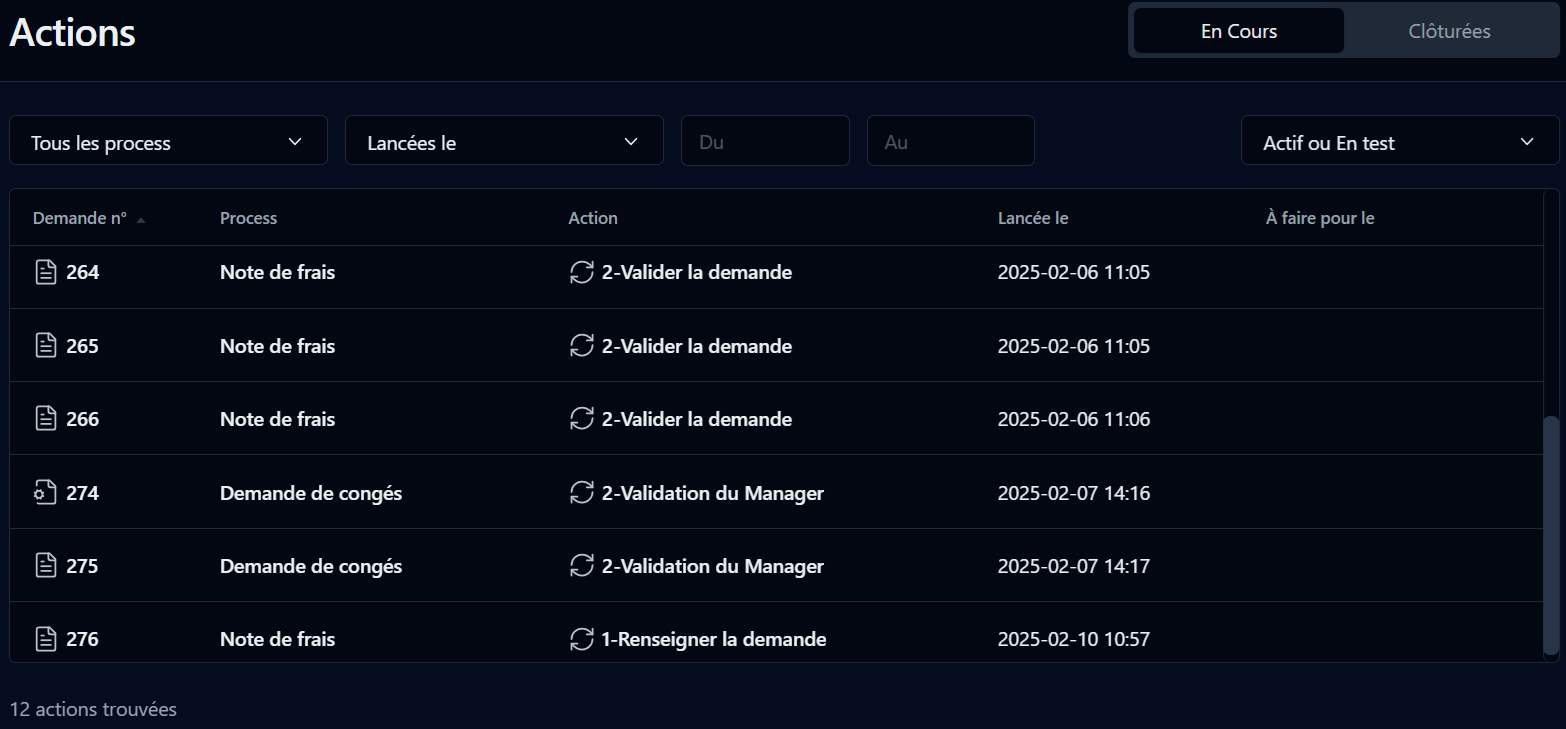
<div align="left"><figure><img src="/files/AKqWU05cP5LGYMZWcm9o" alt=""><figcaption></figcaption></figure></div>

Cette page affiche les actions à faire et clôturées par l’utilisateur.

## Filtre de recherche

<table data-header-hidden><thead><tr><th valign="top">Filtre</th><th valign="top">Remarques</th></tr></thead><tbody><tr><td valign="top"><strong>Filtre</strong></td><td valign="top"><strong>Remarques</strong></td></tr><tr><td valign="top">En cours</td><td valign="top">Filtre par actions à faire</td></tr><tr><td valign="top">Clôturées</td><td valign="top">Filtre par actions clôturées</td></tr><tr><td valign="top">Process</td><td valign="top">Filtre par nom du processus</td></tr><tr><td valign="top">Lancées le</td><td valign="top">Périodes prédéfinies de création des actions</td></tr><tr><td valign="top">Du / Au</td><td valign="top">Période définie par l'utilisateur pour les actions créées (cliquez sur les champs pour afficher un sélecteur de date sous forme de calendrier)</td></tr><tr><td valign="top">Mode</td><td valign="top">Mode de la demande : <strong>Actif ou</strong> <strong>En test</strong>, <strong>Actif</strong> ou <strong>En test</strong></td></tr></tbody></table>

## Liste

<table data-header-hidden><thead><tr><th valign="top">Colonnes</th><th valign="top">Remarques</th></tr></thead><tbody><tr><td valign="top"><strong>Colonnes</strong></td><td valign="top"><strong>Remarques</strong></td></tr><tr><td valign="top">Demande n°</td><td valign="top">Icône et ID de la demande (un lien affiche l’écran de suivi de la demande)</td></tr><tr><td valign="top">Process</td><td valign="top">Nom du processus</td></tr><tr><td valign="top">Action</td><td valign="top"><p>Icône et nom de l’action</p><ul><li>Le clic sur l’icône de l’action affiche l’écran de suivi de l’action</li><li>Le clic sur le nom de l’action lance l’action</li></ul><p>Par défaut, le clic sur le nom de l’action lance l’action mais vous pouvez configurer WorkflowGen afin de modifier ce comportement et afficher l’écran de suivi de l’action à la place du lancement de l’action.</p></td></tr><tr><td valign="top">Lancée le</td><td valign="top">Date de création de l’action</td></tr><tr><td valign="top">À faire pour [1]</td><td valign="top">Délai de la demande après lequel l’action est considérée comme en retard</td></tr><tr><td valign="top">Clôturée [2]</td><td valign="top">Date de clôture de l’action</td></tr></tbody></table>

1. Pour les actions à faire.
2. Pour les actions clôturées.

Vous pouvez trier la liste de manière ascendante ou descendante sur n’importe quelle colonne ci-dessus en cliquant sur l’entête de la colonne.


---

# Agent Instructions: Querying This Documentation

If you need additional information that is not directly available in this page, you can query the documentation dynamically by asking a question.

Perform an HTTP GET request on the current page URL with the `ask` query parameter:

```
GET https://docs.workflowgen.com/portal-fr/10.0/actions.md?ask=<question>
```

The question should be specific, self-contained, and written in natural language.
The response will contain a direct answer to the question and relevant excerpts and sources from the documentation.

Use this mechanism when the answer is not explicitly present in the current page, you need clarification or additional context, or you want to retrieve related documentation sections.
