# Actions d’équipe

## Écran Mes actions d’équipe <a href="#ecran-actions-equipe" id="ecran-actions-equipe"></a>

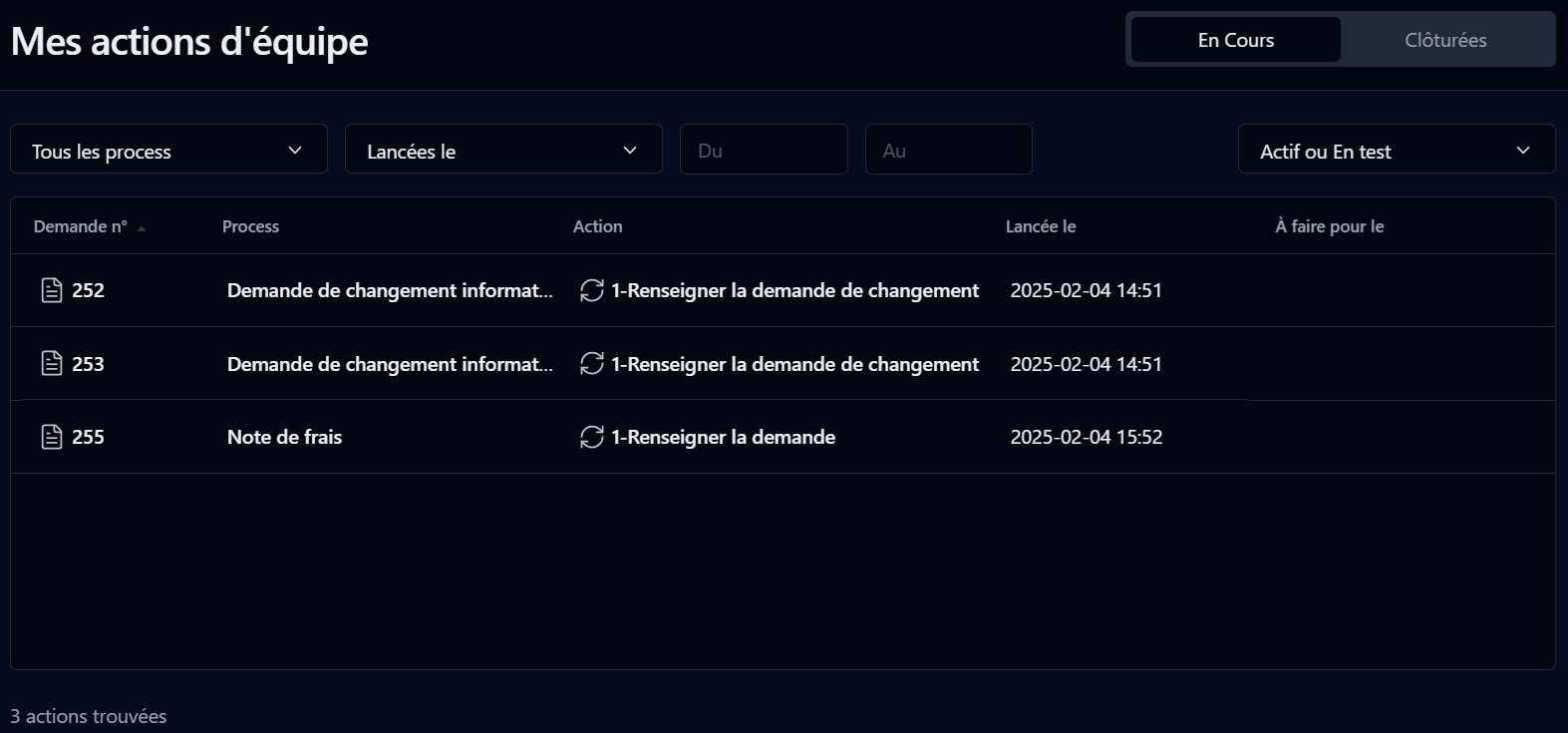
<div align="left"><figure><img src="/files/JXQVLHgbLdHIOJClhnAp" alt=""><figcaption></figcaption></figure></div>

Cette page affiche les actions d’équipe à faire ainsi que celles que vous avez clôturées. Ce sont des actions définies avec la méthode d'affectation « self-service ».

## Filtre de recherche

<table data-header-hidden><thead><tr><th valign="top">Filtre</th><th valign="top">Remarques</th></tr></thead><tbody><tr><td valign="top"><strong>Filtre</strong></td><td valign="top"><strong>Remarques</strong></td></tr><tr><td valign="top">En cours</td><td valign="top">Filtre par actions d’équipe à faire</td></tr><tr><td valign="top">Clôturées</td><td valign="top">Filtre par actions d’équipe clôturées</td></tr><tr><td valign="top">Process</td><td valign="top">Filtre par nom de processus</td></tr><tr><td valign="top">Lancées le</td><td valign="top">Périodes prédéfinies de création des actions</td></tr><tr><td valign="top">Du / Au </td><td valign="top">Période définie par l'utilisateur pour les actions créées (cliquez sur les champs pour afficher un sélecteur de date sous forme de calendrier)</td></tr><tr><td valign="top">Mode</td><td valign="top">Mode de la demande : <strong>Actif ou</strong> <strong>En test</strong>, <strong>Actif</strong> ou <strong>En test</strong></td></tr></tbody></table>

## Liste des actions d’équipe <a href="#liste-actions-equipe" id="liste-actions-equipe"></a>

<table data-header-hidden><thead><tr><th valign="top">Colonnes</th><th valign="top">Remarques</th></tr></thead><tbody><tr><td valign="top"><strong>Colonnes</strong></td><td valign="top"><strong>Remarques</strong></td></tr><tr><td valign="top">Demande n°</td><td valign="top">Icône et ID de la demande (un lien affiche l’écran d'<a href="/pages/-LV-wEjtH9pJFx3AHMf7">informations sur la demande</a>)</td></tr><tr><td valign="top">Process</td><td valign="top">Nom du processus</td></tr><tr><td valign="top">Action</td><td valign="top">Nom de l’action (un lien affiche l’écran de suivi de la demande)</td></tr><tr><td valign="top">Lancée</td><td valign="top">Date de création de l’action</td></tr><tr><td valign="top">À faire pour</td><td valign="top">Délai de la demande après lequel l’action est considérée comme en retard</td></tr><tr><td valign="top">Clôturée *</td><td valign="top">Date de clôture de l’action</td></tr></tbody></table>

\* Pour les actions d’équipe clôturées.

Vous pouvez trier la liste de manière ascendante ou descendante sur n’importe quelle colonne ci-dessus en cliquant sur l’entête de la colonne.


---

# Agent Instructions: Querying This Documentation

If you need additional information that is not directly available in this page, you can query the documentation dynamically by asking a question.

Perform an HTTP GET request on the current page URL with the `ask` query parameter:

```
GET https://docs.workflowgen.com/portal-fr/10.0/equipes.md?ask=<question>
```

The question should be specific, self-contained, and written in natural language.
The response will contain a direct answer to the question and relevant excerpts and sources from the documentation.

Use this mechanism when the answer is not explicitly present in the current page, you need clarification or additional context, or you want to retrieve related documentation sections.
