# Delegations

## Delegations screen

<div align="left"><figure><img src="https://content.gitbook.com/content/87PQd7lEGiEgmvvK00Jy/blobs/NSiEoaR3ziwSPLDTxxlK/delegations.png" alt=""><figcaption></figcaption></figure></div>

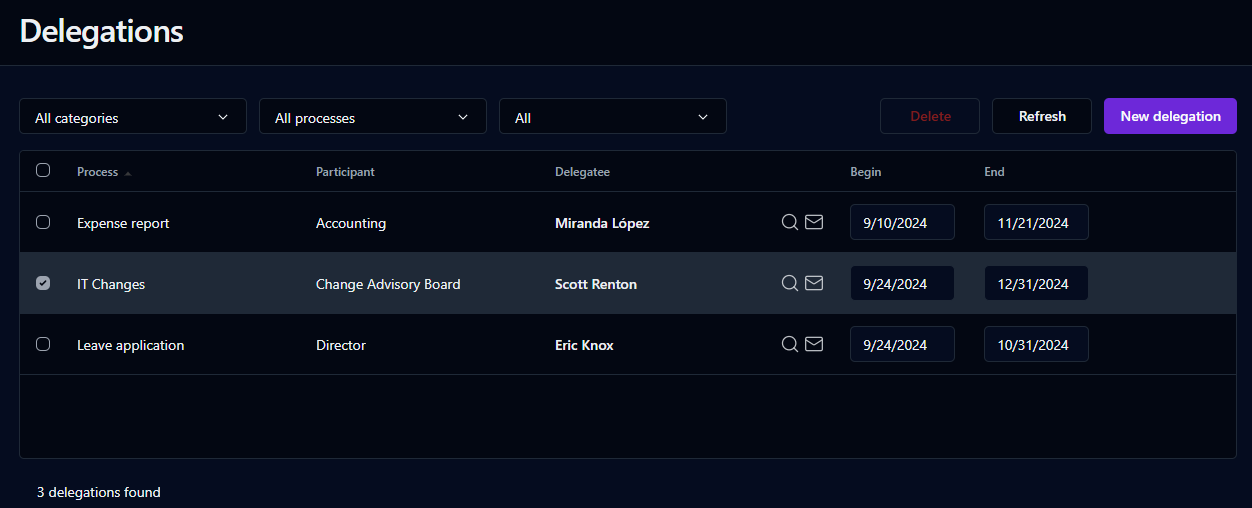
This screen displays participant delegations on active or archived processes. Delegations cannot be added to processes that are under construction or in test.

A user can associate a delegatee with each process participant role displayed in this list. Delegations can be done for an unlimited period of time (if no date range is entered) or for a specific period of time (if a date range is entered).

Two types of delegations are possible: a **global** delegation of all the user’s roles to a person by selecting **All processes** and **All participants**, or a delegation on a **role-by-role** basis by selecting individual delegatees for each process participant role. Note that a role-based delegation can override the global delegation for that specific role and vice-versa.

{% hint style="info" %}
With the new **multi-delegation** feature introduced in version 8, end-users can create multiple **global** and **role-by-role** delegations to different delegatees for different periods of time.
{% endhint %}

{% hint style="info" %}
Administrative roles are not given to users through delegations, except for supervisors. Delegating a supervisor participant will give them only the permissions that the supervisor delegator has. For example, it won't allow the delegated user to access statistics in the Administration Module if they normally don't have this permission, only to view all the requests in the User Portal.
{% endhint %}

## Search filter

<table data-header-hidden><thead><tr><th valign="top">Filter</th><th valign="top">Remarks</th></tr></thead><tbody><tr><td valign="top"><strong>Filter</strong></td><td valign="top"><strong>Remarks</strong></td></tr><tr><td valign="top">Category drop-down list</td><td valign="top">Filter by process category</td></tr><tr><td valign="top">Process drop-down list</td><td valign="top">Filter by process</td></tr><tr><td valign="top">Active delegations</td><td valign="top">Filter by <strong>Active</strong> or <strong>All</strong> delegations</td></tr><tr><td valign="top">Search</td><td valign="top">Launch the search and refresh the delegation list accordingly</td></tr></tbody></table>

## List of delegations

<table data-header-hidden><thead><tr><th valign="top">Columns</th><th valign="top">Remarks</th></tr></thead><tbody><tr><td valign="top"><strong>Columns</strong></td><td valign="top"><strong>Remarks</strong></td></tr><tr><td valign="top">Checkbox</td><td valign="top">Select a delegation to delete</td></tr><tr><td valign="top">Process</td><td valign="top">Process name</td></tr><tr><td valign="top">Participant</td><td valign="top">Process participant name</td></tr><tr><td valign="top">Delegatee</td><td valign="top">Delegatee's name</td></tr><tr><td valign="top"><img src="https://content.gitbook.com/content/87PQd7lEGiEgmvvK00Jy/blobs/PyczhZjybzLXtyJ0782h/delegation_search.png" alt="" data-size="original"></td><td valign="top">Search for a user</td></tr><tr><td valign="top"><img src="https://content.gitbook.com/content/87PQd7lEGiEgmvvK00Jy/blobs/SOs6SU9EejdIaet70zFK/delegation_envelope.png" alt="" data-size="original"></td><td valign="top">Send a notification to the delegatee</td></tr><tr><td valign="top">Begin</td><td valign="top"><ul><li>Delegation start date (inclusive); required if end date defined</li><li>Unlimited delegation period if empty.</li></ul></td></tr><tr><td valign="top">End</td><td valign="top"><ul><li>Delegation end date (inclusive); required if begin date defined</li><li>Unlimited delegation period if empty.</li></ul></td></tr></tbody></table>

## Adding a delegation

To add a new delegation, click the **New delegation** button. From the drop-down lists, choose **All processes** and **All participants** or a specific **process** and **participant**. Then, click on the ![](https://content.gitbook.com/content/87PQd7lEGiEgmvvK00Jy/blobs/45a6Agj3NaiVEx4qtuom/delegation_search_small.png) icon to select and define the delegatee. The new delegation will automatically be saved after selecting a delegated user. At any time before choosing a delegate, you can cancel the new delegation by clicking on the **Cancel** button on the right side of the row.

You can specify the **Begin** and **End** dates, or leave them empty for an unlimited delegation period. They will be saved automatically.

## Notifying the delegated user of a delegation

To send or resend a notification of a delegation to the delegatee, click the ![](https://content.gitbook.com/content/87PQd7lEGiEgmvvK00Jy/blobs/a5GQl16N9lCzDMSqAzuN/delegation_envelope_small.png) icon next to the delegatee's name in the specific delegation row.&#x20;

## Changing to another delegated user

To change the delegated user of a delegation, click the ![](https://content.gitbook.com/content/87PQd7lEGiEgmvvK00Jy/blobs/wbKhCcQJMsJr4gflwApo/delegation_search_small.png) icon, then filter and select a user from the list.

## Deleting a delegation

To delete one or more delegations, check the checkbox to the left of the specific delegation row, then click the **Delete** button that appears above the list.

## Refreshing the delegation list

To refresh the delegation list, click the **Refresh** link above the list.
