# Requests

## Requests screen

<figure><img src="https://content.gitbook.com/content/87PQd7lEGiEgmvvK00Jy/blobs/ZwWh3vWLtGRy9hFRXjkw/requests_screen.png" alt=""><figcaption></figcaption></figure>

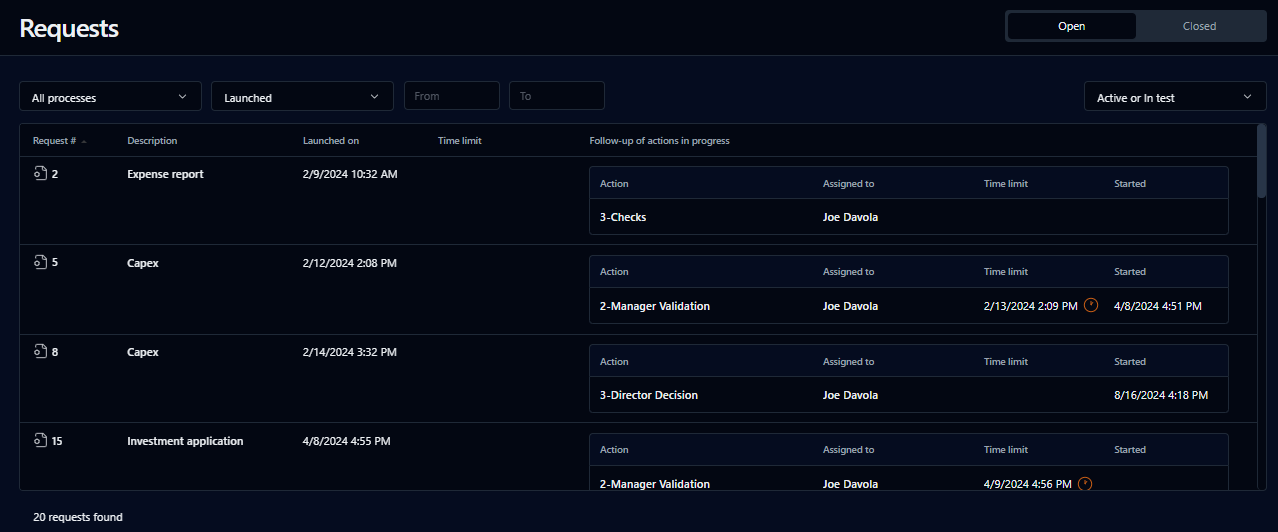
This page displays ongoing and closed requests launched by the user.

## Search filter

<table data-header-hidden><thead><tr><th valign="top">Filter</th><th valign="top">Remarks</th></tr></thead><tbody><tr><td valign="top"><strong>Filter</strong></td><td valign="top"><strong>Remarks</strong></td></tr><tr><td valign="top">Open</td><td valign="top">Filter by current requests</td></tr><tr><td valign="top">Closed</td><td valign="top">Filter by closed requests</td></tr><tr><td valign="top">Process drop-down list</td><td valign="top">Filter by the requests' process names</td></tr><tr><td valign="top">Launched</td><td valign="top">Predefined period for launched requests</td></tr><tr><td valign="top">From / To</td><td valign="top">User-defined period for launched requests; click the fields to open a date picker</td></tr><tr><td valign="top">Mode</td><td valign="top">Request mode: <strong>Active or In test</strong>, <strong>Active</strong>, or <strong>In test</strong></td></tr></tbody></table>

## List

<table data-header-hidden><thead><tr><th valign="top">Columns</th><th valign="top">Remarks</th></tr></thead><tbody><tr><td valign="top"><strong>Columns</strong></td><td valign="top"><strong>Remarks</strong></td></tr><tr><td valign="top">Request #</td><td valign="top">Request icon and request ID; click the icon to open the form or the request ID to open the <a href="request-follow-up-form">request information form</a></td></tr><tr><td valign="top">Process</td><td valign="top">Process name</td></tr><tr><td valign="top">Description</td><td valign="top">Process description</td></tr><tr><td valign="top">Launched</td><td valign="top">Request launch date</td></tr><tr><td valign="top">Time limit [1]</td><td valign="top">Request deadline after which the request is considered late</td></tr><tr><td valign="top">Closed [2]</td><td valign="top">Request closure date</td></tr><tr><td valign="top">Follow-up of actions in progress</td><td valign="top">Current request action in progress, its assigned user, the time limit, and when the action was started</td></tr></tbody></table>

1. For requests to be completed.
2. For closed requests.

You can sort the list ascending or descending by any of the elements by clicking the corresponding column header.
