# Analytics

## Overview

The **Analytics** screen allows users to generate detailed reports of all the ongoing and closed requests. Users can obtain the following categories of reports:

* Activity analytics that provide views of the various requests and actions in real time or during a specified time period
* Data analytics that detail the data information per process with filtering capabilities

Analytics settings (such as the number of items to display in a report) are configured in the **Analytics** section on the **Portal** tab in the Administration Module **Configuration** panel (see [Analytics](https://docs.workflowgen.com/admin/configuration-panel#analytics) in the [WorkflowGen Administration Guide](https://docs.workflowgen.com/admin/) for more information).

## Activity

### Activity analytics form

The **Activity** form lets you create views and reports related to the requests in progress (in real time), as well as requests in any previous timeframe.

{% hint style="info" %}
If the period chosen is **Real time**, then the report will be based on requests in progress only.
{% endhint %}

<table data-header-hidden><thead><tr><th valign="top">Fields</th><th valign="top">Description</th></tr></thead><tbody><tr><td valign="top"><strong>Fields</strong></td><td valign="top"><strong>Description</strong></td></tr><tr><td valign="top">Period</td><td valign="top">Filter by a predefined period</td></tr><tr><td valign="top">from... to...</td><td valign="top">Filter by user defined period</td></tr><tr><td valign="top">Folder</td><td valign="top">Filter by process folder</td></tr><tr><td valign="top">Category</td><td valign="top">Filter by process category</td></tr><tr><td valign="top">Process</td><td valign="top">Filter by process name</td></tr><tr><td valign="top">Version *</td><td valign="top">Filter by process version</td></tr><tr><td valign="top">State</td><td valign="top">Filter by request state: <strong>In Test</strong>, <strong>Active</strong>, or <strong>All</strong></td></tr><tr><td valign="top">Data *</td><td valign="top">Filter by process data values</td></tr></tbody></table>

\* Displayed only when a single process is chosen from the **Process** drop-down list.

### Activity report

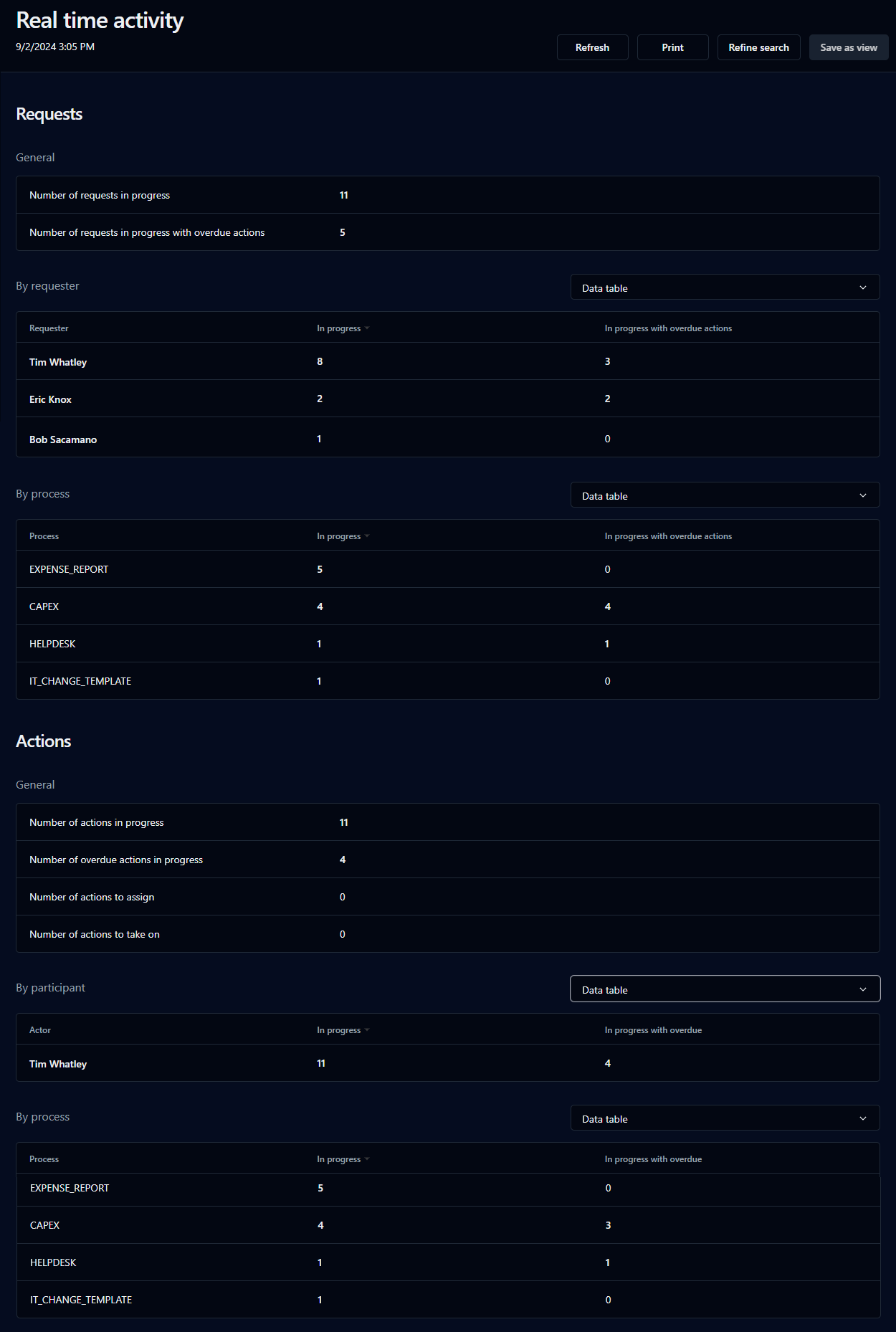
You can generate an activity report, either real time or for a specified period.

<figure><img src="https://content.gitbook.com/content/87PQd7lEGiEgmvvK00Jy/blobs/acDmArT2fOPRmxVKfmq1/activity_report_real_time.png" alt=""><figcaption><p>Real time activity report</p></figcaption></figure>

#### Available functions

<table data-header-hidden><thead><tr><th valign="top">Functions</th><th valign="top">Description</th></tr></thead><tbody><tr><td valign="top"><strong>Functions</strong></td><td valign="top"><strong>Description</strong></td></tr><tr><td valign="top">Refine search</td><td valign="top">Start a new statistics search</td></tr><tr><td valign="top">Save as view</td><td valign="top">Save the current report as a view (see <a href="views">Views</a>)</td></tr><tr><td valign="top">Print</td><td valign="top">Print the report</td></tr></tbody></table>

### Requests

#### General

* Number of requests in progress
* Number of overdue requests in progress
* Number of requests in progress with overdue actions

#### By requester

* In progress
* In progress with overdue
* In progress with overdue actions

Displays available (select from drop-down list): data table, bar chart, donut

#### By process

* In progress
* In progress with overdue
* In progress with overdue actions

Displays available (select from drop-down list): data table, bar chart, donut

### Actions

#### General

* Number of actions in progress
* Number of overdue actions in progress
* Number of actions to assign
* Number of actions to take on (team actions to do but not yet assigned)

#### By participant

* In progress
* In progress with overdue

Displays available (select from drop-down list): data table, bar chart, donut

#### By process

* In progress
* In progress with overdue
* In progress with overdue actions

Displays available (select from drop-down list): data table, bar chart, donut

### Activity report: by period

#### Available functions

<table data-header-hidden><thead><tr><th valign="top">Functions</th><th valign="top">Description</th></tr></thead><tbody><tr><td valign="top"><strong>Functions</strong></td><td valign="top"><strong>Description</strong></td></tr><tr><td valign="top">Refine search</td><td valign="top">Start a new statistical search</td></tr><tr><td valign="top">Save as view</td><td valign="top">Save the current report as a view</td></tr><tr><td valign="top">Print</td><td valign="top">Print the report</td></tr></tbody></table>

### Requests

#### General

* Number of different requesters
* Number of requests in progress
* Number of overdue requests in progress
* Number of requests in progress with overdue actions
* Number of closed requests
* Number of closed requests with overdue
* Number of closed requests with overdue actions
* Average of realization duration (all requests)
* Average of realization duration (except overdue)
* Number of requests per day

{% hint style="info" %}
Results may vary depending on the parameters of the statistics that you filter.
{% endhint %}

#### Top process

* Request (number of requests per process)

Displays available (select from drop-down list): data table, bar chart, donut

### Participants

#### Request volume (by requester)

* Started
* In progress
* In progress and overdue
* In progress with overdue actions
* Closed
* Closed and overdue
* Closed with overdue actions

Displays available (select from drop-down list): data table, bar chart, donut

#### Action volume (by participant)

* In progress
* In progress and overdue
* Closed
* Closed and overdue
* To assign
* To accept (team actions to do but not yet assigned)

Displays available (select from drop-down list): data table, bar chart, donut

#### Action duration (by participant)

* Completion
* Completion except overdue
* Accepted
* Accepted except overdue

Displays available: table, bar chart, pie chart

## Data

### Data statistics form

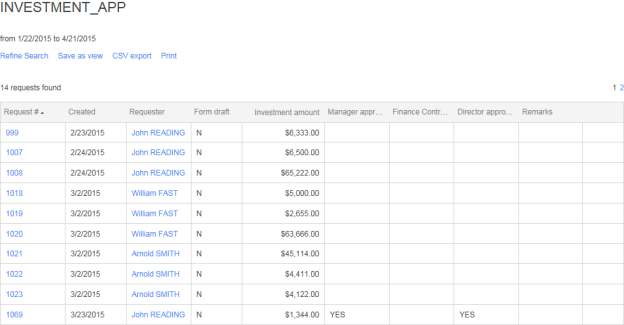
The data statistics form lets you create reports based on the data of a current process.

<table data-header-hidden><thead><tr><th valign="top">Fields</th><th valign="top">Description</th></tr></thead><tbody><tr><td valign="top"><strong>Fields</strong></td><td valign="top"><strong>Description</strong></td></tr><tr><td valign="top">Period</td><td valign="top">Filter by a predefined period</td></tr><tr><td valign="top">from... to...</td><td valign="top">Filter by user defined period</td></tr><tr><td valign="top">Requester</td><td valign="top">Filter by the requester</td></tr><tr><td valign="top">Process</td><td valign="top">Filter by process name</td></tr><tr><td valign="top">Version *</td><td valign="top">Filter by process version</td></tr><tr><td valign="top">State</td><td valign="top">Filter by request in <strong>Test</strong> mode, <strong>Active</strong> mode, or all modes</td></tr><tr><td valign="top">Status</td><td valign="top">Filter by request status</td></tr><tr><td valign="top">Displayed data</td><td valign="top">Choose data items to display in the report (with data selector)</td></tr><tr><td valign="top">Data *</td><td valign="top">Filter by process data values</td></tr></tbody></table>

\* Displayed only when a single process is chosen from the **Process** drop-down list.

#### Available functions

<table data-header-hidden><thead><tr><th valign="top">Functions</th><th valign="top">Description</th></tr></thead><tbody><tr><td valign="top"><strong>Functions</strong></td><td valign="top"><strong>Description</strong></td></tr><tr><td valign="top">Refine search</td><td valign="top">Start a new statistical search</td></tr><tr><td valign="top">Save as view</td><td valign="top">Save the current report as a view</td></tr><tr><td valign="top">CSV export</td><td valign="top"><p>Export the report to a comma-separated value formatted file</p><p><br>✏️ <strong>Note:</strong> You can use a different separator based on your language and/or culture if needed, but this must be configured by a WorkflowGen Administrator.</p></td></tr><tr><td valign="top">Print</td><td valign="top">Print the report</td></tr></tbody></table>

### Data statistics screen

<div align="left"><img src="https://content.gitbook.com/content/87PQd7lEGiEgmvvK00Jy/blobs/zWgRIw3hOT9SUOEa0yYM/data_statistics_screen_624x325.png" alt=""></div>

### Data statistics report

<table data-header-hidden><thead><tr><th valign="top">Columns</th><th valign="top">Description</th></tr></thead><tbody><tr><td valign="top"><strong>Columns</strong></td><td valign="top"><strong>Description</strong></td></tr><tr><td valign="top">Request #</td><td valign="top">Request number</td></tr><tr><td valign="top">Created</td><td valign="top">Request creation date</td></tr><tr><td valign="top">Requester</td><td valign="top">Requester</td></tr><tr><td valign="top">Data</td><td valign="top">Associated data elements (as defined by the process designer)</td></tr></tbody></table>

{% hint style="info" %}
The results list allows drag-and-drop reordering of columns. Column order is specific to the user and is retained thereafter.
{% endhint %}