The DOCUSIGNCHECK workflow application lets you check the status of an envelope and download its associated file, which is a concatenation of attached files.
You can check the status of an envelope and download the file from DocuSign according to your status criteria.
Application logs are available. These can be specified by setting the value of the DocuSignCheckLogLevel parameter in the web.config file to 0 to deactivate logs, 1 for error logs, 2 for information logs, or 3 for debug logs; the default value is 0.
There are two ways to configure DocuSign account information: you can define the configuration in the web.config file or in the Configuration Panel, or you can manage the configuration on each DOCUSIGNCHECK action.
It's necessary to have authorized your DocuSign application for use. To do this, go to the following address: <SERVER>/oauth/auth?response_type=code&scope=signature%20impersonation&client_id=<CLIENT_ID>&redirect_uri=<REDIRECT_URI>
<SERVER>: https://account.docusign.com (production) orhttps://account-d.docusign.com
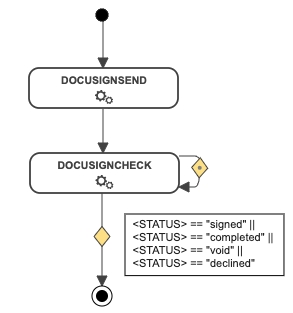
In the following example, the action is directly followed by the DOCUSIGNCHECK action. This action will loop back on itself until the status changes to signed, completed, voided, or declined.
If the status returned meets the condition, the document will be downloaded from DocuSign.
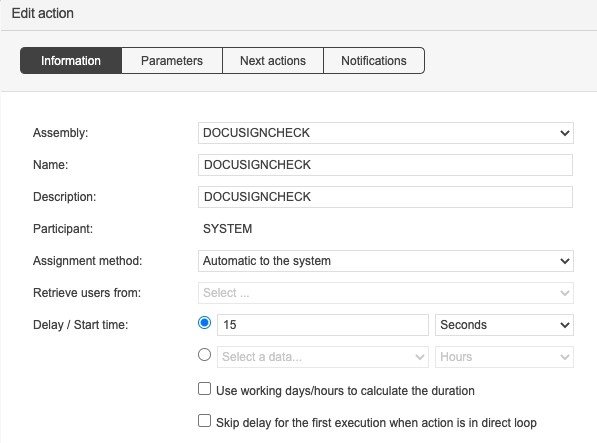
With the system loop action feature, the DOCUSIGNCHECK action will be executed every x seconds until the OUT condition is met.
<CLIENT_ID>: Corresponds to your DocuSign application's Integration Key value
<REDIRECT_URI>: Redirect address (e.g. https://docusign.com)
IN
DocuSign Auth server
DocuSign values:
account.docusign.com (production)
account-d.docusign.com (demo)
By default, this value comes from the DocuSignAuthServer
DOCUSIGN_RSA_KEY
TEXT
IN
DocuSign RSA key
By default, this value come from the /Files/DocuSign/rsaKey.pem file.
DOCUSIGN_HOST_SERVER
TEXT
IN
DocuSign host server
DocuSign values:
https://docusign.net (production)
https://demo.docusign.net (demo)
By default, this value comes from the DocuSignHostServer
OUT
Envelope status
Parameter
Type
Direction
Description
DOCUSIGN_ENVELOPE_ID
TEXT
IN
DocuSign envelope ID to check
Parameters
Type
Direction
Description
DOCUSIGN_CLIENT_ID
TEXT
IN
DocuSign client ID
Corresponds to your DocuSign application's Integration Key value
By default, this value comes from the DocuSignClientId parameter in the web.config.
DOCUSIGN_USER_GUID
TEXT
IN
DocuSign user GUID
Corresponds to the value of User ID in the DocuSign configuration panel
By default, this value comes from the DocuSignUserGuid parameter in the web.config.
DOCUSIGN_AUTH_SERVER
Parameters
Type
Direction
Description
VALID_STATUS_LIST
TEXT
IN
Valid status to download the document
Default: signed,completed,voided,declined
DOCUSIGN_DOCUMENT
FILE
OUT
DocuSign document
DOCUSIGN_STATUS
TEXT
TEXT
web.configweb.config