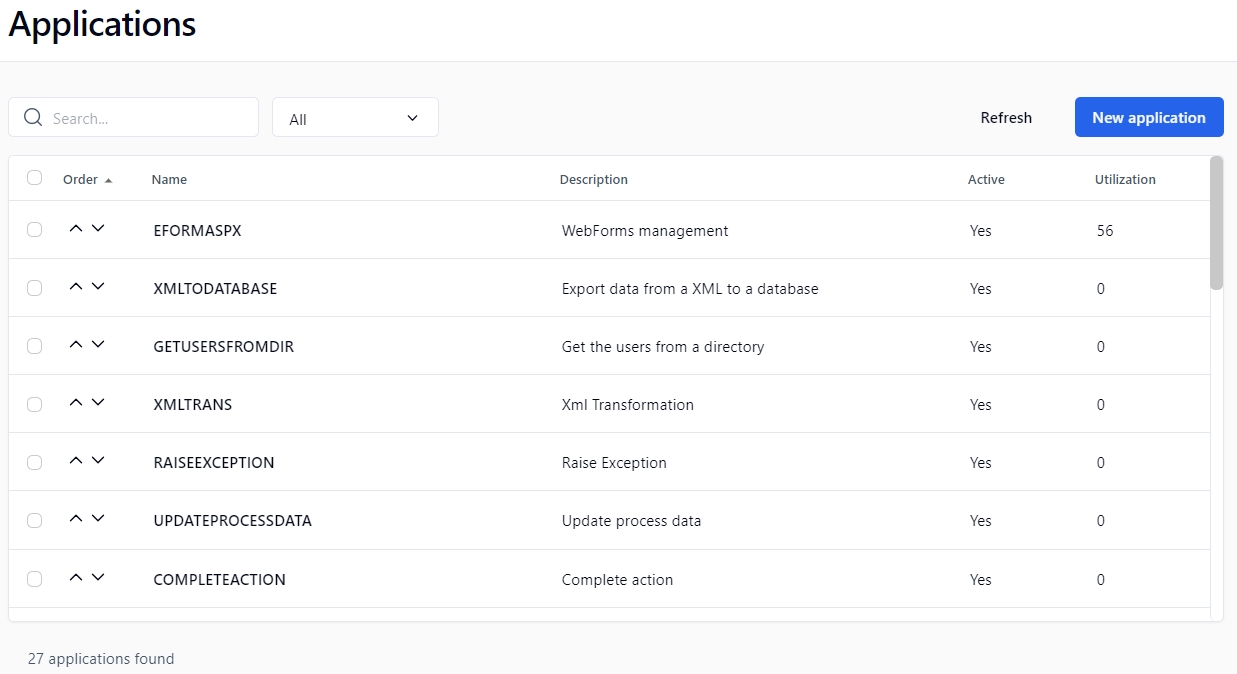
In the left menu on the Administration Module home page, click to display the Applications screen.
* A filter can be applied to a part of a field.
* Only needed by the web procedures and the web services.
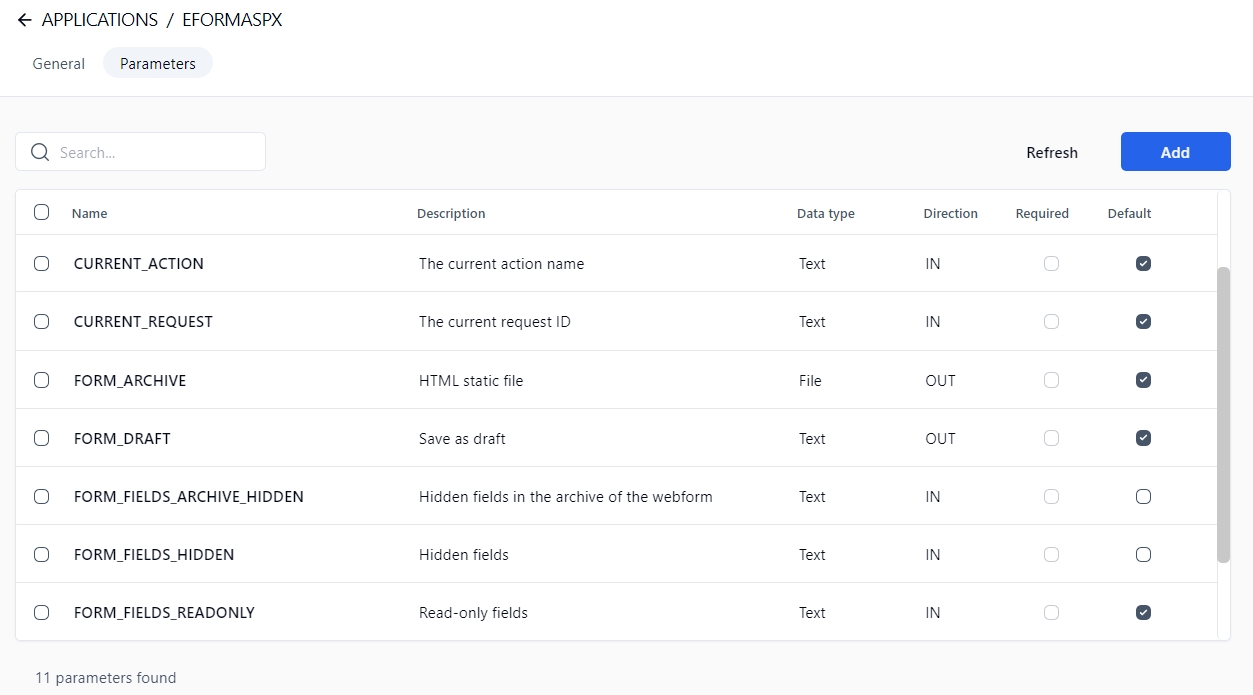
Click the Add button to open the Add an application parameter panel.
An application cannot be deleted if it's used in a process.
A parameter cannot be deleted if its application is used in a process.
This application allows you to declare a .NET class method as a workflow application. This is the fastest solution to develop a custom workflow application (compared to web services). The execution performance is exceptional because WorkflowGen instantiates the assembly directly without network communication or web service authentication.
Copy a sample .dll assembly into a WorkflowGen bin folder.
In the Administration Module, click in the left menu and then New application.
Enter the following information in the appropriate fields:
Class full name: Select WorkflowApp.Test
Method: Select GetString
These parameters are automatically generated:
IN: message (Text)
OUT: RETURN_VALUE (Text)
You can now use this workflow application in your process.
This application allows you to declare a WCF service client proxy .NET class method as a workflow application.
In the WorkflowGen Administration Module, click in the left menu and then New application.
Enter the following information in the appropriate fields:
Name: WCFSERVICE_SAMPLE_GET_STRING
Class full name: Select workflowAppWCFSampleTest.ServiceClient
Method: Select GetString
These parameters are automatically generated:
IN: message (Text)
OUT: RETURN_VALUE (Text)
You can now use this workflow application in your process.
Name: WCFSERVICE_SAMPLE_GET_STRING
WorkflowGen supports web services based on the SOAP standard. This means that web services can be integrated into WorkflowGen to be used by process actions, without the need to program them. WorkflowGen can use predefined web services and reference them by using their WSDL (Web Services Description Language) files.
A URL to the WSDL file defining the web service is required to display the available web methods that can be called by WorkflowGen. Once the WSDL is referenced and saved (in the WorkflowGen application definition), and one of its defined web methods are selected, the WorkflowGen application parameters are automatically generated.
The data types of the parameters are mapped to the corresponding WorkflowGen data types (numeric, text, datetime). All complex XML types are mapped to a WorkflowGen file data.
Public web services are web services that are available for public re-use. To reference one as a WorkflowGen application, follow the example below.
In the Administration Module, click in the left menu, then create a new WorkflowGen application and define the following:
Name
Description
Private web services are web services that are not available for public re-use. They generally use a secure URL that requires the proper authentication. To reference one as a WorkflowGen application, follow the example below.
In the Administration Module, click in the left menu, then create a new WorkflowGen application and define the following:
Name
Description
WorkflowGen will create some extra parameters when referencing a WSDL. Other parameters can also be used in addition to those already defined in the WSDL file.
The other parameters that are defined by WorkflowGen are:
RETURN_VALUE: If the web service returns a value, WorkflowGen will automatically add an OUT parameter.
WFG_WS_URL: Specify a web service URL to override the predefined URL.
WFG_WS_USERNAME: Specify a username to override the predefined username.
Username to be used if an authentication is required to access the application’s URL
Password *
Password to be used if an authentication is required to access the application’s URL
Content type
Type of data encoding to be used when the application returns to WorkflowGen:
application/x-www-form-urlencoded
application/xml; charset=UTF-8
application/json
Context format
Defines the format type of the context parameters exchanged between the application and WorkflowGen:
JSON
XML ADO.NET DataSet (default WorkflowGen schema)
XML ADO Recordset
Schema definition
If checked, the schema will be embedded inline in the XML (for XML context formats only)
Parameters
Application parameters (a link displays the parameters form in edit mode)
Default application
If checked, the application is selected by default
Active
If checked, the application is active
Impersonate username
A WorkflowGen username to impersonate by the application (for the Incoming Webhook and Non Interactive Client application types)
Client ID
A client ID from the registered application of your authentication service provider e.g. Azure Active Directory (for the Non Interactive Client application type)
Optional parameter; displays the parameter in the parameter list of the actions based on the current application by default
If checked, the parameter is displayed in the parameter list of the action based on the current application
They should not contain spaces
They should not begin with the letters XML in any case (e.g. xml or Xml)
For more information, see https://www.w3schools.com/xml/xml_elements.asp.
Name: SAMPLE_GET_STRING
Description: Returns a string with a ! (exclamation point)
Type: Assembly
Assembly full name or path: WorkflowAppSample
Click Save.
Description: Returns a string with a ! (exclamation point)
Type: WCF service
Assembly full name or path: WorkflowAppWCFSampleTest
Click Save.
Username: A valid WorkflowGen Administrator
Password: The valid password for the username
Reference a web service and WSDL by defining a URL to a valid web service and to its related WSDL file and save the application.
📌 URL example:
📌 WSDL example:
Select the web method to use. The WSDL defines which web methods are available to be used. Once you select a web method and save the application, the associated parameters are automatically mapped and the application may now be used by process actions.
Username: A valid WorkflowGen Administrator
Password: The valid password for the username
Reference a web service and WSDL by defining a URL to a valid web service and to its related WSDL file and save the application.
The examples below demonstrate the use of a web service located on a SharePoint 2007 website. In this example, the web service is called lists.asmx.
📌 URL example:
📌 WSDL example:
Select the web method to use. The WSDL defines which web methods are available to be used. Once you select a web method and save the application, the associated parameters are automatically mapped and the application can now be used by process actions.
WFG_WS_PASSWORD: Specify a password to override the predefined password.
Buttons
Remarks
Refresh
Refreshes the displayed application list
New application
Opens a blank New application form
Filter on *
Remarks
Name
Filters by application name
Description
Filters by application description
External filters
Remarks
Active
Displays active applications only
Columns
Remarks
Order
Use the arrows to change the order in which the applications are listed when adding or editing a workflow action
Name
Application name (click to display the application form in edit mode)
Description
Application description
Active
Application active status
Utilization
Number of actions in which the application is used
Fields
Remarks
Name
Unique identifier for the application; must respect nomenclature and be limited to 30 characters (required field)
Description
Application description limited to 255 characters (required field)
Type
Application type:
Assembly
Asynchronous Web Procedure
Incoming Webhook
Non Interactive Client
SOAP Web Service
WCF Service
Web Application
Web Procedure
URL
The relative or the absolute URL of the application; both will work (required field)
WSDL
The WSDL URL to define a WSDL-based web service (if applicable); see WSDL web services for details on WSDL-based web services
Columns
Remarks
Name
Application parameter name
Description
Application parameter description
Data type
Application parameter data type
Direction
Application parameter direction
Required
Required parameter
Fields
Remarks
Name
Application parameter name (required field; see the list of XML naming rules below)
Description
Application parameter description (required field)
Data type
Application parameter data type:
Text
Numeric
Date/Time
File
Direction
Application parameter directions:
IN (send the value into the parameter)
OUT (receive the value from the parameter)
INOUT (send and receive the value into and from the parameter)
Required
Is this parameter required?
Yes (disables the default property)
No (enables the default property)
Username *
Default
Default
http://quickstarts.asp.net/QuickStartv20/webservices/Samples/MathService/vb/Server/MathService.asmxhttp://quickstarts.asp.net/QuickStartv20/webservices/Samples/MathService/vb/Server/MathService.asmx?WSDLhttp://myspsserver/_vti_bin/lists.asmxhttp://myspsserver/_vti_bin/lists.asmx?WSDLmultipart/form-data