> For the complete documentation index, see [llms.txt](https://docs.workflowgen.com/llms.txt). Markdown versions of documentation pages are available by appending `.md` to page URLs; this page is available as [Markdown](https://docs.workflowgen.com/admin/8.3/docusignsend-workflow-application.md).
# DOCUSIGNSEND Workflow Application
## Overview
The **DOCUSIGNSEND** workflow application lets you send one or more documents to DocuSign for electronic signature.
## How it works
* The DOCUSIGNSEND application will create a unique envelope and send it to one or multiple signers.
* You can specify one or multiple files per DOCUSIGNSEND action. To do this, use the `FILEx` parameter, where `x` corresponds to the file number (e.g `FILE1`). At least one file is required.
* You can specify one or multiple signers. To do this, use the combination of `SIGNER_NAME_LIST` and `SIGNER_EMAIL_LIST`. You can also use `SIGNER_NAMEx` and `SIGNER_EMAILx`, where `x` corresponds to the signer number.
* You can specify an access code by signer. To do this, depending on the method you use to specify signers (i.e., with or without `_LIST`), you can use either `SIGNER_ACCESS_CODE_LIST` or `SIGNER_ACCESS_CODEx`, where `x` corresponds to the signer number.
* You can specify the positions of the DocuSign tags for the signer name, the signature location, and the signature date. DocuSign will automatically recognize the tags.
* Application logs are available. These can be specified by setting the value of the `DocuSignSendLogLevel` parameter in the `web.config` file to `0` to deactivate logs, `1` for error logs, `2` for information logs, or `3` for debug logs; the default value is `0`.
## Required parameters
You can use either of the following configurations: with a signers list or with signer numbers.
{% hint style="warning" %}
Signers are handled sequentially, whether configured using a list or using numbers.
{% endhint %}
### With a list of signers
| **Parameter** | **Type** | **Direction** | **Description** |
| ------------------- | -------- | ------------- | -------------------------------------------------------------------------------------------- |
| `SIGNER_NAME_LIST` | TEXT | IN | Names of signers, separated by the value defined in the `DATA_SEPARATOR` parameter |
| `SIGNER_EMAIL_LIST` | TEXT | IN | Emails of signers, separated by the value defined in the `DATA_SEPARATOR` parameter |
| `FILEx` | FILE | IN | File(s) to send, where `x` corresponds to the file number; you can add one or multiple files |
| | | | |
### With signer numbers
| **Parameter** | **Type** | **Direction** | **Description** |
| --------------- | -------- | ------------- | ------------------------------------------------------------------------------------------------------ |
| `SIGNER_NAMEx` | TEXT | IN | Name(s) of signer(s), where `x` corresponds to the signer number; you can add one or multiple signers |
| `SIGNER_EMAILx` | TEXT | IN | Email(s) of signer(s), where `x` corresponds to the signer number; you can add one or multiple signers |
| `FILEx` | FILE | IN | File(s) to send, where `x` corresponds to the file number; you can add one or multiple files |
## Optional parameters
### DocuSign configuration
There are two ways to configure DocuSign account information: you can define the configuration in the `web.config` file or in the Configuration Panel, or you can manage the configuration on each DOCUSIGNSEND action.
{% hint style="info" %}
These parameters must be associated to a DocuSign account.
{% endhint %}
| **Parameters** | **Type** | **Direction** | **Description** |
| ---------------------- | -------- | ------------- | --------------------------------------------------------------------------------------------------------------------------------------------------------------------------------------------------------------------------------------------------------------------------------------------------------- |
| `DOCUSIGN_CLIENT_ID` | TEXT | IN | DocuSign client ID
Corresponds to your DocuSign application's Integration Key value
By default, this value comes from the DocuSignClientId parameter in the web.config.
|
| `DOCUSIGN_USER_GUID` | TEXT | IN | DocuSign user GUID
Corresponds to the value of User ID in the DocuSign Control Panel
By default, this value comes from the DocuSignUserGuid parameter in the web.config.
|
| `DOCUSIGN_AUTH_SERVER` | TEXT | IN | DocuSign Auth server
DocuSign values:
account.docusign.com (production)account-d.docusign.com (demo)
By default, this value comes from the DocuSignAuthServer parameter in the web.config.
|
| `DOCUSIGN_RSA_KEY` | TEXT | IN | DocuSign RSA key
By default, this value come from the /Files/DocuSign/rsaKey.pem file.
|
| `DOCUSIGN_HOST_SERVER` | TEXT | IN | DocuSign host server
DocuSign values:
By default, this value comes from the DocuSignHostServer parameter in the web.config.
|
### General
| **Parameters** | **Type** | **Direction** | **Description** |
| ------------------- | -------- | ------------- | ------------------------------------------------------------------------------------------------------------------------------------------------------------------------------------------------------- |
| `DATA_SEPARATOR` | TEXT | IN | Separator used to separate SIGNERS\_NAME\_LIST, SIGNERS\_EMAIL\_LIST, and SIGNER\_ACCESS\_CODE\_LIST content
Default: ,
|
| `EMAIL_SUBJECT` | TEXT | IN | Email subject used for the DocuSign envelope
Default:Please sign this document sent from WorkflowGen
|
| `PREFIX_SIGNHERE` | TEXT | IN | Prefix of the SignHere tag
Default: /s
|
| `SUFFIX_SIGNHERE` | TEXT | IN | Suffix of the SignHere tag
Default: /
|
| `X_OFFSET_SIGNHERE` | TEXT | IN | Vertical alignment of the SignHere tag in pixels
Default: 0
|
| `Y_OFFSET_SIGNHERE` | TEXT | IN | Horizontal alignment of the SignHere tag in pixels
Default: 0
|
| `PREFIX_FULLNAME` | TEXT | IN | Prefix of the Full name tag
Default: /f
|
| `SUFFIX_FULLNAME` | TEXT | IN | Suffix of the `Full name` tag **Default:** `/` |
| `X_OFFSET_FULLNAME` | NUMERIC | IN | Vertical alignment of the Full name tag in pixels
Default: 0
|
| `Y_OFFSET_FULLNAME` | NUMERIC | IN | Horizontal alignment of the Full name tag in pixels
Default: 0
|
| `PREFIX_DATE` | TEXT | IN | Prefix of the Date tag
Default: /d
|
| `SUFFIX_DATE` | TEXT | IN | Suffix of the Date tag
Default: /
|
| `X_OFFSET_DATE` | NUMERIC | IN | Vertical alignment of the Date tag in pixels
Default: 0
|
| `Y_OFFSET_DATE` | NUMERIC | IN | Horizontal alignment of the Date tag in pixels
Default: 0
|
### Return parameter
| **Parameter** | **Type** | **Direction** | **Description** |
| ---------------------- | -------- | ------------- | ---------------------------------------------------------------------------------------------------------------------------------------------------- |
| `DOCUSIGN_ENVELOPE_ID` | TEXT | OUT | Contains the DocuSign envelope ID; you can use this ID in the [DOCUSIGNCHECK](/admin/8.3/docusigncheck-workflow-application.md) workflow application |
## Examples
### With signer list
| **Parameter** | **Type** | **Direction** | **Value** |
| ------------------------- | -------- | ------------- | --------------------------------------- |
| `SIGNER_NAME_LIST` | TEXT | IN | `John Doe,Jack Adi` |
| `SIGNER_EMAIL_LIST` | TEXT | IN | `john.doe@email.com,jack.adi@email.com` |
| `SIGNER_ACCESS_CODE_LIST` | TEXT | IN | `abc123,def456` |
| `FILE1` | FILE | IN | `contract.pdf` |
| `DOCUSIGN_ENVELOPE_ID` | TEXT | OUT | `xxxxx-xxxxx-xxxxx-xxxxx` |
### With signer number
| **Parameter** | **Type** | **Direction** | **Value** |
| ---------------------- | -------- | ------------- | ------------------------- |
| `SIGNER_NAME1` | TEXT | IN | `John Doe` |
| `SIGNER_NAME2` | TEXT | IN | `Jack Adi` |
| `SIGNER_EMAIL1` | TEXT | IN | `john.doe@email.com` |
| `SIGNER_EMAIL2` | TEXT | IN | `jack.adi@email.com` |
| `SIGNER_ACCESS_CODE1` | TEXT | IN | `abc123` |
| `SIGNER_ACCESS_CODE2` | TEXT | IN | `def456` |
| `FILE1` | FILE | IN | `contract.pdf` |
| `DOCUSIGN_ENVELOPE_ID` | TEXT | OUT | `xxxxx-xxxxx-xxxxx-xxxxx` |
### Sending a document with tags
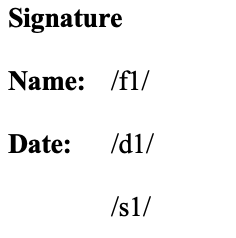
DocuSign lets you specify the location where you want your signer to sign. By default, the tags are `/fx/` for the signer's full name, `/dx/` for the date, and `/sx/` for the `Sign Here` button; `x` corresponds to the signer number.
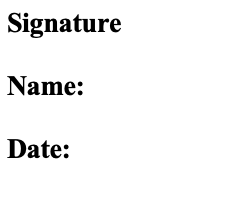
Add tags to your document, as shown below:
Since DocuSign doesn't remove characters from the document and just adds an overload on the tags, you can set the tags' colors to the same color as your background (white, in the following example):
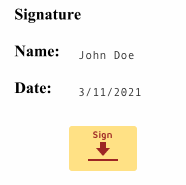
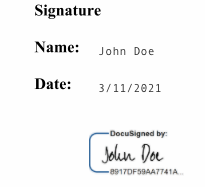
#### Result in DocuSign:
---
# Agent Instructions
This documentation is published with GitBook. GitBook is the documentation platform designed so that both humans and AI agents can read, navigate, and reason over technical content effectively. Learn more at gitbook.com.
## Querying This Documentation
If you need additional information that is not directly available in this page, you can query the documentation by asking a question.
Perform an HTTP GET request on the following URL with the `ask` and `goal` query parameters:
```
GET https://docs.workflowgen.com/admin/8.3/docusignsend-workflow-application.md?ask=&goal=
```
`ask` is the immediate question: it should be specific, self-contained, and written in natural language.
`goal` is what the user is ultimately trying to achieve, the reason they need the answer. Sharing it helps GitBook give you a better, more relevant answer. A goal is most helpful when it describes the outcome the user wants rather than restating the question. For example, with `ask=how do I create an API token`, a goal like `automate deployments from our CI pipeline` lets GitBook tailor the answer to that use case.
The response will contain a direct answer to the question and relevant excerpts and sources from the documentation.
Use this mechanism when the answer is not explicitly present in the current page, you need clarification or additional context, or you want to retrieve related documentation sections.